
Exploring Transversal and Angles: Angle Relationships with Two Lines
Loading the math board and drawing, please wait…
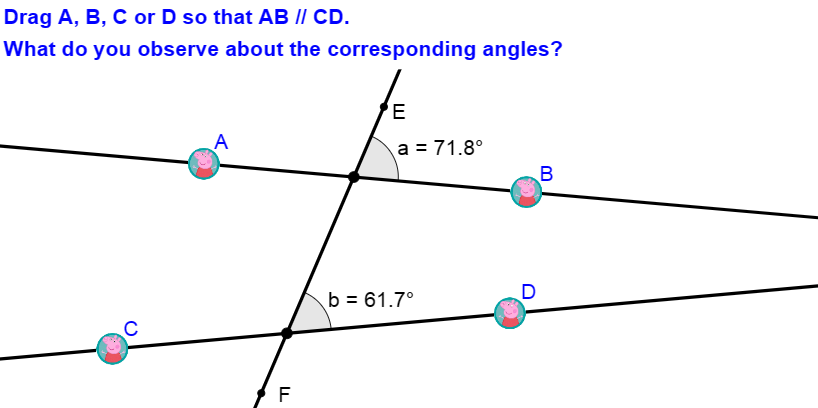
This example demonstrates how angles behave when a transversal intersects two lines (often arranged to be parallel or in a related structured configuration). Students can investigate which angles are corresponding, alternate, interior/exterior, and how angle measures relate through geometric reasoning. The main math ideas include intersection geometry, constructing and naming angles precisely, using rays to orient angle sides, and interpreting angle relationships under specific line configurations. Construction uses GeoGebra commands such as Point to place key vertices, Line to draw the lines, Intersect to compute intersection points (including constructed primed points), Segment to form bounded portions, and Angle together with Ray/Corner to define and visualize the angle objects. The presence of If indicates conditional control over which parts/angle cases are shown or selected. This is well-suited for middle and high school geometry instruction and interactive classroom exploration.
GeoGebra Commands & Parameters
Point(Segment[C, D]) → YPoint(Segment[A, B]) → XLine(X, Y) → c_1Intersect(Line[A, Line[C, D]], OrthogonalLine[B, Line[A, Line[C, D]]]) → B'Intersect(Line[B, Line[C, D]], OrthogonalLine[A, Line[B, Line[C, D]]]) → A'Intersect(Line[C, Line[A, B]], OrthogonalLine[D, Line[C, Line[A, B]]]) → D'Intersect(Line[D, Line[A, B]], OrthogonalLine[C, Line[D, Line[A, B]]]) → C'Line(A, B) → a_1Line(C, D) → b_1Segment(A, B) → s1Segment(C, D) → s2Point(c_1) → EPoint(c_1) → FPoint(Segment[X, Y]) → HAngle(H + (5 * UnitVector[Segment[C, D]]), H, H + (5 * UnitVector[Segment[F, E]])) → bRay(H, Vector[UnitVector[Segment[C, D]]]) → f_1Point(Segment[X, Y]) → IAngle(I + (5 * UnitVector[Segment[F, E]]), I, I + (5 * UnitVector[Segment[B, A]])) → cRay(I, Vector[UnitVector[Segment[B, A]]]) → g_1Point(Segment[X, Y]) → JAngle(J + (5 * UnitVector[Segment[F, E]]), J, J + (5 * UnitVector[Segment[D, C]])) → dPoint(Segment[X, Y]) → KRay(J, Vector[UnitVector[Segment[D, C]]]) → h_1Angle(K + (5 * UnitVector[Segment[E, F]]), K, K + (5 * UnitVector[Segment[A, B]])) → eRay(K, Vector[UnitVector[Segment[A, B]]]) → iPoint(Segment[X, Y]) → LAngle(L + (5 * UnitVector[Segment[E, F]]), L, L + (5 * UnitVector[Segment[C, D]])) → fRay(L, Vector[UnitVector[Segment[C, D]]]) → jPoint(Segment[X, Y]) → MAngle(M + (5 * UnitVector[Segment[B, A]]), M, M + (5 * UnitVector[Segment[E, F]])) → gRay(M, Vector[UnitVector[Segment[B, A]]]) → kPoint(Segment[X, Y]) → NAngle(N + (5 * UnitVector[Segment[D, C]]), N, N + (5 * UnitVector[Segment[E, F]])) → hRay(N, Vector[UnitVector[Segment[D, C]]]) → lPoint(Segment[X, Y]) → GAngle(G + (5 * UnitVector[Segment[A, B]]), G, G + (5 * UnitVector[Segment[F, E]])) → aRay(G, Vector[UnitVector[Segment[A, B]]]) → nCorner(1) → C1Corner(2) → C2Corner(3) → C3Corner(4) → C4If(Slope[Line[A, B]] ≟ Slope[Line[C, D]], true, false) → parallel
AI Drawing Prompt Reference
Draw two intersecting lines AB and CD, then construct an intersection point E. Next, use vectors and rays to define four angles with AB and CD as sides, and label their corresponding relationships. Finally, check if AB and CD are parallel.
The prompt above was compiled from the original drawing commands and is for reference only.