
Exploring Tangram Geometric Construction and Transformations
Loading the math board and drawing, please wait…
In collections
MateTangram
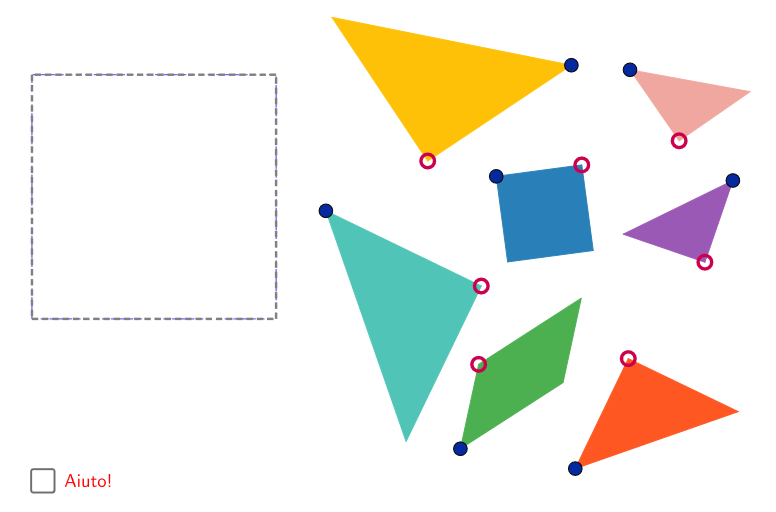
This example demonstrates how to construct the classic Tangram puzzle using GeoGebra. The core mathematical concepts include polygon decomposition, area calculation, and geometric transformations (rotation, translation). Construction key points: Use Polygon command to draw basic triangles and quadrilaterals, Segment command for edges, Midpoint command to find midpoints, Line command for auxiliary lines, Intersect command to determine intersections, and Rotate command for rotation and assembly. Objects include points A to M, polygons poli1 to poli4, segments b_1 to g_2, etc. Suitable for upper elementary to middle school mathematics classes, for understanding basic geometric shapes, area conservation principles, and exploring geometric transformation rules.
GeoGebra Commands & Parameters
Polygon(A, B, 4) → poli1, frame3, frame4, frame1, frame2, C, DSegment(A, C) → frame12Midpoint(D, C) → EMidpoint(D, A) → FSegment(F, E) → frame5Midpoint(A, C) → GSegment(B, G) → frame9Midpoint(F, E) → HMidpoint(G, C) → ISegment(H, I) → frame7Segment(G, H) → frame8Line(F, frame8) → jIntersect(j, frame12) → JSegment(F, J) → frame11Polygon(A, G, B) → poli2, b_1, a_1, g_1Point(Circle[N, b_1]) → ORotate(O + (a_1, 0), Angle[B - G] + Angle[O - N] - Angle[G - A], O) → PPolygon(N, O, P) → poli4, p, n, oPolygon(B, G, C) → poli3, c_1, b_2, g_2Point(Circle[K, c_1]) → LRotate(L + (b_2, 0), Angle[C - G] + Angle[L - K] - Angle[G - B], L) → MPolygon(K, L, M) → poli5, m, k_1, lPolygon(H, E, C, I) → poli6, h_1, e_1, c_2, i_1Point(Circle[Q, h_1]) → RRotate(R + (e_1, 0), Angle[C - E] + Angle[R - Q] - Angle[E - H], R) → SRotate(S + (c_2, 0), Angle[I - C] + Angle[S - R] - Angle[C - E], S) → TPolygon(Q, R, S, T) → poli7, q, r, s, tPolygon(H, G, I) → poli8, i_2, h_2, g_3Point(Circle[U, i_2]) → VRotate(V + (h_2, 0), Angle[I - G] + Angle[V - U] - Angle[G - H], V) → WPolygon(U, V, W) → poli9, w, u, vPolygon(F, H, G, J) → poli10, f_1, h_3, g_4, j_1Point(Circle[Z, f_1]) → A_1Rotate(A_1 + (h_3, 0), Angle[G - H] + Angle[A_1 - Z] - Angle[H - F], A_1) → B_1Rotate(B_1 + (g_4, 0), Angle[J - G] + Angle[B_1 - A_1] - Angle[G - H], B_1) → C_1Polygon(Z, A_1, B_1, C_1) → poli11, z, a_2, b_3, c_3Polygon(F, J, A) → poli12, a_3, f_2, j_2Point(Circle[D_1, a_3]) → E_1Rotate(E_1 + (f_2, 0), Angle[A - J] + Angle[E_1 - D_1] - Angle[J - F], E_1) → F_1Polygon(D_1, E_1, F_1) → poli13, f_3, d_1, e_2Polygon(F, D, E) → poli14, e_3, f_4, d_2Point(Circle[G_1, e_3]) → H_1Rotate(H_1 + (f_4, 0), Angle[E - D] + Angle[H_1 - G_1] - Angle[D - F], H_1) → I_1Polygon(G_1, H_1, I_1) → poli15, i_3, g_5, h_4
AI Drawing Prompt Reference
Draw a tangram puzzle consisting of seven different polygons. Start by drawing basic triangles and quadrilaterals using the polygon command. Then, use segment, midpoint, line, intersect, and rotate commands to construct each polygon. Finally, combine and rotate these polygons to form the complete tangram pattern.
The prompt above was compiled from the original drawing commands and is for reference only.