
Exploring Sphere Surface Area and Volume Relationship
Loading the math board and drawing, please wait…
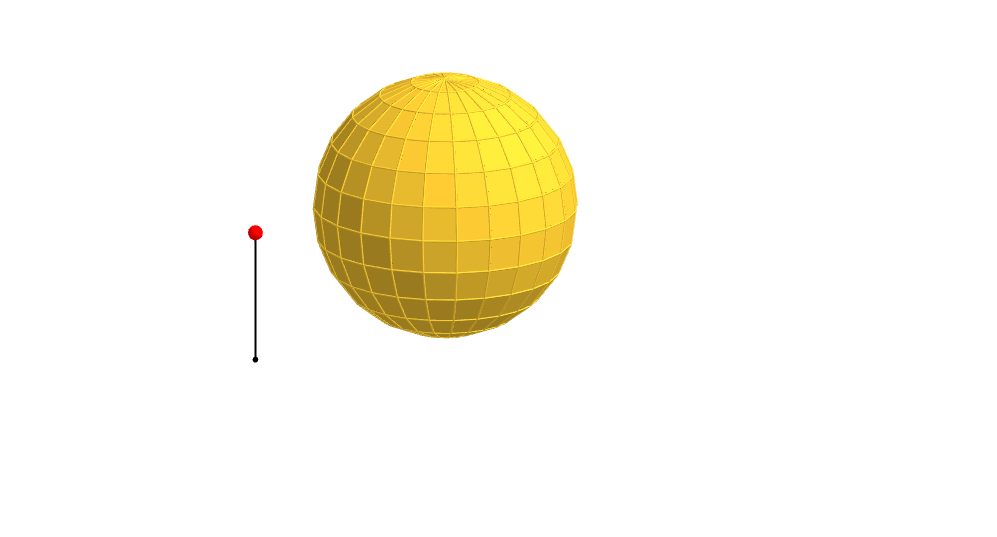
This example demonstrates the dynamic relationship between the surface area and volume of a sphere as its radius changes. Key math concepts include sphere surface area formula, volume formula, and geometric visualization. GeoGebra commands and objects used in construction are Line, Sequence, Rotate, Segment, Point, If, Translate, Sphere, OrthogonalPlane, Mirror, etc., dynamically showcasing spherical geometric properties. Suitable for high school students and math enthusiasts to understand sphere geometry and formula applications.
GeoGebra Commands & Parameters
Line((0, 0, 1), (0, 1, 1)) → cSequence(Rotate[(0, 0, 0), ((-((i * 15))))°, c], i, 0, 6) → list1Rotate(list1, 15*°, zAxis) → list1'Line(Element[list1, 2], Element[list1', 2]) → l1Line((0, 0, 0), l1) → l0Sequence(Polygon[Element[list1, i], Element[list1', i], Element[list1', i + 1], Element[list1, i + 1]], i, 1, 6) → list2Segment(A, A + (0, 0, 1)) → aPoint(a) → PIf(z(P) ≥ 0.5, 0, (2 * (0.5 - z(P)))) → tIf(z(P) ≥ 0.5, (2 * (1 - z(P))), 1) → sTranslate(list2, Vector[(s * Vector[(0, 0, 0), (1, 0, 0)])]) → list2'Translate(l0, Vector[(s * Vector[(0, 0, 0), (1, 0, 0)])]) → l0'Sphere((0, 0, 1), 1) → bSequence(Pyramid[Element[list2, i], (0, 0, 1)], i, 1, 6) → list3Translate(list3, Vector[(s * Vector[(0, 0, 0), (1, 0, 0)])]) → list3'Line(Element[list1, 3], Element[list1', 3]) → l2Line(Element[list1, 4], Element[list1', 4]) → l3Line(Element[list1, 5], Element[list1', 5]) → l4Line(Element[list1, 6], Element[list1', 6]) → l5Line(Element[list1, 7], Element[list1', 7]) → l6Rotate(Element[list3', 1], ((t * 7.5))°, l0') → dTranslate(l1, Vector[(s * Vector[(0, 0, 0), (1, 0, 0)])]) → l1'Translate(l2, Vector[(s * Vector[(0, 0, 0), (1, 0, 0)])]) → l2'Translate(l3, Vector[(s * Vector[(0, 0, 0), (1, 0, 0)])]) → l3'Translate(l4, Vector[(s * Vector[(0, 0, 0), (1, 0, 0)])]) → l4'Rotate(l1', (7.5° * t), l0') → l1''Rotate(Rotate[Element[list3', 2], ((t * 7.5))°, l0'], ((t * 15))°, l1'') → eRotate(Rotate[l2', ((t * 7.5))°, l0'], ((t * 15))°, l1'') → l2''Rotate(Rotate[Rotate[Element[list3', 3], ((t * 7.5))°, l0'], ((t * 15))°, l1''], ((t * 15))°, l2'') → fRotate(Rotate[Rotate[l3', ((t * 7.5))°, l0'], ((t * 15))°, l1''], ((t * 15))°, l2'') → l3''Rotate(Rotate[Rotate[Rotate[Element[list3', 4], ((t * 7.5))°, l0'], ((t * 15))°, l1''], ((t * 15))°, l2''], (15° * t), l3'') → gRotate(Rotate[Rotate[Rotate[l4', ((t * 7.5))°, l0'], ((t * 15))°, l1''], ((t * 15))°, l2''], ((t * 15))°, l3'') → l4''Rotate(Rotate[Rotate[Rotate[Rotate[Element[list3', 5], ((t * 7.5))°, l0'], ((t * 15))°, l1''], ((t * 15))°, l2''], (15° * t), l3''], (15° * t), l4'') → hTranslate(l5, Vector[(s * Vector[(0, 0, 0), (1, 0, 0)])]) → l5'Rotate(Rotate[Rotate[Rotate[Rotate[l5', ((t * 7.5))°, l0'], ((t * 15))°, l1''], ((t * 15))°, l2''], ((t * 15))°, l3''], (15° * t), l4'') → l5''Rotate(Element[list2', 1], ((t * 7.5))°, l0') → poly1Rotate(Rotate[Rotate[Rotate[Rotate[Rotate[Element[list3', 6], ((t * 7.5))°, l0'], ((t * 15))°, l1''], ((t * 15))°, l2''], (15° * t), l3''], (15° * t), l4''], (15° * t), l5'') → iRotate(Rotate[Element[list2', 2], ((t * 7.5))°, l0'], ((t * 15))°, l1'') → poly2Rotate(Rotate[Rotate[Element[list2', 3], ((t * 7.5))°, l0'], ((t * 15))°, l1''], ((t * 15))°, l2'') → poly3Rotate(Rotate[Rotate[Rotate[Element[list2', 4], ((t * 7.5))°, l0'], ((t * 15))°, l1''], ((t * 15))°, l2''], (15° * t), l3'') → poly4Rotate(Rotate[Rotate[Rotate[Rotate[Element[list2', 5], ((t * 7.5))°, l0'], ((t * 15))°, l1''], ((t * 15))°, l2''], (15° * t), l3''], (15° * t), l4'') → poly5Rotate(Rotate[Rotate[Rotate[Rotate[Rotate[Element[list2', 6], ((t * 7.5))°, l0'], ((t * 15))°, l1''], ((t * 15))°, l2''], (15° * t), l3''], (15° * t), l4''], (15° * t), l5'') → poly6OrthogonalPlane((0, 0, 1), zAxis) → mTranslate(l6, Vector[(s * Vector[(0, 0, 0), (1, 0, 0)])]) → l6'Rotate(Rotate[Rotate[Rotate[Rotate[Rotate[l6', ((t * 7.5))°, l0'], ((t * 15))°, l1''], ((t * 15))°, l2''], ((t * 15))°, l3''], (15° * t), l4''], (15° * t), l5'') → l6''Rotate(Rotate[Rotate[Rotate[Rotate[Rotate[Rotate[m, ((t * 7.5))°, l0'], ((t * 15))°, l1''], ((t * 15))°, l2''], (15° * t), l3''], (15° * t), l4''], (15° * t), l5''], (7.5° * t), l6'') → nMirror(i, n) → i'Mirror(h, n) → h'Mirror(g, n) → g'Mirror(f, n) → f'Mirror(e, n) → e'Mirror(d, n) → d'Mirror(poly6, n) → poly6'Mirror(poly5, n) → poly5'Mirror(poly4, n) → poly4'Mirror(poly3, n) → poly3'Mirror(poly2, n) → poly2'Mirror(poly1, n) → poly1'Sequence(Rotate[list3, 15° + ((15° * 22) * i), zAxis], i, 0, 1) → list4Mirror(list4, m) → list4'Sequence(Rotate[list2, (15° * i), zAxis], i, 1, 23) → list5Mirror(list5, m) → list5'
AI Drawing Prompt Reference
Draw a sphere to demonstrate the relationship between its surface area and volume as the radius changes. Start by drawing a sphere with a radius of 1, then rotate a series of planes around the sphere's central axis to form a series of polygons, which will change as the sphere rotates. Finally, use mirroring and rotation operations to generate a series of planes tangent to the sphere's surface, showcasing the sphere's geometric properties.
The prompt above was compiled from the original drawing commands and is for reference only.