
Exploring Sphere Sections
Loading the math board and drawing, please wait…
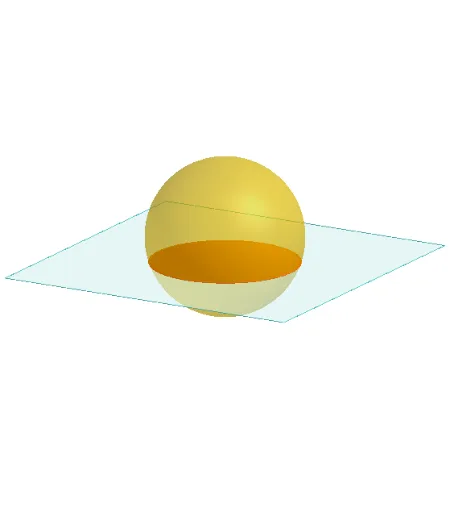
This example demonstrates the various cross-sections formed by slicing a sphere with different planes. It involves core mathematical concepts such as solid geometry, geometric construction, and graphing. Key GeoGebra commands and objects used include Polygon, PointIn, Translate, Rotate, Plane, OrthogonalLine, Sphere, and IntersectPath. Suitable for high school students studying solid geometry and analytical geometry, helping them understand the positional relationships between spheres and planes and the characteristics of their cross-sections.
GeoGebra Commands & Parameters
Polygon(B + (-2, -2), B + (2, -2), B + (2, 2), B + (-2, 2)) → poly3, e, f, g, iPointIn(poly3) → CTranslate((0, 0, 0), Vector[B, C]) → APolygon(A + (-4, -4), A + (4, -4), A + (4, 4), A + (-4, 4)) → poly1, a, b, c, dRotate(Rotate[Translate[poly1, Vector[A, A + (0, 0, h)]], (90° * s), A + (0, 0, h), yAxis], (90° * t), A, zAxis) → poly2PointIn(poly2) → GPointIn(poly2) → HPointIn(poly2) → IPlane(G, I, H) → nOrthogonalLine(A, n) → d_1Sphere((0, 0, 2), 2) → jIntersectPath(n, j) → k
AI Drawing Prompt Reference
Draw a sphere with radius 2 centered at height 2. Above the sphere, construct a horizontal square plane whose center is directly above the sphere's center. Rotate this plane around the vertical axis by an angle, and also tilt it around a horizontal axis, creating an inclined plane. Pick three random points on this inclined plane, which define a cutting plane. This cutting plane intersects the sphere, producing a circular cross-section. Show the sphere with this circular slice, and keep the inclined plane visible to illustrate the relative position between the plane and the sphere.
The prompt above was compiled from the original drawing commands and is for reference only.