
Exploring Smallest and Largest Distances
Loading the math board and drawing, please wait…
In collections
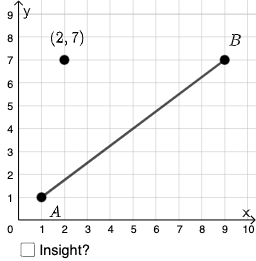
Open Middle: Distance, Midpoint, Slope (2)
This example demonstrates how to explore minimum and maximum distances between points and lines using GeoGebra. It involves core mathematical concepts such as distributions, hyperbolas, Pythagorean theorem, variance, difference, and slope. The construction utilizes commands and objects like PointIn, Textfield, Segment, Midpoint, Intersect, Polygon, Angle, If, and Mode. Suitable for high school and above, it helps understand distance calculations and geometric properties.
GeoGebra Commands & Parameters
PointIn(e) → APointIn(e) → BPointIn(e) → CTextfield(f) → InputBox1Textfield(g) → InputBox2Textfield(h) → InputBox3Textfield(i) → InputBox4Textfield(j) → InputBox5Segment(A, B) → kMidpoint(k) → DSegment(A, D) → lSegment(D, B) → mIntersect(p, eq1) → EPolygon(A, E, B) → t1, b_1, a_1, e_1Angle(B, E, A) → αSegment(A, E) → nSegment(E, B) → qIf(C ≟ D, "√", "X") → text6Mode(l1) → l2If(c2, "√", "X") → text8If(c3, "√", "X") → text9If(Length[l2] ≟ 0, "No digits repeat!", "Repeated digits exist.") → text7
AI Drawing Prompt Reference
Draw two intersecting line segments and mark their intersection point. Select two points on one of the line segments and connect them to form a third line segment. Find the midpoint of the first line segment and draw line segments from the midpoint to each endpoint. Select a point on the first line segment, connect it to both endpoints to form a triangle. Measure one angle of the triangle and display its size. Show different text based on conditions, such as displaying '√' when the midpoint coincides with the third point, otherwise display 'X'.
The prompt above was compiled from the original drawing commands and is for reference only.