
Exploring Sections of a Cone
Loading the math board and drawing, please wait…
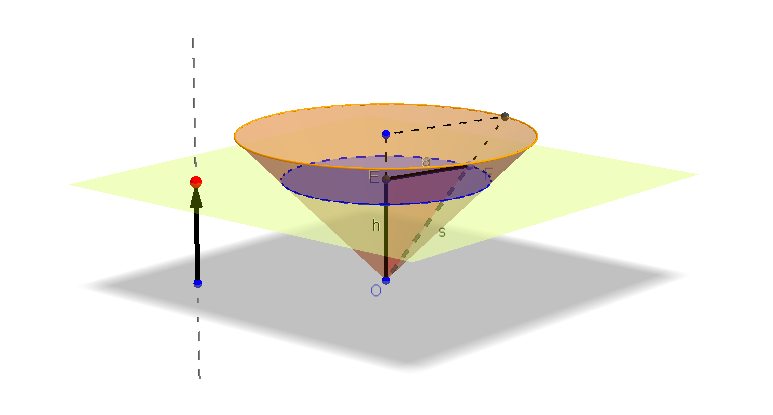
This GeoGebra example demonstrates how a plane cuts through a cone, revealing the resulting cross-section shapes. It covers core mathematical concepts such as the geometry of cones, conic sections (circle, ellipse, parabola, hyperbola) formed by the intersection of a plane and a cone, and the use of polygons to approximate the section. The construction uses GeoGebra commands including Circle, Cone, OrthogonalLine, OrthogonalPlane, IntersectPath, Point, Vector, Polygon, Line, and Segment to build the cone, define the cutting plane, and compute the intersection path. It is suitable for high school or early college students studying solid geometry and analytic geometry, and can be used to dynamically explore how the section changes with the plane's orientation.
GeoGebra Commands & Parameters
Circle(B, 3, zAxis) → cCone(B, O, 3) → a_2, d, bOrthogonalLine(C, xOyPlane) → ePoint(e) → DVector(C, D) → uOrthogonalPlane(D, e) → fIntersectPath(f, a_2) → gCorner(g)Intersect(zAxis, f) → EPoint(g) → FPolygon(E, F, O) → poly1, a, s, hLine(O, F) → iIntersect(i, c) → A,Segment(E, B) → jSegment(A, B) → kSegment(F, A) → l
AI Drawing Prompt Reference
Draw a cone with its axis vertical, base centered at the origin, and apex above. Pick a point outside the cone, draw a line through it perpendicular to the base plane, and choose a point on that line to define a cutting plane. Construct a plane perpendicular to that line, intersecting the cone to produce a cross-section curve. On that curve, select a point, form a triangle with the apex and base center, and add segments showing intersections with the base and side. Illustrate how the plane cuts the cone, revealing the conic section shape.
The prompt above was compiled from the original drawing commands and is for reference only.