
Exploring Rotational Symmetry
Loading the math board and drawing, please wait…
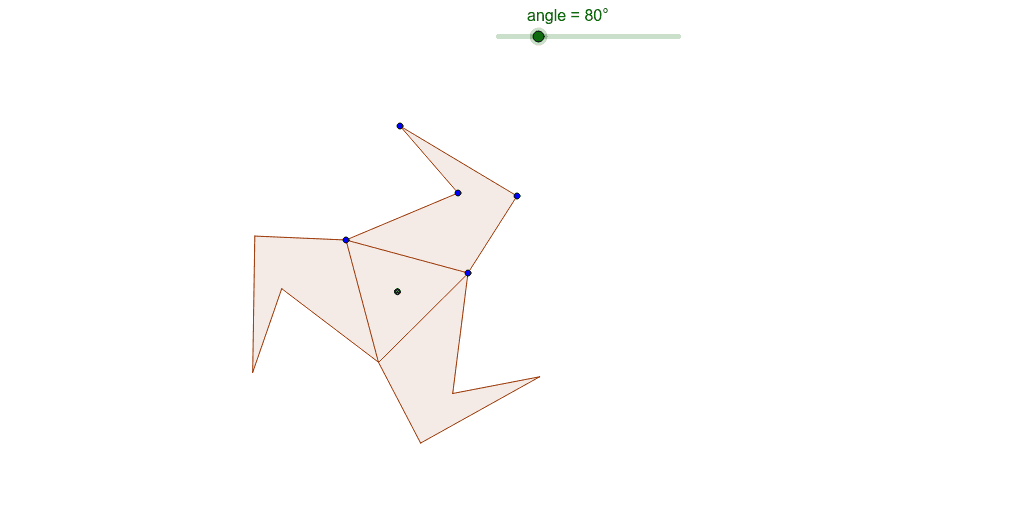
This example demonstrates the concept of rotational symmetry in polygons and its relation to central symmetry. Key math concepts include symmetry, rotation angles, centroid, and polygon construction. GeoGebra commands like Polygon, Midpoint, Segment, Intersect, Rotate, and Centroid are used to construct the example. Suitable for high school mathematics education to understand geometric transformations and symmetry principles.
GeoGebra Commands & Parameters
Polygon(A, B, 3) → poly1, a, b, c, CPolygon(B, D, E, F, A) → poly2, b_1, d, e, f, a_1Midpoint(c) → GMidpoint(a) → HMidpoint(b) → ISegment(I, A) → gSegment(H, C) → hIntersect(g, h) → JRotate(B, 120*°, J) → B'Rotate(D, 120*°, J) → D'Rotate(E, 120*°, J) → E'Rotate(F, 120*°, J) → F'Rotate(A, 120*°, J) → A'Polygon(B', D', E', F', A') → poly2', b', d', e', f', a'Rotate(B', 120*°, J) → B''Rotate(D', 120*°, J) → D''Rotate(E', 120*°, J) → E''Rotate(F', 120*°, J) → F''Rotate(A', 120*°, J) → A''Polygon(B'', D'', E'', F'', A'') → poly2'', b'', d'', e'', f'', a''Centroid(poly1) → K
AI Drawing Prompt Reference
Draw a regular triangle and extend it to form a pentagon. Find the midpoints of each side of the triangle, connect these midpoints to the vertices, and locate the centroid. Rotate the pentagon by 120 degrees around the centroid, then again by 120 degrees, to create two more pentagons. Finally, mark the centroid of the original triangle and illustrate the rotational symmetry.
The prompt above was compiled from the original drawing commands and is for reference only.