
Exploring Rotation 4
Loading the math board and drawing, please wait…
In collections
Geometry Transformations
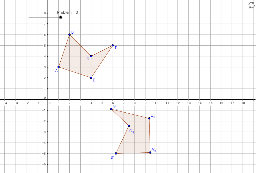
This example demonstrates how to transform a shape by rotating it 180 degrees. Key mathematical concepts include rotation and parallelogram. The commands used include Polygon and Rotate. Suitable for middle school and above students learning geometric transformations.
GeoGebra Commands & Parameters
Polygon(A, E, D, C, B) → poly1, a, b, c, d, eRotate(A, Angle°, F) → A'Rotate(E, Angle°, F) → E'Rotate(D, Angle°, F) → D'Rotate(C, Angle°, F) → C'Rotate(B, Angle°, F) → B'Polygon(A', E', D', C', B') → poly1', a', b', c', d', e'Rotate(A, 100°, G) → A'_2Rotate(E, 100°, G) → E'_1Rotate(D, 100°, G) → D'_1Rotate(C, 100°, G) → C'_2Rotate(B, 100°, G) → B'_2Polygon(A'_2, E'_1, D'_1, C'_2, B'_2) → poly1'_1, a'_1, b'_1, c'_1, d'_1, e'_1Rotate(A, 110°, H) → A'_3Rotate(E, 110°, H) → E'_3Rotate(D, 110°, H) → D'_3Rotate(C, 110°, H) → C'_3Rotate(B, 110°, H) → B'_3Polygon(A'_3, E'_3, D'_3, C'_3, B'_3) → poly1'_2, a'_2, b'_2, c'_2, d'_2, e'_2
AI Drawing Prompt Reference
Draw a pentagon ABCDE, then rotate it 180 degrees around point F to form a new pentagon A'B'C'D'E'. Next, rotate points A, E, D, C, and B around point F by 100 degrees and 110 degrees respectively to form new pentagons A'_2E'_1D'_1C'_2B'_2 and A'_3E'_3D'_3C'_3B'_3.
The prompt above was compiled from the original drawing commands and is for reference only.