
Exploring Reflections 6: Multi-Axis Symmetry and Geometric Transformations
Loading the math board and drawing, please wait…
In collections
Geometry Transformations
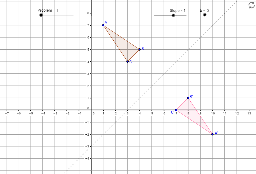
① This GeoGebra example demonstrates how to apply the Mirror command to reflect polygons, cylinders, secant lines, and other objects across multiple axes, generating a series of symmetric figures that vividly illustrate the geometric effects of reflection. ② Core mathematical concepts include reflection (axial symmetry), polygons, secant lines, slope, and probability elements, involving scalene triangles, cylinders, and other geometric objects. ③ Construction highlights: using the Polygon command to create poly1, then applying Mirror with different lines (e.g., a, b, c) as axes to produce multiple mirrored copies (poly1', poly1'_1, etc.), along with Slope objects, text1, and multiple points (A', B', C'), building complex symmetric patterns through repeated reflections. ④ Suitable for middle school geometry lessons or math lab activities, helping students understand reflection rules and how the choice of symmetry axis affects position and orientation, while also exploring fun problems combining probability and geometry.
GeoGebra Commands & Parameters
Polygon(A, B, C) → poly1, c, a, b_1Mirror(A, d) → A'Mirror(B, d) → B'Mirror(C, d) → C'Polygon(A', B', C') → poly1', c', a', b'Mirror(A, e) → A'_2Mirror(B, e) → B'_2Mirror(C, e) → C'_2Polygon(A'_2, B'_2, C'_2) → poly1'_1, c'_1, a'_1, b'_1Mirror(A, f) → A'_3Mirror(B, f) → B'_3Mirror(C, f) → C'_3Polygon(A'_3, B'_3, C'_3) → poly1'_2, c'_2, a'_2, b'_2Mirror(A, g) → A'_4Mirror(B, g) → B'_4Mirror(C, g) → C'_4Polygon(A'_4, B'_4, C'_4) → poly1'_3, c'_3, a'_3, b'_3
AI Drawing Prompt Reference
Draw a triangle formed by three points, then reflect it across three different axes sequentially, reconstructing a new triangle with the reflected points each time, creating a series of symmetrically arranged triangles to illustrate multi-axis symmetry and geometric transformations.
The prompt above was compiled from the original drawing commands and is for reference only.