
Exploring Relationships Between Triangles and Parallelograms
Loading the math board and drawing, please wait…
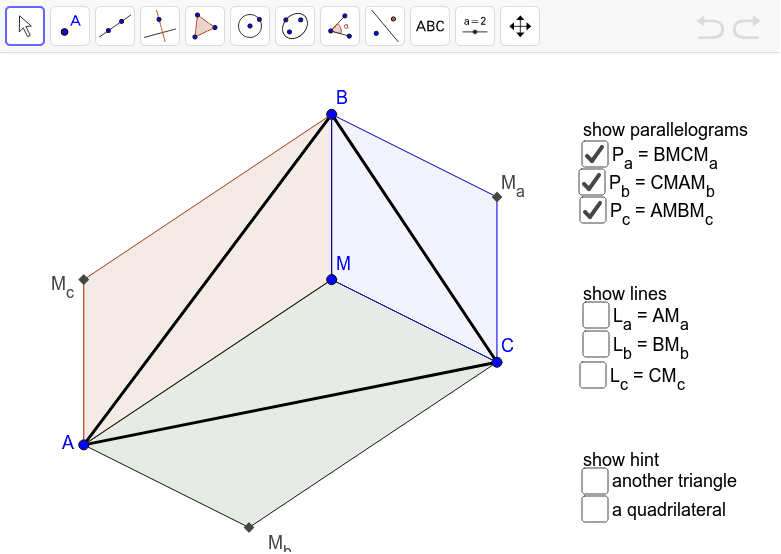
This example demonstrates the geometric relationships between triangles and parallelograms, focusing on incidence and properties. Key math concepts include geometric construction, vectors, coordinate geometry, parallelogram properties, and triangle area. GeoGebra commands like Intersect, Polygon, and Line are used to construct points, lines, and shapes. Suitable for high school mathematics education, exploring geometric transformations, vector applications, and analytical geometry methods.
GeoGebra Commands & Parameters
Intersect(Line[B, Line[A, M]], Line[A, Line[B, M]]) → M_cIntersect(Line[C, Line[A, M]], Line[A, Line[C, M]]) → M_bIntersect(Line[C, Line[B, M]], Line[B, Line[C, M]]) → M_aPolygon(A, B, C) → tri, AB, BC, CAPolygon(A, M, B, M_c) → Pc, AMP_c, BMP_c, BM_c, AM_cPolygon(A, M, C, M_b) → Pb, AMP_b, CMP_b, CM_b, AM_bPolygon(B, M, C, M_a) → Pa, BMP_a, CMP_a, CM_a, BM_aLine(A, M_a) → L_aLine(B, M_b) → L_bLine(C, M_c) → LcPolygon(M_a, M_b, M_c) → dual, m_c, m_a, m_bPolygon(A, B, M_a, M_b) → quad, a_1, b_1, m_1, m_2
AI Drawing Prompt Reference
Draw triangle ABC and parallelogram PbCMPb, where M is the midpoint of AB and M_b is the midpoint of AC. Then draw triangle AMC and parallelogram PaCMPa, where M_a is the midpoint of BC. Finally, draw triangle BMC and parallelogram PcBMPc, where M_c is the midpoint of BC. Connect points A, B, and C, and M_a, M_b, and M_c to form a new triangle.
The prompt above was compiled from the original drawing commands and is for reference only.