
Exploring Number of Solutions of Equations
Loading the math board and drawing, please wait…
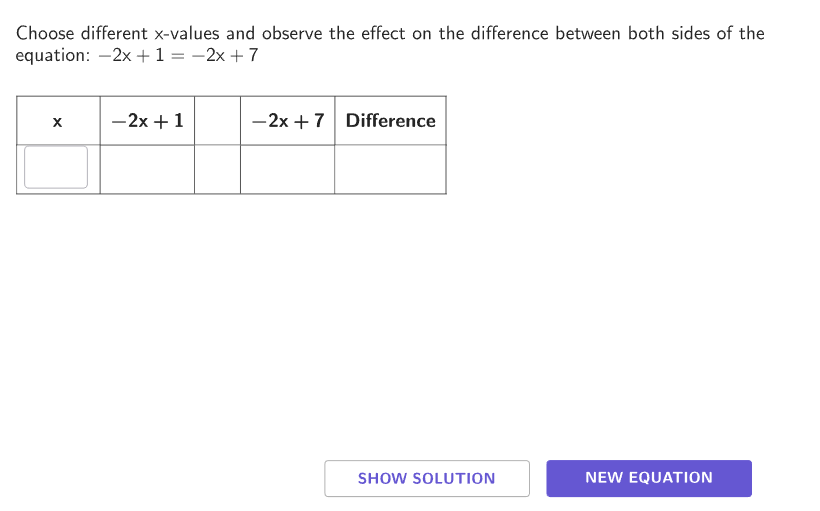
This activity helps students explore when linear equations have 0, 1, or infinitely many solutions. Key math concepts include properties of linear equations and determining solutions. GeoGebra commands like Shuffle, Join, Element, and If are used to create interactive elements. Suitable for grades 6-8 to understand the variety of solutions in equations.
GeoGebra Commands & Parameters
Shuffle(Sequence[-5, 5]) → sols, {2, -1, -2, -4, 3, 1, 5, 0, 4, -3, -5}Shuffle(Flatten[Sequence[Sequence[3], kk, 1, 10]]) → solutions, {2, 1, 1, 3, 3, 3, 2, 2, 3, 2, 2, 1, 3, 1, 3, 2, 3, 1, 2, 1, 1, 2, 1, 3, 3, 1, 2, 1, 2, 3}Join({{1 / 2, 1 / 5, 2 / 5}, (-1 * {1 / 2, 1 / 5, 2 / 5})}) → allowedFractionsShuffle(Flatten[{Sequence[-10, 10] \ {0}, allowedFractions}]) → bNums, {1, 2, -7, 5, -9, 10, 9, -6, 4, 0.4, -1, 0.2, -5, 8, 3, -0.4, -0.5, 6, -0.2, 0.5, -4, -8, 7, -2, -3, -10}Shuffle(Flatten[{Sequence[-10, 10] \ {0, 1}, allowedFractions}]) → aNums, {-2, -7, 4, 9, 0.4, 6, -5, 2, 0.2, 8, -6, 7, -3, -0.5, -0.4, -1, 0.5, 5, -0.2, -10, -4, 3, -8, 10, -9}Element(aNums, Mod[questionCount, Length[aNums]] + 1) → aShuffle(Flatten[{Sequence[-10, 10] \ {0, 1, a}, allowedFractions}]) → cNums, {3, -6, 6, -1, 0.2, -8, 7, -5, -9, -0.2, 5, -10, 0.4, 8, -3, -4, -0.4, 4, -0.5, 0.5, 2, 9, -7, 10}Element(sols, Mod[questionCount + 1, Length[sols]] + 1) → intElement(sols, Mod[questionCount, Length[sols]] + 1) → solElement(solutions, Mod[questionCount, Length[solutions]] + 1) → solutionsCurrentIf(solutionsCurrent ≠ 1, Element[bNums, Mod[questionCount, Length[bNums]] + 1], int - (a * sol)) → bShuffle(Flatten[{Sequence[-10, 10] \ {0, b}, allowedFractions}]) → dNums, {7, -1, 0.2, -6, 9, 0.4, 6, 3, -2, -5, -7, -3, 2, -8, 10, -9, -10, -4, -0.2, 4, -0.5, 8, 5, -0.4, 0.5}If(Length[xNumbers] ≥ maxAllowed, 1 + maxS - slide, 1) → minElement(cNums, Mod[questionCount, Length[cNums]] + 1) → c1If(solutionsCurrent ≟ 1, c1, a) → cElement(dNums, Mod[questionCount, Length[dNums]] + 1) → d1If(solutionsCurrent ≟ 3, b, solutionsCurrent ≟ 1, int - (c * sol), d1) → dIf(Length[xNumbers] ≟ 0, {}, Zip[g1(kk) - f1(kk), kk, xNumbers]) → DifNumerator(a - c) → numerDenominator(a - c) → denomIf(Length[xNumbers] ≤ maxAllowed, Length[xNumbers], min + maxAllowed - 1) → maxAppend("\vspace{15}\hspace{25}\bold{x}\hspace{15}\phantom{\frac{2}{5}}", If[Length[xNumbers] ≟ 0, {"\phantom{\frac{2}{5}}"}, Take[Append[Zip[(("\phantom{\frac{2}{5}}" * Text[ii]) * "\phantom{\frac{2}{5}}"), ii, xNumbers], "\phantom{\frac{2}{5}}"], min, max + 1]]) → colXZip((("$\textsf{" * tt) * " }$"), tt, {"Simple: \(ax+b = cx+d\)", "More complex: \(ax+b = c(x+d)\)", "Most complex: \(a(x+b) = c(x+d)\)"}) → optionsSelectedIndex(options) → caseNumIf(caseNum ≟ 3, left3, left12) → leftIf(caseNum ≟ 1, right1, right23) → rightIf(Length[xNumbers] ≟ 0, {}, Zip[f1(kk), kk, xNumbers]) → leftNumbersIf(Length[xNumbers] ≟ 0, {}, Zip[g1(kk), kk, xNumbers]) → rightNumbersIf(Length[xNumbers] ≟ 0, {"\hspace{50}"}, Zip[If[AA < BB, "<", AA > BB, ">", "="] + "\phantom{\frac{2}{5}}\hspace{-15}", AA, leftNumbers, BB, rightNumbers]) → ineqTextfield(xStudent) → InputBox1Append((("\bold{" * If[caseNum ≟ 3, left3, left12]) * "}"), If[Length[xNumbers] ≟ 0, {}, Take[Append[Zip[Text[ii], ii, leftNumbers, DD, Dif], "\hspace{50}"], min, max + 1]]) → colLeftAppend((("\bold{" * If[caseNum ≟ 1, right1, right23]) * "}"), If[Length[xNumbers] ≟ 0, {}, Take[Append[Zip[Text[ii], ii, rightNumbers, DD, Dif], "\hspace{50}"], min, max + 1]]) → colRightAppend("\hspace{25}", If[Length[xNumbers] ≟ 0, {}, Take[Append[Zip[ii, ii, ineq, DD, Dif], "\hspace{25}"], min, max + 1]]) → colMiddlePolygon(Zip[PixelsToPoint[Corner[1], Corner[3], Corner[5], CLIPBOARDmagicSTRINGA], CLIPBOARDmagicSTRINGA, {(pixelsLeft_{1}, pixelsTop_{1}), (pixelsLeft_{1}, y(Corner[5]) - pixelsBottom_{1}), Corner[5] - (pixelsRight_{1}, pixelsBottom_{1}), (x(Corner[5]) - pixelsRight_{1}, pixelsTop_{1})}]) → borderBox_{1}Append("\textsf\bold{Difference}", If[Length[xNumbers] ≟ 0, {}, Take[Append[Zip[Text[ii], ii, Dif], "\hspace{50}"], min, max + 1]]) → colDifZip((("$\textsf{" * TT) * " }$"), TT, {"\phantom{One solution}", "One solution", "No solution", "Infinite solutions"}) → AnswerIf(caseNum ≟ 3, left3, left12) → A1If(caseNum ≟ 1, right1, right23) → B1TableText(Take[solLeft, If[caseNum ≥ 2, 1, 2], If[solutionsCurrent ≟ 1, 5, 4]], Sequence["=", kk, 1, 3 + If[caseNum ≠ 1, 1, 0] + If[solutionsCurrent ≟ 1, 1, 0]], Take[solRight, If[caseNum ≥ 2, 1, 2], If[solutionsCurrent ≟ 1, 5, 4]], "vrcl") → solSimple2Sequence(142 + (ii * (189 - 142)), ii, 0, 5) → yIB, {142, 189, 236, 283, 330, 377}Textfield(xStudent) → InputBox2Textfield(xStudent) → InputBox3Textfield(xStudent) → InputBox4Textfield(xStudent) → InputBox5If(Defined[Element[colX, C1]], Element[colX, C1], "") → D1If(Defined[Element[colLeft, C1]], Element[colLeft, C1], "") → E1If(Defined[Element[colLeft, C2]], Element[colLeft, C2], "") → E2If(Defined[Element[colLeft, C3]], Element[colLeft, C3], "") → E3If(Defined[Element[colLeft, C4]], Element[colLeft, C4], "") → E4If(Defined[Element[colLeft, C5]], Element[colLeft, C5], "") → E5If(Defined[Element[colLeft, C6]], Element[colLeft, C6], "") → E6If(Defined[Element[colMiddle, C1]], Element[colMiddle, C1], "") → F1If(solutionsCurrent ≟ 3 ∧ Defined[Element[xNumbers, I2]], Element[colors, 1], If[solutionsCurrent ≟ 2 ∧ Defined[Element[xNumbers, I2]] ∨ J2 ≥ 10, Element[colors, 4], If[J2 ≥ 5, Element[colors, 3], If[J2 > 0, Element[colors, 2], If[J2 ≟ 0, Element[colors, 1], "white"]]]]) → K2If(solutionsCurrent ≟ 3 ∧ Defined[Element[xNumbers, I3]], Element[colors, 1], If[solutionsCurrent ≟ 2 ∧ Defined[Element[xNumbers, I3]] ∨ J3 ≥ 10, Element[colors, 4], If[J3 ≥ 5, Element[colors, 3], If[J3 > 0, Element[colors, 2], If[J3 ≟ 0, Element[colors, 1], "white"]]]]) → K3If(solutionsCurrent ≟ 3 ∧ Defined[Element[xNumbers, I4]], Element[colors, 1], If[solutionsCurrent ≟ 2 ∧ Defined[Element[xNumbers, I4]] ∨ J4 ≥ 10, Element[colors, 4], If[J4 ≥ 5, Element[colors, 3], If[J4 > 0, Element[colors, 2], If[J4 ≟ 0, Element[colors, 1], "white"]]]]) → K4If(solutionsCurrent ≟ 3 ∧ Defined[Element[xNumbers, I5]], Element[colors, 1], If[solutionsCurrent ≟ 2 ∧ Defined[Element[xNumbers, I5]] ∨ J5 ≥ 10, Element[colors, 4], If[J5 ≥ 5, Element[colors, 3], If[J5 > 0, Element[colors, 2], If[J5 ≟ 0, Element[colors, 1], "white"]]]]) → K5If(solutionsCurrent ≟ 3 ∧ Defined[Element[xNumbers, I6]], Element[colors, 1], If[solutionsCurrent ≟ 2 ∧ Defined[Element[xNumbers, I6]] ∨ J6 ≥ 10, Element[colors, 4], If[J6 ≥ 5, Element[colors, 3], If[J6 > 0, Element[colors, 2], If[J6 ≟ 0, Element[colors, 1], "white"]]]]) → K6If(Defined[Element[colRight, C1]], Element[colRight, C1], "") → G1If(Defined[Element[colDif, C1]], Element[colDif, C1], "") → H1If(Defined[Element[colRight, C2]], Element[colRight, C2], "") → G2If(Defined[Element[colRight, C3]], Element[colRight, C3], "") → G3If(Defined[Element[colRight, C4]], Element[colRight, C4], "") → G4If(Defined[Element[colRight, C5]], Element[colRight, C5], "") → G5If(Defined[Element[colRight, C6]], Element[colRight, C6], "") → G6TableText(Take[{{D1, E1, F1, G1, H1}, {D2, E2, F2, G2, H2}, {D3, E3, F3, G3, H3}, {D4, E4, F4, G4, H4}, {D5, E5, F5, G5, H5}, {D6, E6, F6, G6, H6}}, 1, Min[max + 2, 6]], "c|_lllll") → text2
AI Drawing Prompt Reference
The graphic explores the solutions of a linear equation. It displays an equation expression, possibly in the form ax+b=cx+d. A list of possible solutions, including integer and fractional solutions, is shown beside it. Classification labels indicate three cases: one solution, no solution, and infinite solutions. The construction order is: first draw the equation, then generate the solution list, then add classification labels, and finally display the solution type based on the number of solutions. The graphic aims to help understand the diversity of equation solutions.
The prompt above was compiled from the original drawing commands and is for reference only.