
Exploring Minimum Possibility
Loading the math board and drawing, please wait…
In collections
Open Middle: Distance and Midpoint Exercise
This example demonstrates the dynamic geometric construction to explore the minimum possibility involving angles, continuity, and quadratic equations. Key math concepts include angles, continuity, quadratic equations, surfaces, and hypothesis testing. Construction highlights GeoGebra commands like PointIn, Segment, SurdText, Textfield, Point, Mode, Intersect, Polygon, Midpoint, If, and Angle. Suitable for high school and above learners to understand dynamic relationships between complex geometry and algebra problems.
GeoGebra Commands & Parameters
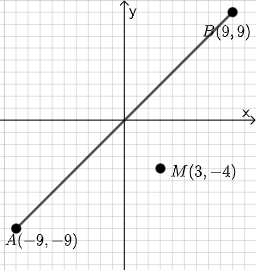
PointIn(e) → APointIn(e) → BSegment(A, B) → fSurdText(f) → text1Textfield(j) → InputBox1Textfield(k) → InputBox2Point(Circle[A, sqrt((100 * j) + (10 * k) + o)]) → CSegment(A, C) → lMode(l1) → l2Intersect(eq1, p) → DPolygon(A, D, M) → t1, f_1, g_1, h_1Segment(A, D) → qSegment(D, B) → rTextfield(o) → InputBox3Midpoint(Segment[A, B]) → EIf(mcorrect, "√", "x") → text9Segment(A, M) → i_1Segment(D, M) → j_1Angle(M, D, A) → αSegment(A, D) → k_1Segment(A, M) → l_1Segment(M, B) → m_1If(Distance[A, C] < Distance[A, M], "Too short!", Distance[A, C] > Distance[A, M], "Too long!", "This value is correct!") → text7If(Length[l2] ≟ 0, "All digits are different.", "Some digits repeat.") → text8
AI Drawing Prompt Reference
Draw a dynamic geometric figure with points A and B, draw a segment f through points A and B, display the length of segment f. Input variables j and k, draw a circle based on the formula, take a point C on the circle, connect point A and point C, find the midpoint M of line segment l, connect point A and point M, connect point D and point M, calculate the angle AMD as α, connect point A and point D, check if point C is on the circle, and display 'Correct' if it is, otherwise display 'Incorrect'.
The prompt above was compiled from the original drawing commands and is for reference only.