
Exploring Isosceles Triangles and Reflection via Sequence (SEQ.SC.4)
Loading the math board and drawing, please wait…
In collections
Mapping Diagrams: From AB to C&DE, Resource
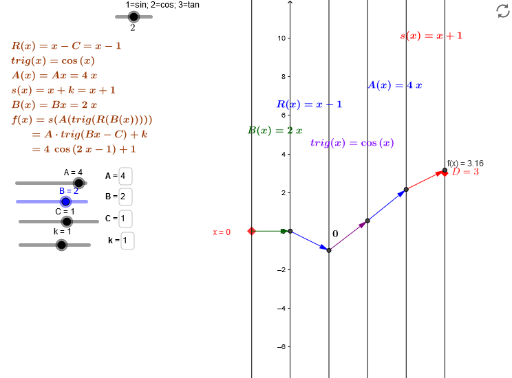
①This example demonstrates how to construct a sequence of isosceles triangles using reflection and dynamic input fields in GeoGebra, allowing users to observe how the shapes change with parameters. ②Core mathematical concepts include properties of isosceles triangles, planar reflection transformations, rational number inputs, and the use of sequences to generate multiple geometric objects. ③Construction highlights: from the summary, commands such as Element, Point, Textfield, and Vector are used; objects include multiple triangles (trl, atrl, atrl2), reflection-related objects (s, s_invD, m_invSinvD), input boxes (inputBox1, inputBoxf, etc.), and text labels. The construction leverages sequence and reflection to create symmetric patterns, with sliders or input boxes controlling parameters. ④This is suitable for middle or high school geometry classes to explore reflection symmetry, isosceles triangle construction, and dynamic mathematical experimentation, and for teachers to demonstrate the integration of sequences and transformations.
GeoGebra Commands & Parameters
Element(trl, fnum) → trigPoint(i) → KElement(atrl, fnum) → atrigElement(atrl2, fnum) → atrig2Textfield(B) → inputBox1Textfield(s) → inputBoxfPoint(b) → A_xVector(K, s_{inv}D) → wVector(s_{inv}D, m_{invSinvD}) → zVector(m_{invSinvD}, q_{inv+}) → dVector(q_{inv+}, I) → h_1Textfield(C) → inputBox2Textfield(k) → inputBox3Textfield(A) → inputBox4Textfield(B) → inputBox5Textfield(s) → inputBox6Vector(m_{invSinvD}, P_2) → uVector(P_2, J) → jVector(I, E) → vVector(J, D) → cTextfield(B) → inputBox7Vector(A_x, F) → mVector(F, G) → nVector(G, H) → pVector(H, L) → qVector(L, M) → r