
Exploring Dilations: Dynamic Scale Factors and Geometric Scaling
Loading the math board and drawing, please wait…
In collections
Dilations
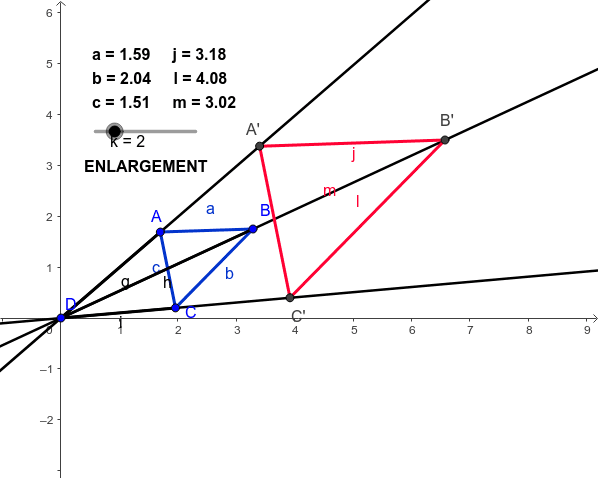
This GeoGebra example dynamically demonstrates the core geometric concept of dilations (scaling) and how the scale factor directly affects the lengths of the preimage and the image. Students can interactively adjust the scale factor and observe the corresponding geometric changes in real-time. The core mathematical concepts covered include geometric similarity, scale factors (scaling factors), center of dilation, and coordinate geometry under transformation. To construct this model, the creator utilized key GeoGebra commands such as Segment, Line, Circle, and Intersect to define key points and objects (A, B, C, D, and their transformed counterparts A', B', C', etc.). This tool is highly suitable for middle school and high school geometry classrooms, serving as an interactive visual aid to teach geometric transformations, similarity, and spatial scaling.
GeoGebra Commands & Parameters
Segment(B, A) → aSegment(A, C) → cSegment(C, B) → bLine(D, A) → dLine(D, B) → eLine(D, C) → fSegment(D, A) → gSegment(D, B) → hSegment(D, C) → iCircle(D, p) → sIntersect(s, d) → E, A'Circle(D, q) → tIntersect(t, e) → G, B'Circle(D, r) → c1Intersect(c1, f) → I, C'Segment(A', B') → jSegment(B', C') → lSegment(C', A') → m
AI Drawing Prompt Reference
Draw a dynamic scaling model showing how the scale factor affects the size of the figure. Include points A, B, C and their scaled points A', B', C'. Adjust the scale factor to observe changes. Ensure the figure is clear and labeled with key points.
The prompt above was compiled from the original drawing commands and is for reference only.