
Exploring Cross Sections of Triangular Prisms
Loading the math board and drawing, please wait…
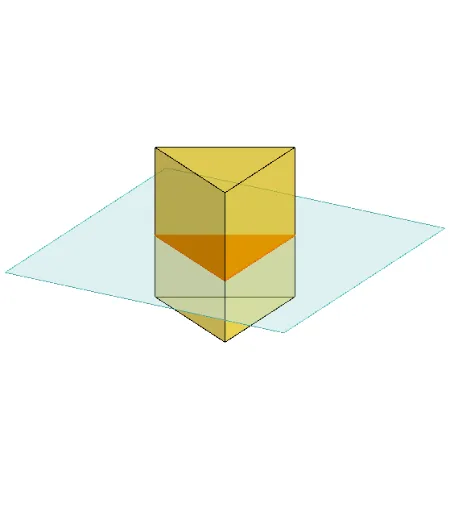
This example demonstrates how to investigate various cross sections of triangular prisms using GeoGebra. Key math concepts include solid geometry, cross-section geometry, and polygon properties. The construction utilizes commands like Polygon, PointIn, Translate, Rotate, Prism, Plane, IntersectPath, and OrthogonalLine. It is suitable for high school students learning about solid geometry, helping them understand the characteristics of cross-sections in 3D shapes.
GeoGebra Commands & Parameters
Polygon(B + (-2, -2), B + (2, -2), B + (2, 2), B + (-2, 2)) → poly3, e, f, g, iPointIn(poly3) → CTranslate((0, 0, 0), Vector[B, C]) → APolygon(A + (-4, -4), A + (4, -4), A + (4, 4), A + (-4, 4)) → poly1, a, b, c, dRotate(Rotate[Translate[poly1, Vector[A, A + (0, 0, h)]], (90° * s), A + (0, 0, h), yAxis], (90° * t), A, zAxis) → poly2Rotate(D, 120°, (0, 0, 0)) → EPolygon(D, E, 3, xOyPlane) → poly4, j, k, l, FPrism(poly4, D + (0, 0, 4)) → m, M, edge4, edge5, edge6, N, face1, face2, face3, face4, edge1, edge2, edge3PointIn(poly2) → GPointIn(poly2) → HPointIn(poly2) → IPlane(G, I, H) → nIntersectPath(n, m) → poly6, poly5, r, a_1, b_1, c_1, K, L_1, O, P, J, L, p, qRotate(m, 0, zAxis) → m'Rotate(m, 0, zAxis) → m'_1OrthogonalLine(A, n) → d_1
AI Drawing Prompt Reference
Draw a 3D triangular prism and illustrate a cross section formed by an intersecting plane. The figure should include a prism with a triangular base and rectangular sides, along with an inclined cutting plane that passes through the prism to create a polygonal cross section. The cross section should be clearly visible, possibly highlighted in a contrasting color. The overall composition should be shown from multiple angles to emphasize the shape and spatial orientation of the cross section.
The prompt above was compiled from the original drawing commands and is for reference only.