
Exploring Centers of Triangles
Loading the math board and drawing, please wait…
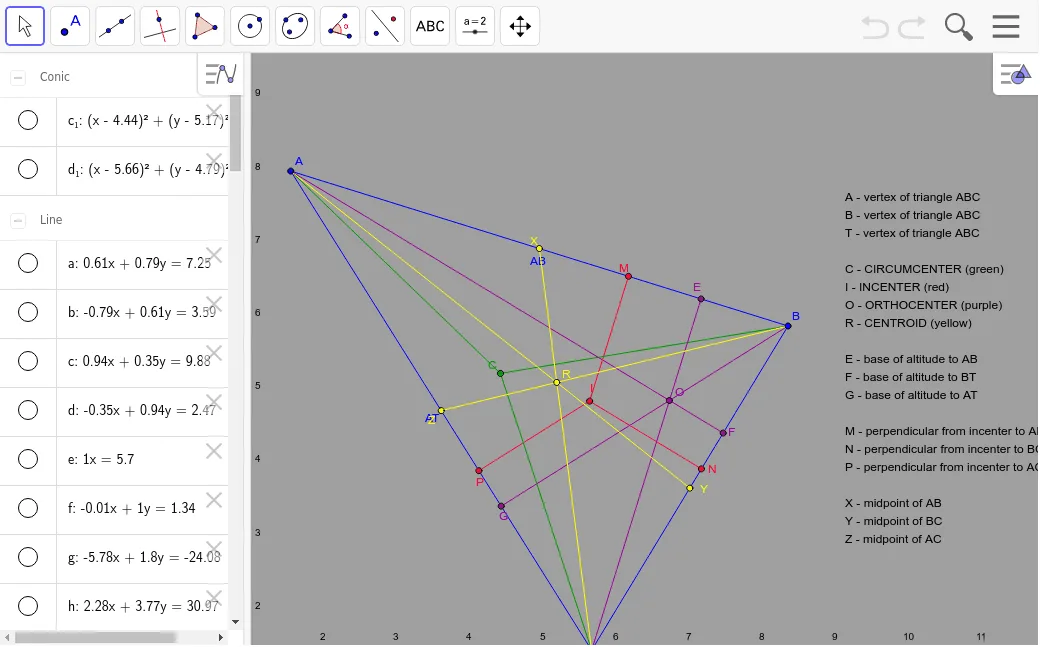
This example allows you to manipulate a triangle to discover the properties of its centroid, circumcenter, incenter, and orthocenter. Key mathematical concepts include triangle geometry, vectors, and geometric construction. Commands used include Segment, Midpoint, AngularBisector, Intersect, OrthogonalLine, Circle, etc. Suitable for middle school and above students or teachers.
GeoGebra Commands & Parameters
Segment(A, B) → ABSegment(B, T) → BTSegment(A, T) → ATMidpoint(AB) → XMidpoint(BT) → YMidpoint(AT) → ZAngularBisector(AT, AB) → a, bAngularBisector(AB, BT) → c, dAngularBisector(BT, AT) → e, fIntersect(a, d) → IOrthogonalLine(I, AB) → gOrthogonalLine(I, BT) → hOrthogonalLine(I, AT) → iIntersect(g, AB) → MIntersect(h, BT) → NIntersect(i, AT) → PSegment(I, M) → IMSegment(I, N) → INSegment(I, P) → IPOrthogonalLine(X, AB) → jOrthogonalLine(Z, AT) → kOrthogonalLine(Y, BT) → lIntersect(j, l) → CSegment(C, A) → CASegment(C, B) → CBSegment(C, T) → CTOrthogonalLine(T, AB) → mOrthogonalLine(B, AT) → nOrthogonalLine(A, BT) → pIntersect(p, n) → OIntersect(m, AB) → EIntersect(p, BT) → FIntersect(n, AT) → GSegment(T, E) → qSegment(A, F) → rSegment(B, G) → sSegment(T, X) → TXSegment(B, Z) → BZSegment(A, Y) → AYIntersect(BZ, AY) → RSegment(O, C) → tIntersect(TX, t) → DCircle(A, T, B) → c_1Circle(I, P) → d_1