
Exploring a Special Case of the Law of Sines
Loading the math board and drawing, please wait…
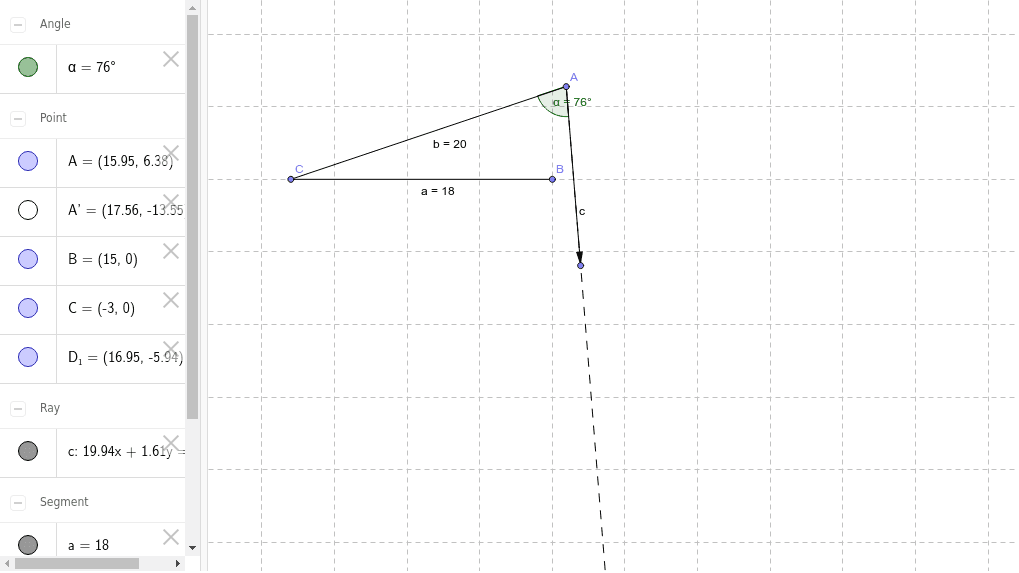
This example uses GeoGebra to dynamically demonstrate a special case of the Law of Sines. The core mathematical concepts involved are trigonometry, specifically the Law of Sines. By constructing points, segments, rotations, angles, rays, and vectors, students can visually understand the application of the Law of Sines. Suitable for high school mathematics education and learning.
GeoGebra Commands & Parameters
Point(xAxis) → CPoint(Circle[C, 18]) → BSegment(C, B) → aPoint(Circle[C, abs(20)]) → ASegment(C, A) → bRotate(C, 76*°, A) → A'Angle(C, A, A') → αRay(A, A') → cPoint(c) → D_1Vector(A, D_1) → u
AI Drawing Prompt Reference
Draw a triangle ABC with point C on the x-axis, point B on a circle centered at C with radius 18, and point A on a circle centered at C with radius 20. Rotate point C around point A to get point A', and construct angle α between points C, A, and A'. Draw a vector u starting from point A through point D1.
The prompt above was compiled from the original drawing commands and is for reference only.