
Explore the Relationship Between Volume and Surface Area of Spheres
Loading the math board and drawing, please wait…
In collections
Geometry - Area & Volume
Volumes and Surface Areas of Pyramids, Cones and Spheres
GCSE Higher Ch7 Area and Volume
Volumes and Surface Areas of Pyramids, Cones and Spheres
More about Volumes and Surface Areas
Spheres & Cross Sections
Surface Area and Volume
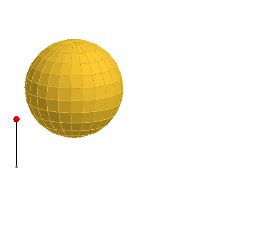
This example dynamically demonstrates the relationship between the volume and surface area of spheres. Key mathematical concepts include the formulas for the volume and surface area of a sphere. It utilizes commands such as Line, Sequence, Rotate, Segment, Point, If, Translate, Sphere, OrthogonalPlane, and Mirror in GeoGebra. Suitable for high school mathematics education, particularly in solid geometry and calculus courses.
GeoGebra Commands & Parameters
Line((0, 0, 1), (0, 1, 1)) → cSequence(Rotate[(0, 0, 0), ((-((i * 15))))°, c], i, 0, 6) → list1Rotate(list1, 15°, zAxis) → list1'Line(Element[list1, 2], Element[list1', 2]) → l1Line((0, 0, 0), l1) → l0Sequence(Polygon[Element[list1, i], Element[list1', i], Element[list1', i + 1], Element[list1, i + 1]], i, 1, 6) → list2Segment(A, A + (0, 0, 1)) → aPoint(a) → PIf(z(P) ≥ 0.5, 0, (2 * (0.5 - z(P)))) → tIf(z(P) ≥ 0.5, (2 * (1 - z(P))), 1) → sTranslate(list2, Vector[(s * Vector[(0, 0, 0), (1, 0, 0)])]) → list2'Translate(l0, Vector[(s * Vector[(0, 0, 0), (1, 0, 0)])]) → l0'Sphere((0, 0, 1), 1) → bSequence(Pyramid[Element[list2, i], (0, 0, 1)], i, 1, 6) → list3Translate(list3, Vector[(s * Vector[(0, 0, 0), (1, 0, 0)])]) → list3'Line(Element[list1, 3], Element[list1', 3]) → l2Line(Element[list1, 4], Element[list1', 4]) → l3Line(Element[list1, 5], Element[list1', 5]) → l4Line(Element[list1, 6], Element[list1', 6]) → l5Line(Element[list1, 7], Element[list1', 7]) → l6Rotate(Element[list3', 1], ((t * 7.5))°, l0') → dTranslate(l1, Vector[(s * Vector[(0, 0, 0), (1, 0, 0)])]) → l1'Translate(l2, Vector[(s * Vector[(0, 0, 0), (1, 0, 0)])]) → l2'Translate(l3, Vector[(s * Vector[(0, 0, 0), (1, 0, 0)])]) → l3'Translate(l4, Vector[(s * Vector[(0, 0, 0), (1, 0, 0)])]) → l4'Rotate(l1', (7.5° * t), l0') → l1''Rotate(Rotate[Element[list3', 2], ((t * 7.5))°, l0'], ((t * 15))°, l1'') → eRotate(Rotate[l2', ((t * 7.5))°, l0'], ((t * 15))°, l1'') → l2''Rotate(Rotate[Rotate[Element[list3', 3], ((t * 7.5))°, l0'], ((t * 15))°, l1''], ((t * 15))°, l2'') → fRotate(Rotate[Rotate[l3', ((t * 7.5))°, l0'], ((t * 15))°, l1''], ((t * 15))°, l2'') → l3''Rotate(Rotate[Rotate[Rotate[Element[list3', 4], ((t * 7.5))°, l0'], ((t * 15))°, l1''], ((t * 15))°, l2''], (15° * t), l3'') → gRotate(Rotate[Rotate[Rotate[l4', ((t * 7.5))°, l0'], ((t * 15))°, l1''], ((t * 15))°, l2''], ((t * 15))°, l3'') → l4''Rotate(Rotate[Rotate[Rotate[Rotate[Element[list3', 5], ((t * 7.5))°, l0'], ((t * 15))°, l1''], ((t * 15))°, l2''], (15° * t), l3''], (15° * t), l4'') → hTranslate(l5, Vector[(s * Vector[(0, 0, 0), (1, 0, 0)])]) → l5'Rotate(Rotate[Rotate[Rotate[Rotate[l5', ((t * 7.5))°, l0'], ((t * 15))°, l1''], ((t * 15))°, l2''], ((t * 15))°, l3''], (15° * t), l4'') → l5''Rotate(Element[list2', 1], ((t * 7.5))°, l0') → poly1Rotate(Rotate[Rotate[Rotate[Rotate[Rotate[Element[list3', 6], ((t * 7.5))°, l0'], ((t * 15))°, l1''], ((t * 15))°, l2''], (15° * t), l3''], (15° * t), l4''], (15° * t), l5'') → iRotate(Rotate[Element[list2', 2], ((t * 7.5))°, l0'], ((t * 15))°, l1'') → poly2Rotate(Rotate[Rotate[Element[list2', 3], ((t * 7.5))°, l0'], ((t * 15))°, l1''], ((t * 15))°, l2'') → poly3Rotate(Rotate[Rotate[Rotate[Element[list2', 4], ((t * 7.5))°, l0'], ((t * 15))°, l1''], ((t * 15))°, l2''], (15° * t), l3'') → poly4Rotate(Rotate[Rotate[Rotate[Rotate[Element[list2', 5], ((t * 7.5))°, l0'], ((t * 15))°, l1''], ((t * 15))°, l2''], (15° * t), l3''], (15° * t), l4'') → poly5Rotate(Rotate[Rotate[Rotate[Rotate[Rotate[Element[list2', 6], ((t * 7.5))°, l0'], ((t * 15))°, l1''], ((t * 15))°, l2''], (15° * t), l3''], (15° * t), l4''], (15° * t), l5'') → poly6OrthogonalPlane((0, 0, 1), zAxis) → mTranslate(l6, Vector[(s * Vector[(0, 0, 0), (1, 0, 0)])]) → l6'Rotate(Rotate[Rotate[Rotate[Rotate[Rotate[l6', ((t * 7.5))°, l0'], ((t * 15))°, l1''], ((t * 15))°, l2''], ((t * 15))°, l3''], (15° * t), l4''], (15° * t), l5'') → l6''Rotate(Rotate[Rotate[Rotate[Rotate[Rotate[Rotate[m, ((t * 7.5))°, l0'], ((t * 15))°, l1''], ((t * 15))°, l2''], (15° * t), l3''], (15° * t), l4''], (15° * t), l5''], (7.5° * t), l6'') → nMirror(i, n) → i'Mirror(h, n) → h'Mirror(g, n) → g'Mirror(f, n) → f'Mirror(e, n) → e'Mirror(d, n) → d'Mirror(poly6, n) → poly6'Mirror(poly5, n) → poly5'Mirror(poly4, n) → poly4'Mirror(poly3, n) → poly3'Mirror(poly2, n) → poly2'Mirror(poly1, n) → poly1'Sequence(Rotate[list3, 15° + ((15° * 22) * i), zAxis], i, 0, 1) → list4Mirror(list4, m) → list4'Sequence(Rotate[list2, (15° * i), zAxis], i, 1, 23) → list5Mirror(list5, m) → list5'
AI Drawing Prompt Reference
Draw a sphere and rotate a series of polygons around the sphere's central axis to form a 3D shape. First, draw a horizontal line, then rotate a series of polygons around this line to create a 3D structure. Next, rotate these polygons around the sphere's central axis to form a complex 3D shape. Finally, use mirroring to make the shape more symmetrical.
The prompt above was compiled from the original drawing commands and is for reference only.