
Explore the Isometric Planes
Loading the math board and drawing, please wait…
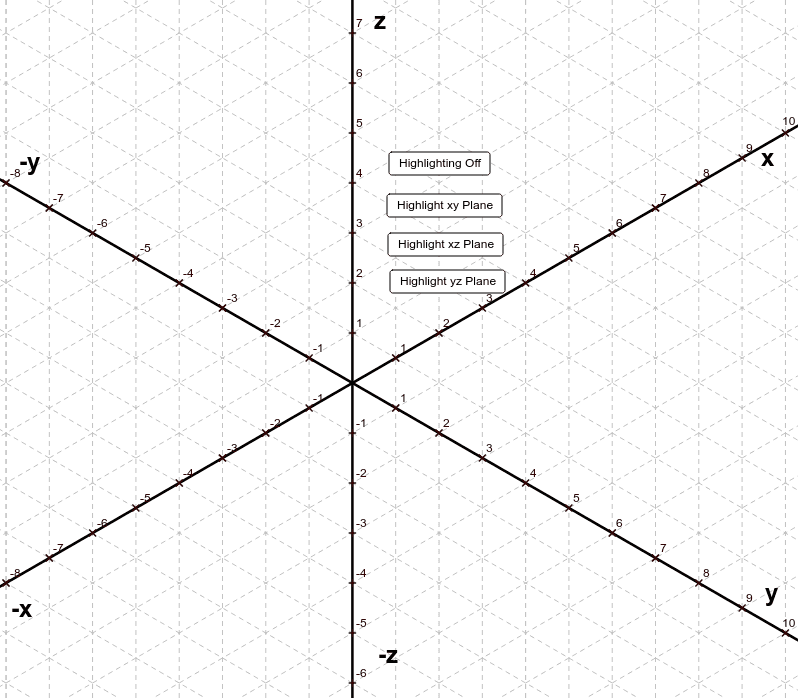
This example demonstrates observing the appearance of the xy, xz, and yz planes on a 3-d isometric grid. It involves core math concepts like planes, vectors, polygons, and solid geometry. Constructed using GeoGebra commands such as Line, Point, Intersect, and Polygon. Suitable for high school students learning solid geometry.
GeoGebra Commands & Parameters
Line(O, z_1) → aLine(O, x_1) → bLine(O, y_1) → cLine(z_1, b) → dLine(z_2, d) → eLine(z_3, e) → fLine(z_4, f) → gLine(z_5, g) → hLine(z_6, h) → iLine(y_{-7}, i) → jLine(y_{-8}, j) → kLine(y_{-9}, k) → lLine(y_{-10}, l) → mLine(y_{-11}, m) → nLine(y_{-12}, n) → pLine(y_{-13}, p) → qPoint(c) → ALine(A, q) → rLine(y_1, d) → sLine(y_2, s) → tLine(y_3, t) → a_1Line(y_4, a_1) → b_1Line(y_5, b_1) → c_1Line(y_6, c_1) → d_1Line(y_7, d_1) → e_1Line(y_8, e_1) → f_1Line(y_9, f_1) → g_1Line(y_{10}, g_1) → h_1Line(y_{11}, h_1) → i_1Line(y_{12}, i_1) → j_1Line(B, j_1) → k_1Line(C, k_1) → l_1Line(x_1, a) → m_1Line(x_2, m_1) → n_1Line(x_3, n_1) → p_1Line(x_4, p_1) → q_1Line(x_5, q_1) → r_1Line(x_6, r_1) → s_1Line(x_7, s_1) → t_1Line(x_8, t_1) → a_2Line(x_9, a_2) → b_2Line(x_{10}, b_2) → c_2Line(x_{11}, c_2) → d_2Line(x_{12}, d_2) → e_2Point(b) → DLine(D, e_2) → f_2Point(b) → ELine(E, f_2) → g_2Line(F, g_2) → h_2Line(G, h_2) → i_2Line(H, i_2) → j_2Line(x_{-1}, a) → k_2Line(x_{-2}, k_2) → l_2Line(x_{-3}, l_2) → m_2Line(x_{-4}, m_2) → n_2Line(x_{-5}, n_2) → p_2Line(x_{-6}, p_2) → q_2Line(x_{-7}, q_2) → r_2Line(x_{-8}, r_2) → s_2Line(x_{-9}, s_2) → t_2Line(x_{-10}, t_2) → a_3Line(x_{-11}, a_3) → b_3Line(x_{-12}, b_3) → c_3Line(I, c_3) → d_3Line(J, d_3) → e_3Line(K, e_3) → f_3Line(x_{-1}, c) → g_3Line(x_{-2}, g_3) → h_3Line(x_{-3}, h_3) → i_3Line(x_{-4}, i_3) → j_3Line(x_{-5}, j_3) → k_3Line(x_{-6}, k_3) → l_3Line(x_{-7}, l_3) → m_3Line(x_{-8}, m_3) → n_3Line(x_{-9}, n_3) → p_3Line(x_{-10}, p_3) → q_3Line(x_{-11}, q_3) → r_3Line(x_{-12}, r_3) → s_3Line(L, s_3) → t_3Line(x_1, c) → a_4Line(x_2, a_4) → b_4Line(x_3, b_4) → c_4Line(x_4, c_4) → d_4Line(x_5, d_4) → e_4Line(x_6, e_4) → f_4Line(x_7, f_4) → g_4Line(x_8, g_4) → h_4Line(x_9, h_4) → i_4Line(x_{10}, i_4) → j_4Line(x_{11}, j_4) → k_4Line(x_{12}, k_4) → l_4Intersect(b, f_2) → MLine(M, l_4) → m_4Intersect(b, g_2) → NLine(N, m_4) → n_4Line(P, n_4) → p_4Polygon(Q, R, S, T) → poly1, q_4, r_4, s_4, t_4
AI Drawing Prompt Reference
Draw three mutually perpendicular planes in a 3D isometric grid representing the xy, xz, and yz planes. Start by sketching the grid's base lines, then use these lines to construct the outlines of the three planes, each formed by multiple segments and vertices. Begin with the xy plane, then the xz plane, and finally the yz plane, ensuring the vertices of each plane intersect the grid lines correctly to maintain proper spatial orientation.
The prompt above was compiled from the original drawing commands and is for reference only.