
Explore Similar Pentagons
Loading the math board and drawing, please wait…
In collections
Geo&Alg:Area Volume Pythagorean Th.
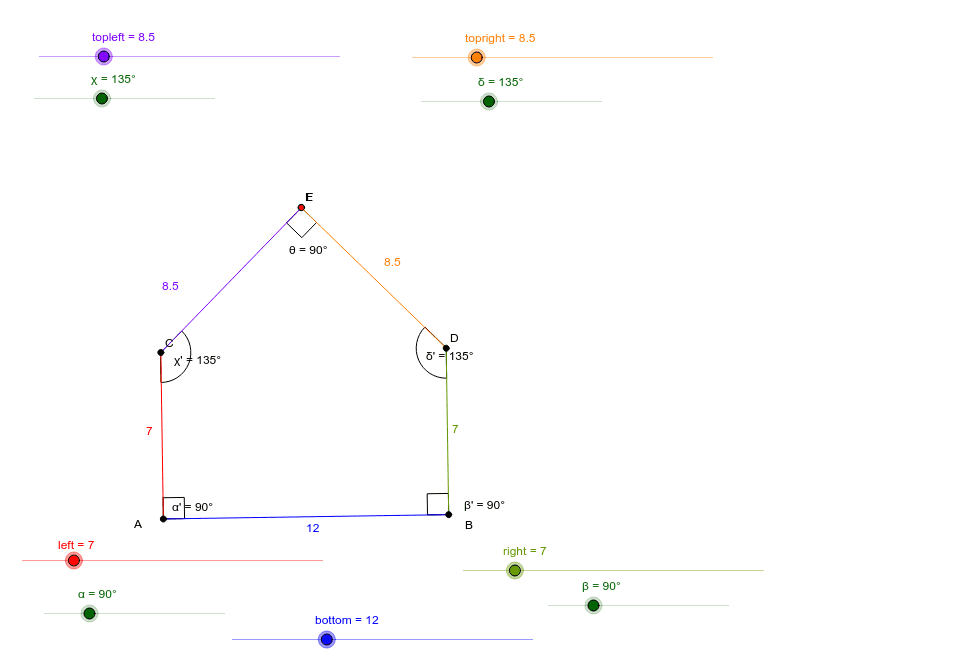
This example demonstrates the properties of similar pentagons. Key mathematical concepts include similar figures, angles, and rotation. Using GeoGebra commands such as Point, Segment, Circle, and Rotate, similar pentagons can be constructed. Suitable for middle school and above students to learn about the properties of similar figures and geometric construction.
GeoGebra Commands & Parameters
Point(Circle[A, bottom]) → BSegment(A, B) → fCircle(B, right) → cCircle(A, left) → dRotate(B, α, A) → B'Angle(B, A, B') → α'Rotate(A, -β, B) → A'Angle(A', B, A) → β'Ray(A, B') → aRay(B, A') → bIntersect(d, a) → C,Intersect(c, b) → D,Segment(C, A) → eSegment(D, B) → gRotate(A, χ, C) → A'_1Angle(A, C, A'_1) → χ'Rotate(B, -δ, D) → B'_1Angle(B'_1, D, B) → δ'Ray(C, A'_1) → hRay(D, B'_1) → iCircle(D, topright) → kIntersect(k, i) → E,Circle(C, topleft) → pIntersect(p, h) → F,Segment(C, F) → jSegment(D, E) → lIntersect(j, l) → GAngle(C, G, D) → θ
AI Drawing Prompt Reference
Draw two similar pentagons. Start by drawing a circle with center A, then take point B on the circle and connect AB. Next, draw a circle with center B and another with center A. Rotate B around A to get B', and calculate ∠BAB'. Then, rotate A around B counterclockwise to get A', and calculate ∠BA'A. Draw rays AB' and BA', which intersect the circles at C and D, respectively. Connect AC and BD. Next, rotate A around C to get A'_1, and calculate ∠CA'A'_1. Rotate B around D counterclockwise to get B'_1, and calculate ∠DB'B'_1. Draw rays CA'_1 and DB'_1, which intersect the circles at E and F, respectively. Connect CF and DE, which intersect at G. Calculate ∠CGD.
The prompt above was compiled from the original drawing commands and is for reference only.