
Explore Parallelogram
Loading the math board and drawing, please wait…
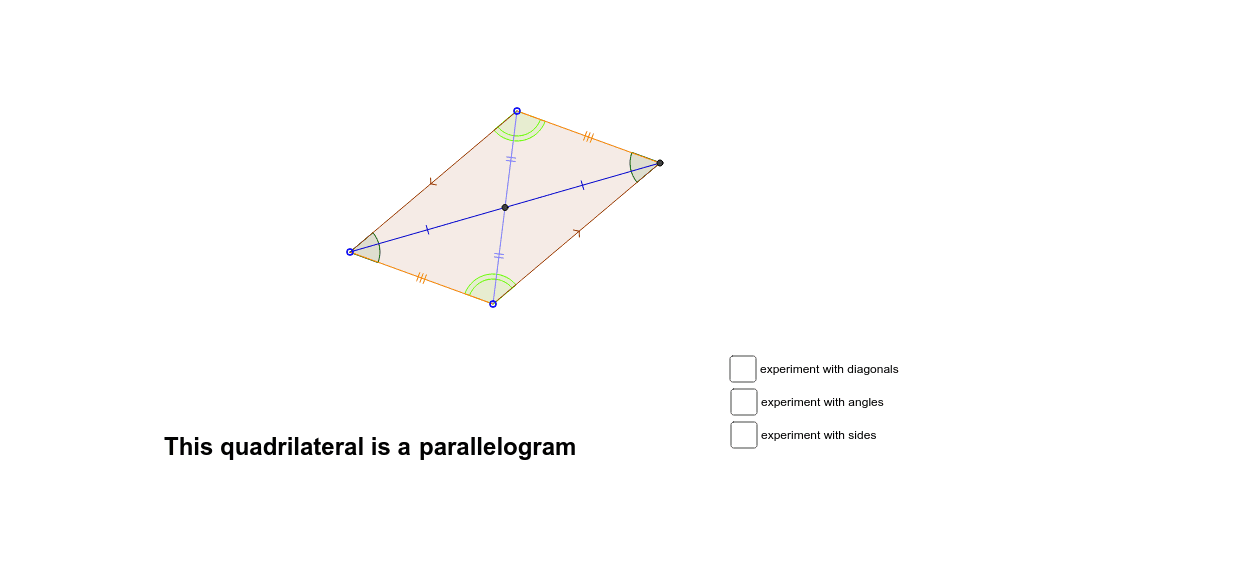
This example demonstrates the properties of a parallelogram and its variations, including rectangles, rhombuses, and squares. Using GeoGebra commands such as Line, Intersect, Polygon, etc., the construction process of a parallelogram is visually illustrated. Suitable for middle school and above students and teachers to understand geometric transformations and similar triangles.
GeoGebra Commands & Parameters
Line(A, B) → aLine(A, C) → bLine(C, a) → cLine(B, b) → dIntersect(c, d) → DOrthogonalLine(C, a) → eOrthogonalLine(D, a) → fPolygon(C, A, B, D) → poly1, c_1, a_1, b_1, d_1Segment(A, D) → gSegment(B, C) → hIntersect(g, h) → ECircle(E, C) → kCircle(E, D) → pOrthogonalLine(E, h) → iOrthogonalLine(E, g) → jSegment(A, E) → lSegment(E, D) → mSegment(E, B) → nSegment(E, C) → qSegment(A, E) → rSegment(E, D) → sAngle(C, D, B) → αAngle(D, B, A) → βAngle(B, A, C) → γAngle(A, C, D) → δCircle(A, ray) → tIntersect(t, b, 2) → FIntersect(t, a, 2) → GVector(A, F) → uTranslate(G, u) → G'Polygon(A, G, G', F) → poly2, a_2, g_1, g', f_1Vector(F, C) → vVector(G, B) → wTranslate(A, v) → A'Translate(G, v) → G'_1Translate(G', v) → G''Translate(F, v) → F'Polygon(A', G'_1, G'', F') → poly2', a', g'_1, g'', f'Translate(A, w) → A'_1Translate(G, w) → G'_2Translate(G', w) → G''_1Translate(F, w) → F'_1Polygon(A'_1, G'_2, G''_1, F'_1) → poly2'_1, a'_1, g'_2, g''_1, f'_1Translate(A', w) → A''Translate(G'_1, w) → HTranslate(G'', w) → G'''Translate(F', w) → F''Polygon(A'', H, G''', F'') → poly2'', a'', h_1, g''', f''Vector(G'_2, F') → u_1Translate(H, u_1) → H'Segment(C, A) → e_1Segment(B, D) → i_1OrthogonalLine(A, c_1) → l_1Circle(B, D) → q_1
AI Drawing Prompt Reference
Draw a parallelogram by connecting points A, B, C, and D. Then construct the intersection point E of the diagonals, draw circles centered at E, and create parallel lines and vectors. Finally, generate variations of rectangles, rhombuses, and squares through translations.
The prompt above was compiled from the original drawing commands and is for reference only.