
Explore Cubic Equations via Graph Intersections
Loading the math board and drawing, please wait…
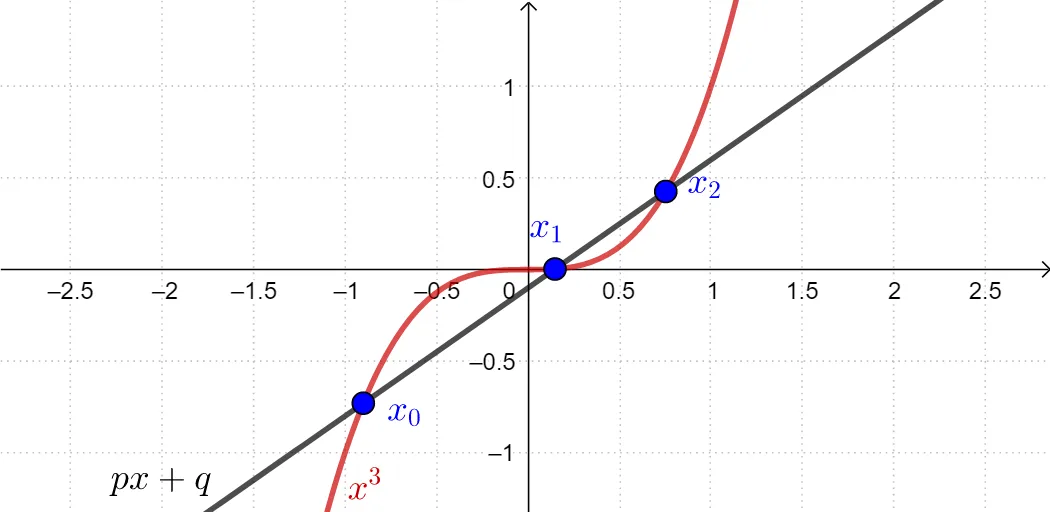
This example demonstrates how real solutions of a cubic equation can be found and interpreted through intersection points of graphs. It focuses on the connection between cubic functions’ shapes and the equation’s roots (zeros): when the graph of a cubic function meets a second curve/line, their intersection x-coordinates correspond to the solutions of the equation. The construction emphasizes core ideas of function analysis and graphical solution methods, including how translations or transformations shift intersection locations. In GeoGebra, the setup is realized using the Intersect command on relevant geometric/graph objects (p, q, f, g, and points A–F), where computed intersections serve as the graphical representation of the equation’s solutions. Suitable for middle school through early university contexts, for lessons on functions, graphing techniques, and solving equations visually.
GeoGebra Commands & Parameters
Intersect(g, f, -10, 10) → A, B, CIntersect(f, g) → D, E, F
AI Drawing Prompt Reference
In a single coordinate plane, draw a cubic function graph together with a second curve or a line that intersects it. Mark the intersection points where the two graphs meet, first restricting attention to the x-range roughly from −10 to 10, and then again finding the intersections without an explicit range limit. Keep and display all resulting intersection points clearly. The key idea is that the x-coordinates of these intersection points represent the real solutions (zeros) of the equation, illustrating how the cubic’s shape relates to the roots.
The prompt above was compiled from the original drawing commands and is for reference only.