
Explore Angles in a Trapezium
Loading the math board and drawing, please wait…
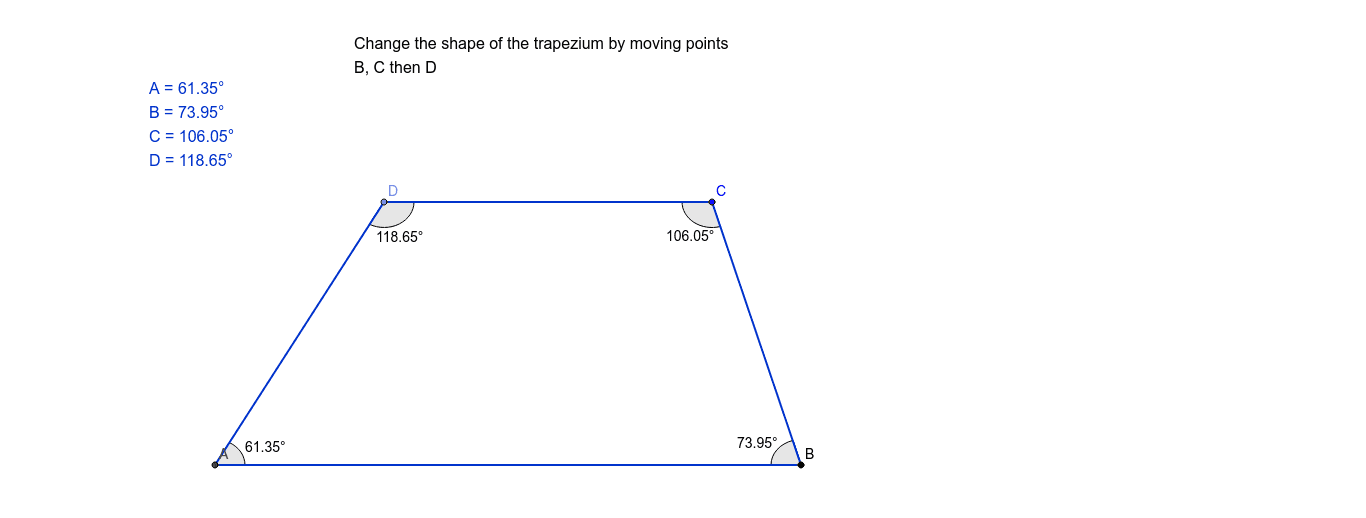
This example demonstrates how to observe the internal and external angle relationships in a trapezium using GeoGebra. Key math concepts include polygons, angle measurement, and geometric construction. It utilizes commands like Intersect, Point, Segment, Line, and Angle. Suitable for middle school and above students to understand trapezium angle properties and geometric drawing techniques.
GeoGebra Commands & Parameters
Intersect(xAxis, yAxis) → APoint(xAxis) → BSegment(A, B) → aLine(C, a) → bPoint(b) → DSegment(B, C) → cSegment(C, D) → dSegment(D, A) → eAngle(B, A, D) → αAngle(C, B, A) → βAngle(D, C, B) → γAngle(A, D, C) → δ
AI Drawing Prompt Reference
Draw a trapezium with its internal and external angles labeled. Start by drawing two parallel lines, then take a point on one line and connect it to the other line to form two non-parallel sides of the trapezium. Next, draw perpendicular lines from the point to the parallel lines to find the top vertices. Measure and label the four interior angles of the trapezium, as well as the four exterior angles formed with the perpendiculars, showing the complementary relationship between interior and adjacent exterior angles.
The prompt above was compiled from the original drawing commands and is for reference only.