
Basic Right Angled Triangle Trig Ratios
Loading the math board and drawing, please wait…
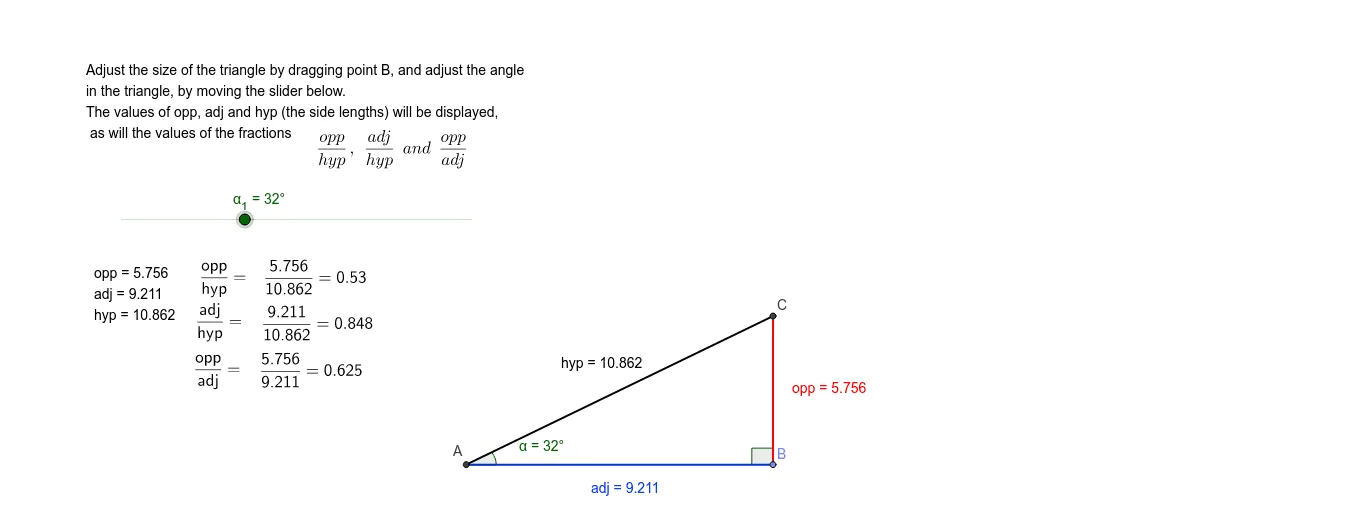
This GeoGebra example demonstrates the fundamental trigonometric ratios (sine, cosine, tangent) in a right-angled triangle through an interactive dynamic construction. It visually links the angles and side lengths, allowing users to explore how the ratios change with the triangle's shape. Core concepts include right triangle geometry, trigonometric definitions, and the Pythagorean theorem. The construction uses commands such as Intersect, Point, Segment, OrthogonalLine, Rotate, Angle, Ray, Distance, and Midpoint to build the triangle, label vertices, measure sides, and display text annotations for side lengths and ratio values. Suitable for middle school or high school students beginning trigonometry, as well as for classroom demonstrations to reinforce the relationship between angles and side ratios in right triangles.
GeoGebra Commands & Parameters
Intersect(xAxis, yAxis) → APoint(xAxis) → BSegment(A, B) → adjOrthogonalLine(B, adj) → bRotate(B, α_1, A) → B'Angle(B, A, B') → αRay(A, B') → hyp_1Intersect(hyp_1, b) → CSegment(B, C) → oppSegment(A, C) → hypDistance(A, B) → distanceABDistance(B, C) → distanceBCDistance(C, A) → distanceCAMidpoint(hyp) → DMidpoint(adj) → EMidpoint(opp) → FAngle(C, B, A) → β
AI Drawing Prompt Reference
Draw a right-angled triangle with one leg horizontal on the x-axis and the other leg vertical upward. From the left endpoint of the horizontal leg, draw a hypotenuse to the top of the vertical leg, forming the right angle at the lower right. Mark an acute angle at the right-angle vertex and display its sine, cosine, and tangent values. Label the lengths of all three sides, and place small dots at the midpoints of each side. Also label the other acute angle. The figure should clearly show the relationship between angles and side ratios.
The prompt above was compiled from the original drawing commands and is for reference only.