
Exploratory Pythagorean Discovery with Thin Slices
Loading the math board and drawing, please wait…
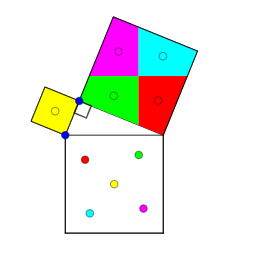
This GeoGebra example demonstrates a “thin slice” style exploratory approach to the Pythagorean theorem: by constructing and comparing geometric decompositions, students can visually uncover the relationship between the squared legs and the squared hypotenuse (a^2 + b^2 ≈ c^2) and track how ratios behave across multiple configurations. It centers on Pythagoras/Pythagorean theorem in a geometry setting, ratio analysis to study consistency or convergence trends, and an iteration mindset using sequences and series; it also connects to data reasoning through expected value and variance as a way to discuss variability in measured quantities. Construction highlights include using Intersect to locate key points, Point/Segment/Ray for the core geometric primitives, Polygon plus Semicircle/CircleArc/Circle to form curved-and-polygonal “slice” regions, and Mirror/Translate to generate symmetric or shifted configurations for comparison. It also uses Midpoint to establish reference points, OrthogonalLine to enforce perpendicular structure, Vector and Centroid for vector-based and center-of-mass style features, and Angle to label and control critical angle relationships. The example is suitable for middle/high school geometry exploration, proof-intuition building, and early undergraduate activity-based learning that blends geometry with a light probability-statistics perspective.
GeoGebra Commands & Parameters
Intersect(xAxis, yAxis) → APoint(xAxis) → BRay(A, B) → aPoint(a) → CMirror(C, A) → C'Semicircle(C, C') → cIntersect(c, yAxis) → D,CircleArc(A, D, C) → dPoint(d) → ESegment(C, E) → bSegment(E, C') → eSegment(C', C) → fPolygon(C', C, 4) → poly1, g, h, i, j, F, GPolygon(C, E, 4) → poly2, k, l, m, n, H, IPolygon(E, C', 4) → poly3, p, q, r, s, J, KMidpoint(E, J) → LOrthogonalLine(L, i) → tOrthogonalLine(L, t) → a_1Intersect(a_1, s) → MIntersect(t, r) → NIntersect(a_1, q) → OIntersect(t, e) → PPolygon(M, L, N, K) → poly4, m_1, l_1, n_1, k_1Polygon(L, N, J, O) → poly5, l_2, n_2, j_1, oPolygon(L, P, C', O) → poly6, l_3, p_1, c', o_1Polygon(P, L, M, E) → poly7, p_2, l_4, m_2, e_1Vector(L, C) → uVector(L, F) → vVector(L, C') → wVector(L, G) → u_1Centroid(poly4) → QCentroid(poly5) → RCentroid(poly6) → SCentroid(poly7) → TTranslate(T, w) → T'Translate(S, u) → S'Translate(R, v) → R'Translate(Q, u_1) → Q'Segment(Q, Q') → b_1Segment(R, R') → c_1Segment(S, S') → d_1Segment(T, T') → f_1Point(b_1) → UPoint(c_1) → VPoint(d_1) → WPoint(f_1) → ZVector(Q, U) → v_1Vector(R, V) → w_1Vector(S, W) → g_1Vector(T, Z) → h_1Translate(L, w_1) → L'Translate(N, w_1) → N'Translate(J, w_1) → J'Translate(O, w_1) → O'Polygon(L', N', J', O') → poly5', l', n', j', o'Translate(M, v_1) → M'Translate(L, v_1) → L'_1Translate(N, v_1) → N'_1Translate(K, v_1) → K'Polygon(M', L'_1, N'_1, K') → poly4', m', l'_1, n'_1, k'Translate(L, g_1) → L'_2Translate(P, g_1) → P'Translate(C', g_1) → C''Translate(O, g_1) → O'_1Polygon(L'_2, P', C'', O'_1) → poly6', l'_2, p', c'', o'_1Translate(P, h_1) → P'_1Translate(L, h_1) → L'_3Translate(M, h_1) → M'_1Translate(E, h_1) → E'Polygon(P'_1, L'_3, M'_1, E') → poly7', p'_1, l'_3, m'_1, e'Midpoint(H, C) → A_1Midpoint(C, G) → B_1Segment(A_1, B_1) → i_1Point(i_1) → C_1Vector(A_1, C_1) → q_1Translate(poly2, q_1) → poly2'Angle(C, E, C') → α
AI Drawing Prompt Reference
Draw a right triangle with its legs and hypotenuse, then use semicircles and polygons to decompose the areas. Compare the areas of the decomposed parts to visually demonstrate the Pythagorean theorem. Rotate and translate the shapes to see how they form new configurations and analyze the changes in area and ratios.
The prompt above was compiled from the original drawing commands and is for reference only.