
Exploration: Sine vs Cosine in a Right Triangle
Loading the math board and drawing, please wait…
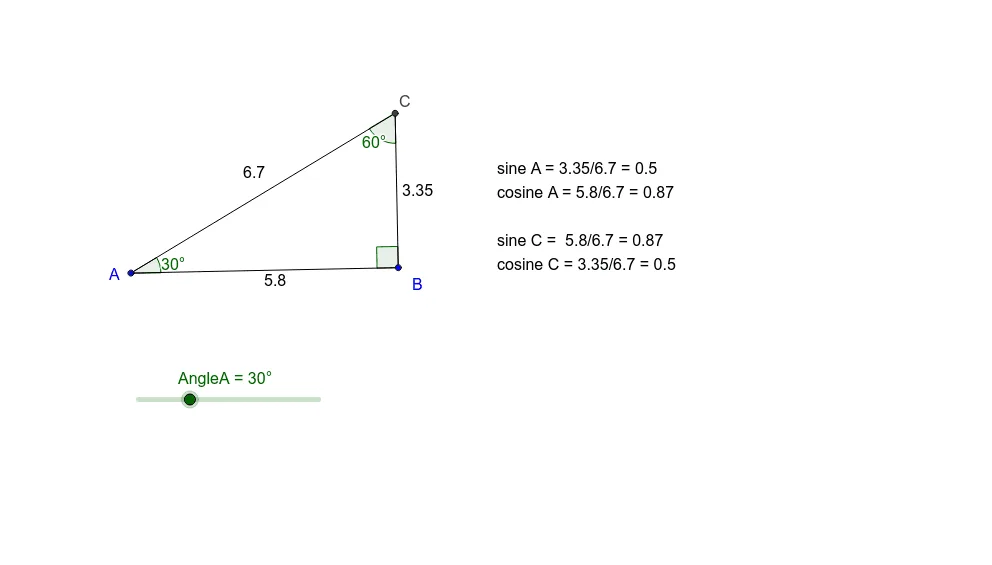
① This applet dynamically demonstrates the relationship between sine and cosine in a right triangle, showing how their values change with the acute angle. ② Core concepts include right-triangle trigonometry, the ratio definitions of sine and cosine, and the complementary angle identity. ③ Construction uses GeoGebra commands: Rotate to create rays, Angle to label α, β, γ, Ray and Intersect to form triangle vertices, Segment for sides, and text objects to display computed ratios; dragging vertices or sliders updates values in real time. ④ Suitable for middle-to-high school students first learning trigonometric functions, or for teachers to illustrate the geometric origin of sine and cosine.
GeoGebra Commands & Parameters
Rotate(A, -90°, B) → A'Angle(A', B, A) → αRotate(B, AngleA, A) → B'Angle(B, A, B') → βRay(B, A') → aRay(A, B') → bIntersect(a, b) → CSegment(C, B) → cSegment(C, A) → dSegment(A, B) → eAngle(A, C, B) → γ
AI Drawing Prompt Reference
Draw a right triangle ABC with A as the right angle, B as the acute angle, and C as the vertex. Use the rotate command to create B' and A' such that B' is to the left of A' and A' is below B. Label angles α, β, and γ, where α is ∠BAC, β is ∠ABC, and γ is ∠ACB. Draw rays AB and AC, intersecting at point C. Connect C to B and A to form the sides of the triangle. Drag points or sliders to change the angles and observe the changes in sine and cosine values.
The prompt above was compiled from the original drawing commands and is for reference only.