
Expanding a Single Bracket: A Visual Algebraic-Geometric Demo
Loading the math board and drawing, please wait…
In collections
Concrete-Pictorial-Abstract and the Teaching for Mastery
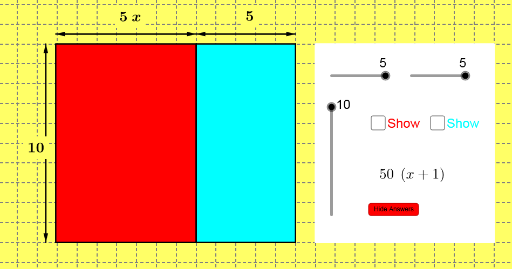
This GeoGebra example dynamically illustrates the algebraic operation of expanding a single bracket, revealing the geometric meaning of the distributive law through visual area or length relationships. Core mathematical concepts include polynomial multiplication, the distributive property, factorization and expansion, and the correspondence between algebraic expressions and geometric shapes such as rectangles and triangles. Construction highlights: using the Polygon command to create multiple polygons (poly1 to poly4), Midpoint to generate midpoints, Vector to create vectors, and Simplify and Factor commands to reduce and factor expressions, thereby intuitively showing the geometric composition of terms before and after expansion. Suitable for middle and high school students, this example helps learners understand the geometric interpretation of algebraic identities, and serves as a valuable resource for classroom demonstrations or independent student exploration, bridging algebra and geometry.
GeoGebra Commands & Parameters
Polygon(F, I, E, H) → poly1, f, i, e, hPolygon(I, D, A, E) → poly2, i_1, d_1, a_1, e_1Polygon(H, E, B, C) → poly3, h_1, e_2, b_1, c_1Polygon(E, A, G, B) → poly4, e_3, a_2, g, b_2Midpoint(F, E) → JMidpoint(D, E) → KMidpoint(E, G) → LMidpoint(H, B) → MVector(P, O) → uVector(O, P) → vVector(O, N) → wVector(N, O) → zVector(Q, R) → jVector(R, Q) → kVector(R, S) → lVector(S, R) → mMidpoint(P, O) → TMidpoint(O, N) → UMidpoint(Q, R) → VMidpoint(R, S) → WPolygon(Z, A_1, B_1, C_1) → poly5, z_1, a_3, b_3, c_2Simplify(A1) → A2Factor(A2) → A3Simplify(A5) → A6Simplify(A8) → A9