
Exercise 10.2: Angle-Driven Circle/Line Constructions with Function Geometry
Loading the math board and drawing, please wait…
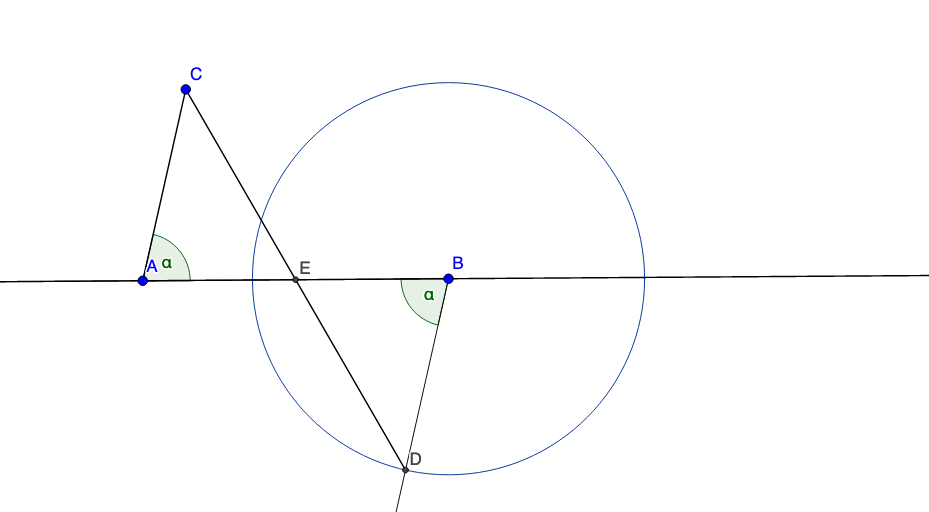
This example demonstrates how to build a dynamic GeoGebra figure where an angle mover (counterclockwise) drives a configuration of lines, segments, circles, and their intersection points. The resulting geometry is used to explore and visually verify relationships that connect geometric measurements with function-based ideas (e.g., themes such as logarithms, sine, and parabolic behavior, plus geometric interpretation related to volume). Key concepts include dynamic geometry, angle constraints and motion, constructing intersection points between lines and circles, and linking constructed geometric quantities to functional behavior. Construction highlights from the provided summary: it uses Line and Segment to create lines/segments; Angle and AngleMoverCCW to define a movable angle; Point to place defining/measuring points; Circle to draw circles; and Intersect to compute intersection points that determine dependent objects (A, B, C, D, E, F, along with angle variables like α and β and intermediate constructed objects such as i, i_2, h, c). The dynamic dragging makes the figure suitable for reasoning and checking conjectures. Appropriate for secondary school enrichment through introductory university courses in geometric construction, function visualization, and exploratory learning.
GeoGebra Commands & Parameters
Line(A, B) → fSegment(A, C) → gAngle(B, A, C) → αAngleMoverCCW(C, A, B, B, A) → i, i_2Point(i) → FAngle(A, B, F) → βCircle(B, Segment[A, C]) → cIntersect(c, i) → D,Segment(C, D) → hIntersect(h, f) → E
AI Drawing Prompt Reference
Construct a dynamic geometric figure: place two fixed points and one movable point, connect two points with a segment, and form an adjustable angle using another segment. Add a counterclockwise angle mover that rotates along an arc, and pick a point on one side of this angle. Draw a circle centered at one fixed point with radius equal to a given segment length, then intersect this circle with the angle mover's line to obtain a point. Connect this intersection point to the other fixed point, forming a new segment, and intersect that segment with the initial line to get a final point. As the angle changes, the intersection points shift, illustrating relationships between geometry and functions.
The prompt above was compiled from the original drawing commands and is for reference only.