
Example 2a: Functional Variations
Loading the math board and drawing, please wait…
In collections
Realidades de GeoGebra
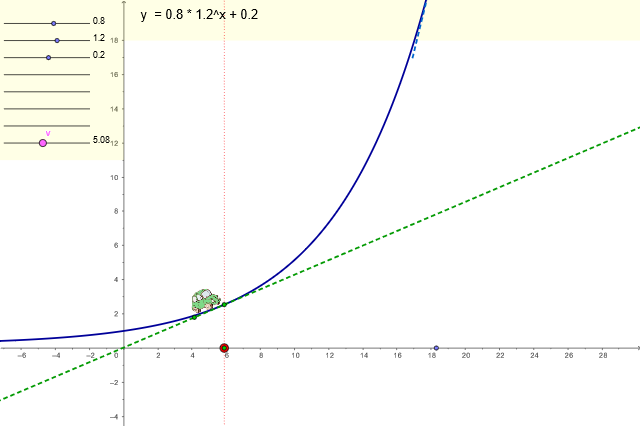
This example demonstrates the dynamic changes in functions. Key concepts include functions, derivatives, tangents, and equations. Using GeoGebra commands such as Ray, Segment, Point, and Tangent, dynamic observations of function graphs can be made. Suitable for high school mathematics education and learning.
GeoGebra Commands & Parameters
Ray(A, B) → aSegment(S3_1, S3_2) → s_3Point(s_3) → C1_3Segment(S2_1, S2_2) → s_2Point(s_2) → C1_2Segment(S1_1, S1_2) → s_1Point(s_1) → C1_1Tangent(Azul_1, f) → gSegment(S4_1, S4_2) → s_4Point(s_4) → C5_4Point(s_3) → C5_3Point(s_2) → C5_2Point(s_1) → C5_1Point(s_4) → C4_4Point(s_2) → C4_2Point(s_3) → C4_3Point(s_1) → C4_1Segment(S7_1, S7_2) → s_7Point(s_7) → C3_7Segment(S6_1, S6_2) → s_6Point(s_6) → C3_6Segment(S5_1, S5_2) → s_5Point(s_5) → C3_5Point(s_4) → C3_4Point(s_3) → C3_3Point(s_2) → C3_2Point(s_1) → C3_1Point(s_3) → C2_3Point(s_2) → C2_2Point(s_1) → C2_1Point(a) → RojoOrthogonalLine(Rojo, xAxis) → tTangent((xj, f(xj)), f) → e_1Slope(e_1) → hIf(abs(h) ≥ 0, 1 / sqrt(1 + (h * h)), 1) → m3Slope(g) → h2If(abs(h2) ≥ 0, 1 / sqrt(1 + (h2 * h2)), 1) → m2OrthogonalLine(Azul_1, g) → dIf(xc > xj, (tiempo2, e_2(tiempo2))) → Verde_1OrthogonalLine(Verde_1, e_1) → l_1OrthogonalLine(Rojo, xAxis) → i_1If(elegida ≟ 2, R1, R1 + (-100, 0)) → R2_1If(elegida ≟ 2, R2, R2 + (-100, 0)) → R2_2If(elegida ≟ 2, R3, R3 + (-100, 0)) → R2_3If(elegida ≟ 1, R1, R1 + (-100, 0)) → R1_1If(elegida ≟ 1, R2, R2 + (-100, 0)) → R1_2If(elegida ≟ 1, R3, R3 + (-100, 0)) → R1_3If(elegida ≟ 3, R1, R1 + (-100, 0)) → R3_1If(elegida ≟ 3, R2, R2 + (-100, 0)) → R3_2If(elegida ≟ 3, R3, R3 + (-100, 0)) → R3_3If(elegida ≟ 3, R4, R4 + (-100, 0)) → R3_4If(elegida ≟ 3, R5, R5 + (-100, 0)) → R3_5If(elegida ≟ 3, R6, R6 + (-100, 0)) → R3_6If(elegida ≟ 3, R7, R7 + (-100, 0)) → R3_7If(elegida ≟ 4, R1, R1 + (-100, 0)) → R4_1If(elegida ≟ 4, R2, R2 + (-100, 0)) → R4_2If(elegida ≟ 4, R3, R3 + (-100, 0)) → R4_3If(elegida ≟ 4, R4, R4 + (-100, 0)) → R4_4If(elegida ≟ 5, R1, R1 + (-100, 0)) → R5_1If(elegida ≟ 5, R2, R2 + (-100, 0)) → R5_2If(elegida ≟ 5, R3, R3 + (-100, 0)) → R5_3If(elegida ≟ 5, R4, R4 + (-100, 0)) → R5_4Polygon(PL_1, PL_2, PL_3, PL_4) → PL, pl_1, pl_2, pl_3, pl_4Polygon(PO_1, PO_2, PO_3, PO_4) → PO, po_1, po_2, po_3, po_4Segment(S8_1, S8_2) → s_8Point(s_8) → vSegment(Azul_4, Azul_3) → v_g
AI Drawing Prompt Reference
In the same coordinate plane, start with a given function curve f. Choose a tangent line g to the graph and mark one or more tangent points on the curve; at each selected point, construct the corresponding tangent line and consider the local slope. For each tangent slope, draw perpendicular/orthogonal lines relative to the coordinate x-axis and relative to the tangent direction, using their intersections to define several auxiliary points. Connect some of these auxiliary points with line segments and keep also a few rays emanating from given reference points. The final figure should clearly show multiple tangent constructions tied to f, together with the resulting slope and orthogonality relationships, highlighting functional variation.
The prompt above was compiled from the original drawing commands and is for reference only.