
Example 2: Geometric Transformation Demo – Polygon Reflection
Loading the math board and drawing, please wait…
In collections
CCSS IP Math I Unit 5 Lesson 5
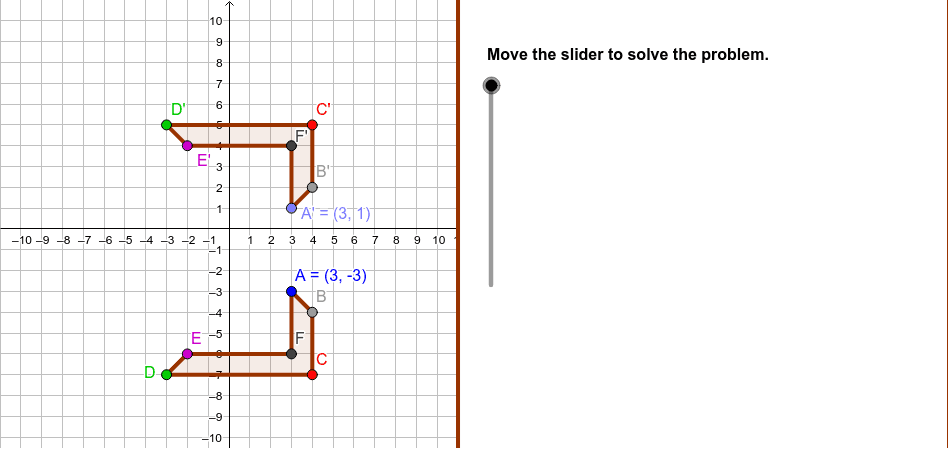
This example shows a polygon (e.g., a kite) reflected across a line, illustrating the transformation step by step. Key concepts include geometric transformations (reflection), congruence, symmetry axis, and coordinate changes of polygon vertices. Construction uses Polygon to create the original figure, Point for vertices, LineBisector and Mirror/ReflectLine for the reflection, Midpoint, Segment, and PolyLine for auxiliary elements, and SliderDirections with step objects to animate the process. It is suitable for middle‑ and high‑school geometry lessons, transformation geometry modules, and GeoGebra construction practice.
GeoGebra Commands & Parameters
Polygon((11, y(Corner[1])), Corner[2], Corner[3], (11, y(Corner[4]))) → Mask, mask4, mask3, mask2, mask1Polygon(A, B, C, D, E, F) → poly1, poly1AB, poly1BC, poly1CD, poly1DE, poly1EF, poly1AFPoint(PerpLine) → A'LineBisector(A, A') → ReflectLineMirror(A, ReflectLine) → A'_1Mirror(B, ReflectLine) → B'Mirror(C, ReflectLine) → C'Mirror(D, ReflectLine) → D'Mirror(E, ReflectLine) → E'Mirror(F, ReflectLine) → F'Polygon(A'_1, B', C', D', E', F') → poly1', poly1'AB, poly1'BC, ploy1'CD, poly1'DE, poly1'EF, poly1'AFMidpoint(A, A') → A''Midpoint(B, B') → B''Midpoint(E, E') → E''Midpoint(D', D) → D''PolyLine(B, C, D) → ploy1edgePolyLine(B', C', D') → poly1'edgeSegment(A, A'') → AA''Segment(A'', A') → A'A''Segment(B, B'') → BB''Segment(B'', B') → B'B''Segment(E, E'') → EE''Segment(E'', E') → E'E''Segment(D'', D) → DD''Segment(D'', D') → D'D''
AI Drawing Prompt Reference
Draw a kite-shaped hexagon and reflect it across a line of symmetry to create its mirror image. Start with the original hexagon, then define a symmetry axis. Reflect each vertex of the hexagon across this axis and connect the reflected points to form the mirrored hexagon. Also draw auxiliary segments connecting each original vertex to its reflected counterpart, marking their midpoints, and use dashed or thin lines to connect some adjacent midpoints to show the symmetric relationship. The overall composition shows the original and reflected shapes perfectly aligned across the axis, illustrating reflection and congruence in geometric transformations.
The prompt above was compiled from the original drawing commands and is for reference only.