
Estimating Surface Area
Loading the math board and drawing, please wait…
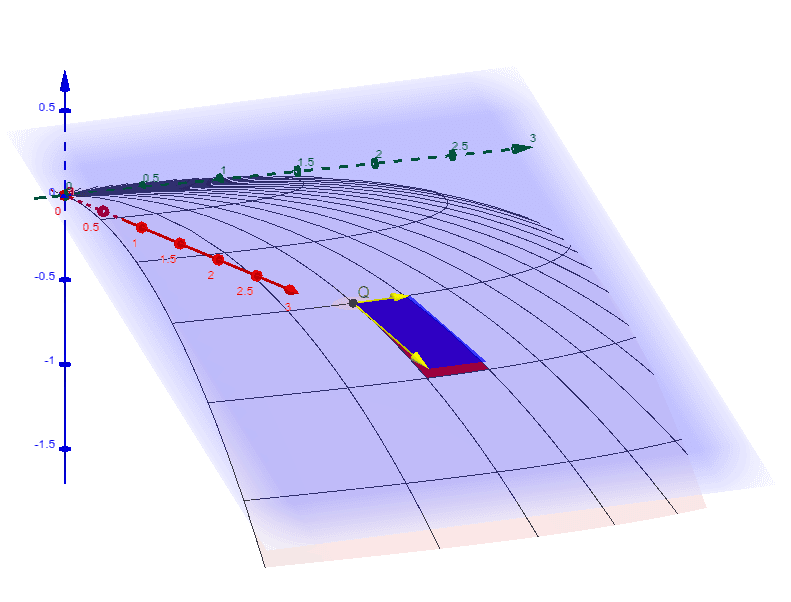
This example demonstrates how to estimate the area of a surface using geometric methods. Key math concepts involved include area, surface, tangent line, geometric mean, probability, and mode. Construction highlights the use of GeoGebra commands and objects like Surface, Vector, OrthogonalPlane, Point, and Polygon. Suitable for high school and above students to learn and understand surface area estimation in solid geometry and calculus.
GeoGebra Commands & Parameters
Surface(s, t, ((-s^(2))) / 4 - t^(3) / 64, s, -3, 3, t, -2.5, 0) → bSurface(s, t, ((-s^(2))) / 4 - t^(3) / 64, s, x_0, x_0 + 3 / 13, t, y_0 + 15 / 12, y_0 + 20 / 12) → b_1Surface(((2 * s) * cos(t)), (((8 * s) * sin(t)))^(2 / 3), (-s^(2)), s, 0, 1.4, t, 0, π) → aSurface(((2 * s) * cos(t)), (((8 * s) * sin(t)))^(2 / 3), (-s^(2)), s, s_0, s_0 + 1.4 / 6, t, t_0, t_0 + π / 27) → a_1Vector(Q, Q + (1.4 / 6 * ((2 * cos(t_0)), (16 * sin(t_0) / ((3 * (((8 * s_0) * sin(t_0)))^(1 / 3)))), (-2 * s_0)))) → a_sVector(Q, Q + (π / 27 * (((-2 * s_0) * sin(t_0)), ((((2 / 3 * (((8 * s_0) * sin(t_0)))^(-1 / 3)) * 8) * s_0) * cos(t_0)), 0))) → a_tOrthogonalPlane(Q, Vector[a_s ⊗ a_t]) → cPoint(Q, a_s) → APoint(Q, a_t) → BPoint(Q, Vector[a_s + a_t]) → CPolygon(Q, A, C, B) → poly1, q, a_2, c_1, b_2
AI Drawing Prompt Reference
Draw a 3D surface to demonstrate how to estimate its surface area using geometric methods. The surface has two highlighted regions, one defined by a vector with a starting and ending point, and another using an orthogonal plane and a triangle. First, sketch the main surface, then add the vector, orthogonal plane, and triangle to the highlighted areas, and finally connect key points with lines to form geometric shapes.
The prompt above was compiled from the original drawing commands and is for reference only.