
Estimating Squares: Hot and Cold Activity
Loading the math board and drawing, please wait…
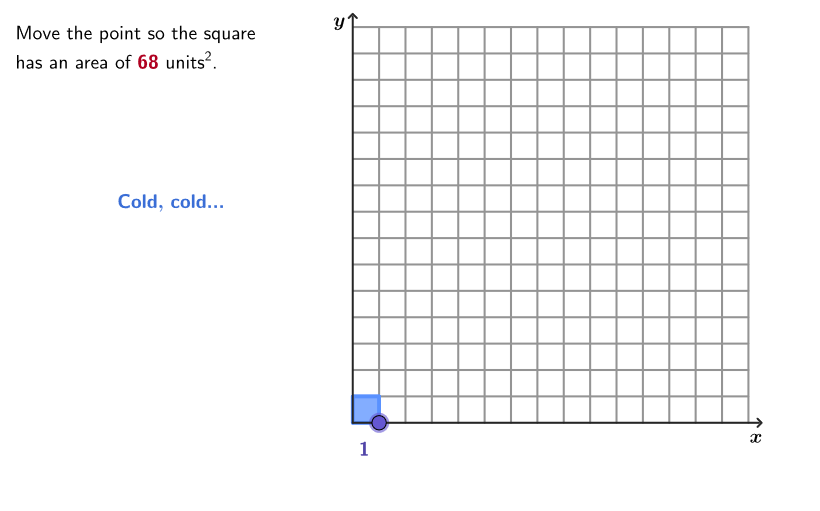
This GeoGebra activity demonstrates how to estimate the square root of a number using a square area model as a visual tool. Students determine whether a given side length is reasonable for creating a square with an approximate target area. Core mathematical concepts include square roots, consecutive integer approximation, and the connection between algebra and geometry. Construction highlights: Polygon command creates square models, Point and Segment commands mark side lengths, Sequence command generates consecutive integer sequences for comparison, and Vector command assists with length representation. The interactive design includes a random question generator (Shuffle command) and button triggers (btnNew). Suitable for grades 6-8 students to master square root estimation skills and understand how a radicand lies between two consecutive perfect squares, developing number sense and geometric intuition.
GeoGebra Commands & Parameters
Shuffle(unMixedAreas) → allAreas, {162, 104, 23, 21, 46, 158, 155, 186, 20, 3, 189, 88, 5, 183, 160, 13, 181, 132, 30, 68, 29, 151, 129, 32, 22, 60, 135, 87, 152, 76, 185, 153, 111, 115, 42, 69, 93, 75, 33, 127, 77, 59, 27, 136, 110, 43, 106, 86, 126, 54, 187, 150, 116, 95, 96, 89, 55, 70, 40, 139, 58, 92, 131, 94, 56, 107, 12, 73, 130, 108, 190, 90, 11, 31, 182, 7, 177, 156, 154, 39, 163, 138, 53, 109, 112, 137, 14, 85, 176, 114, 134, 6, 72, 180, 128, 28, 175, 113, 45, 184, 159, 179, 133, 178, 71, 188, 91, 44, 157, 149, 74, 52, 105, 41, 19, 57, 161, 18}Polygon(P1, P1', P1'', P1''') → peep, p1, p1', p1'', p1'''SelectedIndex(ddMenu) → isSequence((k, 0), k, 0.1, 15, 0.01) → xGridPoint(xGrid) → PPolygon(O, P, 4) → squ, f, g, h, i, D, EElement(allAreas, Mod[arCount, Length[allAreas]] + 1) → givenArVector((0, 15), (0, 16)) → vecYaxVector((15, 0), (16, 0)) → vecXaxSegment((0, 0), (0, 15.5)) → fakeYSegment((0, 0), (15.5, 0)) → fakeXZip({Segment[(k, 0), (k, 15)], Segment[(0, k), (15, k)]}, k, 1…15) → squareGridSegmcirclePixels(P, 7 + (7 * pulsing), Corner[1], Corner[3], Corner[5]) → pulsingObject
AI Drawing Prompt Reference
Draw a square with side lengths from 0 to 15, including a grid and coordinate axes. Randomly select an area, represent it with a square, and determine if the side length is reasonable. Generate a grid from 16 to 17, mark the vertices with points, and connect them to form a square. Randomly choose an area within the square, represent it with a square, and adjust its size to match the target area.
The prompt above was compiled from the original drawing commands and is for reference only.