
Estimating Products of 2-digit Numbers
Loading the math board and drawing, please wait…
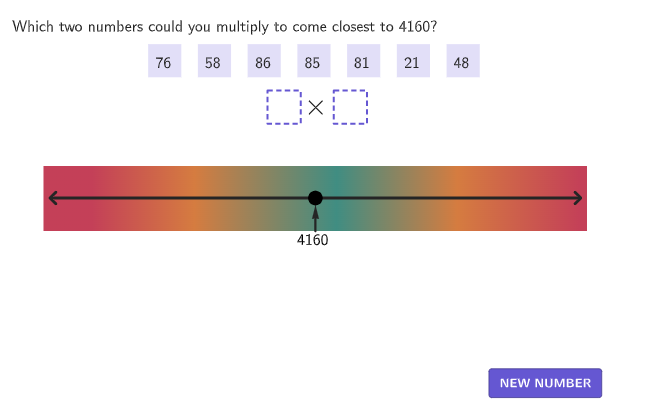
This GeoGebra example demonstrates how to find pairs of two-digit numbers whose product is closest to a target value. The key math concepts involve estimation and optimization. Construction uses commands like Sequence, Shuffle, Min, Max, and distanceProducts to visualize the process. Suitable for grades 4-5 to help students grasp estimation strategies and geometric intuition.
GeoGebra Commands & Parameters
Sequence((allSelections(A, 1) * allSelections(A, 2)), A, 1, Length[allSelections]) → allSelectedProducts, {}Shuffle(Remove[Sequence[2, 99], {10, 20, 30, 40, 50, 60, 70, 80, 90}]) → possibleNumbers, {99, 69, 56, 88, 93, 91, 2, 4, 24, 82, 31, 5, 61, 53, 76, 58, 86, 85, 81, 21, 48, 94, 23, 75, 95, 16, 51, 66, 32, 59, 6, 72, 39, 18, 98, 52, 11, 77, 3, 67, 37, 8, 14, 84, 25, 45, 83, 54, 22, 28, 9, 36, 15, 13, 68, 62, 96, 17, 7, 63, 35, 46, 43, 64, 71, 55, 42, 78, 73, 49, 92, 33, 57, 44, 47, 34, 38, 41, 26, 87, 27, 65, 19, 74, 12, 97, 89, 79, 29}Sequence(Element[possibleNumbers, Mod[randomIndex + A, Length[possibleNumbers]] + 1], A, 1, 7) → currentNumbersRemoveUndefined(Flatten[Sequence[Sequence[If[i < j, (allNums(i) * allNums(j))], i, 1, 7], j, 1, 7]]) → possibleProductsMin(possibleProducts) → productLowestMax(possibleProducts) → productHighestMax(expectedProduct - productLowest, productHighest - expectedProduct) → displayRangeZip(If[abs((expectedProduct - A) / displayRange) > 0.75, 1, If[abs((expectedProduct - A) / displayRange) > 0.35, 2, 3]], A, allSelectedProducts) → colorIndexZip(abs(expectedProduct - A), A, possibleProducts) → distanceProductsElement(possibleProducts, IndexOf[Min[distanceProducts], distanceProducts]) → closestProductShuffle(Sequence[1, 7]) → randomIndex2, {6, 1, 3, 4, 2, 7, 5}Element(randomIndex2, Mod[countQuestion, Length[randomIndex2]] + 1) → index2TmpShuffle(Sequence[1, 7]) → randomIndex1, {5, 3, 4, 7, 1, 6, 2}Element(randomIndex1, Mod[countQuestion, Length[randomIndex1]] + 1) → index1If(index1 ≟ index2Tmp, Mod[index1 + 1, Length[randomIndex2]] + 1, index2Tmp) → index2Zip(If[abs((expectedProduct - A) / displayRange) > 0.75, colorSpectrum(1), If[abs((expectedProduct - A) / displayRange) > 0.35, colorSpectrum(2), colorSpectrum(3)]], A, allSelectedProducts) → allColorsSequence((((((If[highlightRow ≟ A, (("\textcolor{" * colorSpectrum(colorIndex(A))) * "}\fbox"), "\fbox\textcolor{#252525}"] * "{") * allSelections(A, 1)) * "\times") * allSelections(A, 2)) * "}"), A, 1, Length[allSelections]) → coloredDataShuffle({1, 1, 1, 1, 1, 1, 1, 1, 2, 2, 2, 2, 2, 2, 2, 2}) → randomIndices, {1, 1, 1, 2, 1, 2, 2, 2, 1, 2, 1, 2, 2, 1, 1, 2}Element(randomIndices, Mod[countQuestion + 2, Length[randomIndices]] + 1) → opIndex3Element(randomIndices, Mod[countQuestion + 1, Length[randomIndices]] + 1) → opIndex2Element(randomIndices, Mod[countQuestion, Length[randomIndices]] + 1) → opIndex1makeBox(Anchor2 + (((-1.2 * boxWidth)) / 2, boxHeight / 2), (1.2 * boxWidth), boxHeight) → region2Zip(IsInRegion[A, region2], A, allPoints) → countRegion2makeBox(Anchor1 + (((-1.2 * boxWidth)) / 2, boxHeight / 2), (1.2 * boxWidth), boxHeight) → region1Zip(IsInRegion[A, region1], A, allPoints) → countRegion1Shuffle(Sequence[1, 9]) → randomDigits5, {7, 8, 5, 4, 1, 3, 9, 6, 2}Shuffle(Sequence[1, 9]) → randomDigits4, {1, 6, 8, 5, 4, 3, 7, 9, 2}Shuffle(Sequence[1, 9]) → randomDigits3, {3, 9, 5, 1, 7, 6, 2, 4, 8}Shuffle(Sequence[1, 9]) → randomDigits2, {1, 3, 2, 8, 9, 7, 5, 4, 6}Shuffle(Sequence[1, 9]) → randomDigits1, {6, 9, 3, 2, 7, 4, 5, 8, 1}Zip(Join[{A, A}], A, {randomDigits1, randomDigits2, randomDigits3, randomDigits4, randomDigits5}) → allRandomTake(Element[allRandom, randomIndex], startIndex, startIndex + 4) → currentRandomsmakeBox(P5, boxWidth, boxHeight) → box5makeBox(P3, boxWidth, boxHeight) → box3makeBox(P2, boxWidth, boxHeight) → box2makeBox(P1, boxWidth, boxHeight) → box1Corner(5) → DimsmakeBox(Anchor2, boxWidth, boxHeight) → boxBmakeBox(Anchor1, boxWidth, boxHeight) → boxAMidpoint(Corner[2], Corner[1]) → PCentermakeBox(P7, boxWidth, boxHeight) → box7Zip(Text[("" * A), B + (boxHeight / 2 + 0.2, ((-boxWidth)) / 2), true, true, 0, 0], A, {num1, num2, num3, num4, num5, num6, num7}, B, {P1, P2, P3, P4, P5, P6, P7}) → digitTextSequence(HomeAnchor + (((A * 1.5) * boxWidth), 0), A, 0, 6) → homePointsSequence(If[countRegion1(A) ∧ (countEntries(1) ≟ 1 ∨ movedBox ≟ A), Anchor1, If[countRegion2(A) ∧ (countEntries(2) ≟ 1 ∨ movedBox ≟ A), Anchor2, homePoints(A)]], A, 1, 7) → allLocationsSegment(AnchorLine, AnchorLineEnd) → numberLineMin(possibleProducts) → minProductMax(possibleProducts) → maxProductSequence((((allSelectedProducts(A) - expectedProduct) / displayRange * lineLength / 2), 0), A, 1, Length[allSelectedProducts]) → allDisplayPointsVector((0, -5), (0, -1)) → vCorrectSequence(If[allSelectedProducts(A) ≟ closestProduct, (("\textcolor{" * colorTealSuccess) * "}{✓ }"), ""], A, 1, Length[allSelectedProducts]) → checksLength(allSelections) → numTriesText(("" * expectedProduct), PointN + (0, -7), false, true, 0, 0) → lblExpectedZip(abs(A - expectedProduct), A, allSelectedProducts) → allDistancesTranslate(Vector[(0, 5), (0, 0)], CurrentDisplayPoint + (0, 6)) → arrowCurrentmakeBox(P4, boxWidth, boxHeight) → box4makeBox(P6, boxWidth, boxHeight) → box6Flatten(Sequence[Sequence[AnchorFactors + ((i * 11.2), (j * (-5.3))), i, 0, 7], j, 0, 2]) → allFactorPointsZip(Text[("" * A), B, true, true, 1, 0], A, coloredData, B, allFactorPoints) → displayData
AI Drawing Prompt Reference
Create a mathematical visualization showing how to find pairs of two-digit numbers whose product is closest to a target value. Include a slider to control the target value, randomly generate multiple two-digit numbers, and calculate all possible products to find the closest ones. Use different colors to highlight the closest and farthest products, and visually represent the distance of each product from the target value using geometry. The final image should intuitively demonstrate the optimization process and geometric intuition.
The prompt above was compiled from the original drawing commands and is for reference only.