
Draw a Boxplot by Entering Q1, Q2 and Q3
Loading the math board and drawing, please wait…
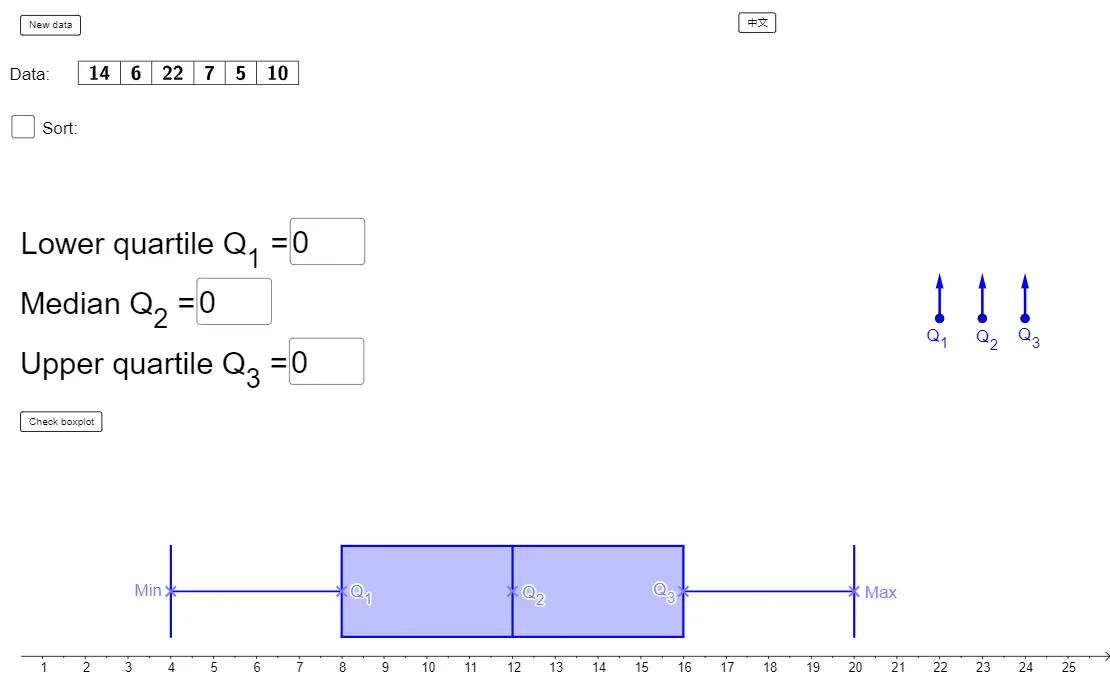
This example demonstrates how to construct a box-and-whisker plot from user-provided quartiles Q1, Q2, and Q3, making the median position and distribution spread easy to visualize. The key mathematics concepts are quartiles, the boxplot’s five-number-summary idea, and interpreting variability and skewness through a single diagram. Construction highlights: the GeoGebra scene uses input fields (input1, input2, input3) to obtain Q1/Q2/Q3 values, applies conditional logic via If to define drawable quantities (such as Q_1, Q_2, Q_3, and the Median-related components), then generates the actual box-and-whisker figure using the BoxPlot command (boxplot2). Supporting commands like Point, Segment, Polygon, Textfield, and DynamicCoordinates are used to place points, build geometry elements, and display labels (e.g., text1/text2) tied to the computed quartiles. Suitable for 10th grade (or equivalent) probability & statistics lessons, classroom demonstrations, and student exercises on descriptive statistics.
GeoGebra Commands & Parameters
Point(L) → H'Point(L) → G'Point(L) → F'Point(L) → E'Point(L) → D'Random(NumberMin, NumberMax) → nVector(A, A + (0, 1)) → u_1Vector(B, B + (0, 1)) → u_2Vector(C, C + (0, 1)) → u_3Sequence(Random[DataMin, DataMax], i, 1, n) → list1Sort(list1) → list2TableText({list2}, "c|_") → text1TableText({list1}, "c|_") → text2Q1(list2) → Q_1Q3(list2) → Q_3Median(list2) → Q_2Textfield(input1) → inputBox1Textfield(input2) → inputBox2Textfield(input3) → inputBox3DynamicCoordinates(D', round((2 * x(D'))) / 2, round((2 * y(D'))) / 2) → DDynamicCoordinates(E', round((2 * x(E'))) / 2, round((2 * y(E'))) / 2) → EDynamicCoordinates(F', round((2 * x(F'))) / 2, round((2 * y(F'))) / 2) → FDynamicCoordinates(G', round((2 * x(G'))) / 2, round((2 * y(G'))) / 2) → GDynamicCoordinates(H', round((2 * x(H'))) / 2, round((2 * y(H'))) / 2) → HSegment(D, E) → sh1Segment(G, H) → sh2Polygon(E + (0, 1), E - (0, 1), G - (0, 1), G + (0, 1)) → boxplot2, a, b, c, dSegment(D - (0, 1), D + (0, 1)) → s1Segment(F - (0, 1), F + (0, 1)) → s3Segment(H - (0, 1), H + (0, 1)) → s5BoxPlot(4, 0.5, list2) → boxplotIf(Chinese, "數據:", "Data:") → text3If(Chinese, "←正確", "←Correct") → text4If(Chinese, "←正確", "←Correct") → text5If(Chinese, "←正確", "←Correct") → text6If(Chinese, "←不正確", "←Incorrect") → text7If(Chinese, "←不正確", "←Incorrect") → text8If(Chinese, "←不正確", "←Incorrect") → text9If(Chinese, "框線圖正確!", "Correct boxplot!") → text10If(Chinese, "部分出錯 ...", "something wrong ...") → text11
AI Drawing Prompt Reference
Draw a box-and-whisker plot to display data distribution. Start by placing five points on the coordinate plane)Skip. Use three input fields to enter the lower quartile, median, and upper quartile. Based on these values, determine the box's left and right edges and the median line, then draw the box, whiskers, and median line. Simultaneously, generate a random dataset, compute its actual quartiles, and compare them with the entered values, labeling each as correct or incorrect. Finally, show the data list and the corresponding boxplot in the figure for direct visual comparison.
The prompt above was compiled from the original drawing commands and is for reference only.