
Equivalent Fractions by Marjorie Brillante (2)
Loading the math board and drawing, please wait…
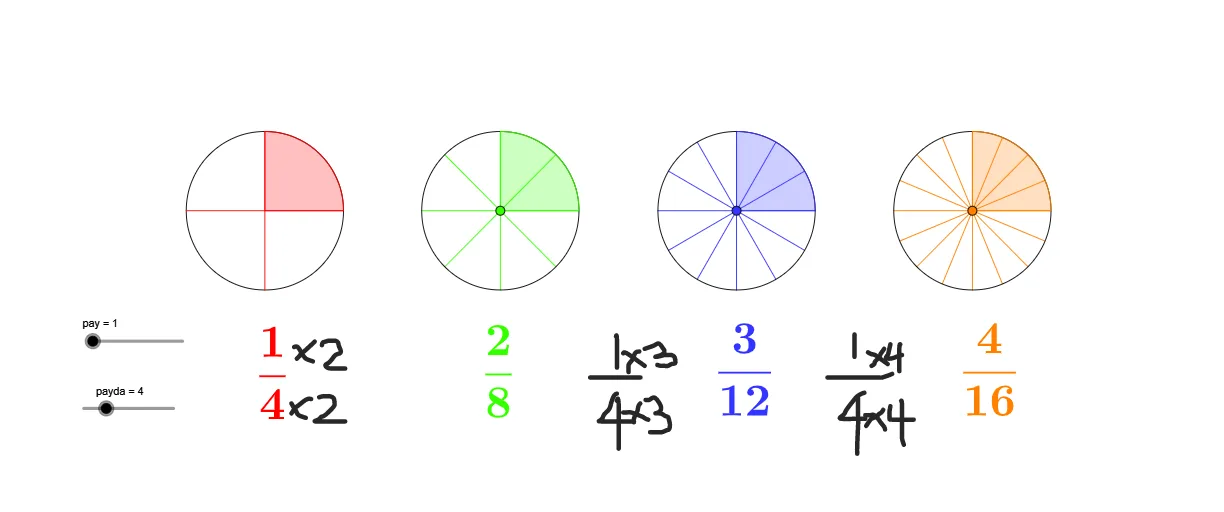
This example demonstrates the geometric representation and transformation of equivalent fractions. It involves core mathematical concepts such as the fundamental properties of fractions, geometric partitioning, and combination. Construction highlights include using GeoGebra commands like Circle, Sequence, Point, Rotate, Intersect, and CircleSector to visually represent fractions. Suitable for middle school mathematics teaching to intuitively understand the relationships of fraction equivalence.
GeoGebra Commands & Parameters
Circle((0, 0), 1) → cSequence(Rotate[A, (i * (360 / payda)°)], i, 1, payda) → liste1Point(xAxis) → CCircle(C, 1) → gPoint(xAxis) → DCircle(D, 1) → hPoint(xAxis) → ECircle(E, 1) → kPoint(g) → FPoint(h) → GPoint(k) → HRotate(A, (360 * (pay / payda)°)) → A'Rotate(F, (360 * (pay / payda)°), C) → F'Rotate(G, (360 * (pay / payda)°), D) → G'Rotate(H, (360 * (pay / payda)°), E) → H'Intersect(xAxis, yAxis) → BCircleSector(B, A, A') → dCircleSector(C, F, F') → pCircleSector(D, G, G') → qCircleSector(E, H, H') → rSequence(Rotate[F, (i * (360 / ((2 * payda)))°), C], i, 1, (2 * payda)) → liste4Sequence(Rotate[G, (i * (360 / ((3 * payda)))°), D], i, 1, (3 * payda)) → liste5Sequence(Rotate[H, (i * (360 / ((4 * payda)))°), E], i, 1, (4 * payda)) → liste6Sequence(Segment[(0, 0), Element[liste1, i]], i, 1, payda) → liste3Sequence(Segment[C, Element[liste4, i]], i, 1, (2 * payda)) → liste2Sequence(Segment[D, Element[liste5, i]], i, 1, (3 * payda)) → liste7Sequence(Segment[E, Element[liste6, i]], i, 1, (4 * payda)) → liste8
AI Drawing Prompt Reference
Draw a circle and divide it into several equal parts to represent different fractions geometrically. Start by drawing a unit circle at the center, then divide it into parts based on the numerator and denominator of the fraction. Use rotation and intersection to create multiple sectors and segments, visually demonstrating the equivalence of fractions. Finally, connect key points with lines to form a clear geometric pattern, helping to understand the fundamental properties and combinations of fractions.
The prompt above was compiled from the original drawing commands and is for reference only.