
Equivalent Fractions by James Monaghan
Loading the math board and drawing, please wait…
In collections
Fractions and decimals
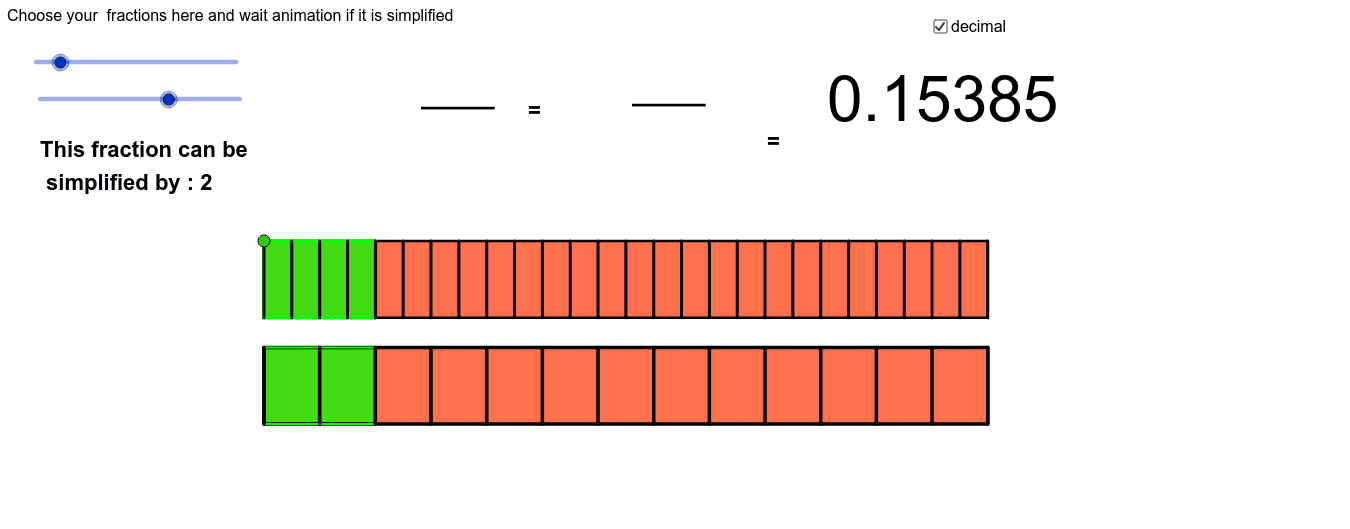
This example visually demonstrates the concept of equivalent fractions through the dynamic rotation of a cuboid, illustrating how different fractions can represent the same quantity. It involves core mathematical concepts such as fractions, integers, line segments, and equilateral triangles. The construction utilizes commands like GCD, Segment, RandomNormal, RandomBinomial, Sequence, Polygon, Line, and If, along with objects like n_1, d_1, h, t, A, Longueur, etc. It is suitable for middle school mathematics education, helping students understand the fundamental properties of fractions and their geometric representations.
GeoGebra Commands & Parameters
GCD(n_1, d_1) → hSegment(A, B) → aRandomNormal(2, 4) → cRandomBinomial(2, 3) → bBinomial(4, 2) → dSequence((x(D) + (i * a / d_1), y(D)), i, 0, d_1) → PointbasSequence((x(A) + (i * a / d_1), y(A)), i, 0, d_1) → PointhautSequence(Segment[Element[Pointhaut, i], Element[Pointbas, i]], i, 1, d_1 + 1) → liste1Polygon(A, B, C, D) → Total, a_2, b_1, c_1, d_4Polygon(A, D, Element[Pointbas, n_1 + 1], Element[Pointhaut, n_1 + 1]) → Morceau, a_1, d_3, i, jPolygon(E, F, H, G) → poly1, e, f_1, h_1, g_1Sequence((x(G) + (i * e / (d_1 / h)), y(G)), i, 0, d_1 / h) → L2Sequence((x(E) + (i * e / (d_1 / h)), y(E)), i, 0, d_1 / h) → L3Sequence(Segment[Element[L3, i], Element[L2, i]], i, 1, d_1 / h + 1) → liste2Polygon(E, G, Element[L2, n_1 / h + 1], Element[L3, n_1 / h + 1]) → poly2, e_1, g, f, kLine(A, yAxis) → lIf((h * h) ≟ 1, 0, 5) → Vitesse
AI Drawing Prompt Reference
Draw two rectangles aligned horizontally. The left rectangle is divided into several vertical strips, with a portion highlighted to represent a fraction. The right rectangle is divided into fewer strips, with the corresponding portion highlighted to show an equivalent fraction. Connect the highlighted areas of both rectangles with dashed lines to illustrate equivalence. Use a clean geometric style with white background and a single highlight color.
The prompt above was compiled from the original drawing commands and is for reference only.