
Equilateral Triangle Cross Sections Exploration
Loading the math board and drawing, please wait…
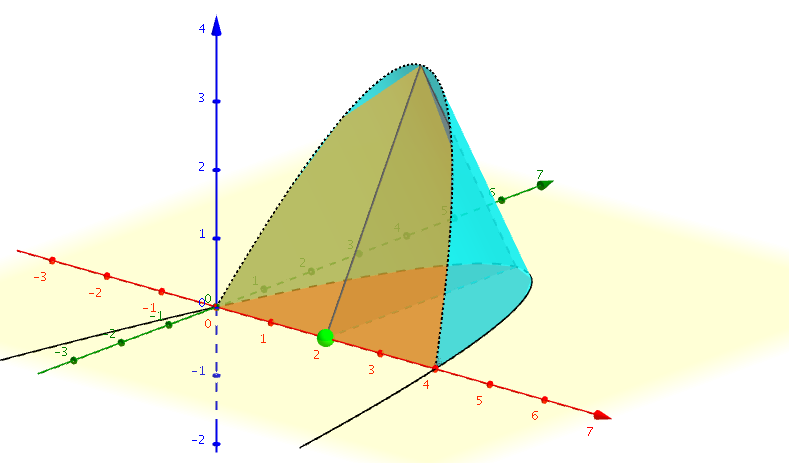
This example demonstrates the solid formed by constructing equilateral triangles on the region defined by a parabola and the x-axis. It involves key math concepts like coordinate geometry, solid geometry, and trigonometry. The construction uses GeoGebra commands such as Point, Polygon, CurveCartesian, and Surface. Suitable for high school students and math enthusiasts exploring the intersection of spatial geometry and function graphs.
GeoGebra Commands & Parameters
Point(Segment[(0, 0), (4, 0)]) → APolygon(A, (x(A), f(x(A)), 0), (x(A), (0.5 * f(x(A))), ((0.5 * sqrt(3)) * f(x(A))))) → poly1, a, b, cCurveCartesian(t, (0.5 * f(t)), ((0.5 * sqrt(3)) * f(t)), t, 0, 4) → dSurface(t, (u * 0) + (((1 - u) * 0.5) * f(t)), (u * 0) + ((((1 - u) * 0.5) * sqrt(3)) * f(t)), t, 0, 4, u, 0, 1) → eSurface(t, ((u * 0.5) * f(t)) + ((1 - u) * f(t)), (((u * 0.5) * sqrt(3)) * f(t)) + ((1 - u) * 0), t, 0, 4, u, 0, 1) → gSurface(t, (u * f(t)), 0, t, 0, 4, u, 0, 1) → h
AI Drawing Prompt Reference
On a coordinate plane, draw a parabola and the x-axis. Construct an equilateral triangle on each point along the x-axis up to the parabola, forming a solid shape. Visualize the 3D structure created by these triangles, highlighting the relationship between the triangles, the parabola, and the x-axis.
The prompt above was compiled from the original drawing commands and is for reference only.