
Elliptical Double Cone and Cylinder Intersection
Loading the math board and drawing, please wait…
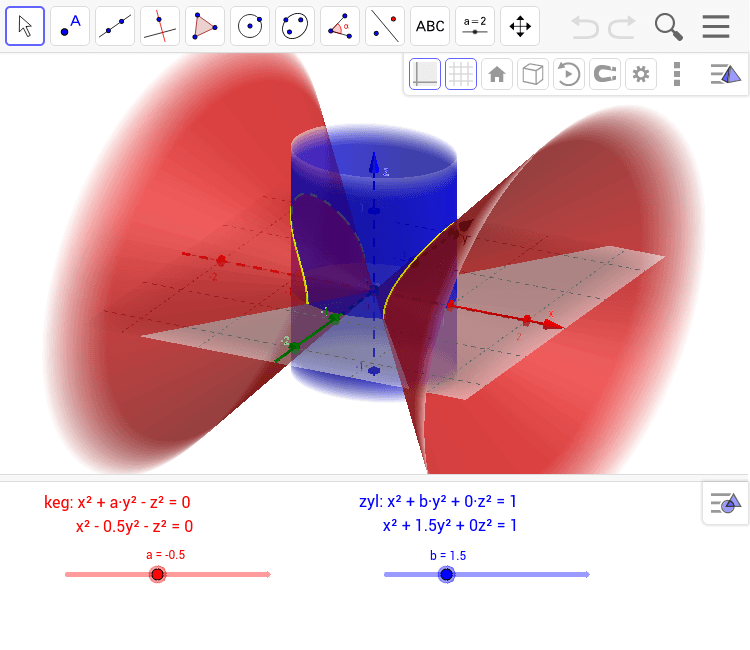
This example demonstrates the intersection of an elliptical double cone and a cylinder, visually showcasing the resulting geometric solid. It involves core mathematical concepts such as conical surfaces, cylindrical surfaces, intersections, quadratic surfaces, and analytical geometry. The construction uses commands like IntersectConic (intersection) and CurveCartesian (Cartesian curve), along with objects like b, a, zyl, keg, c, e, d, and Text elements. Suitable for high school students and math enthusiasts to explore spatial geometry and analytical geometry, it can be used for teaching demonstrations or geometric investigations.
GeoGebra Commands & Parameters
IntersectConic(keg, zyl) → cCurveCartesian(cos(u), (sgn(sin(u)) * sqrt((1 - cos(u)^(2)) / b)), sqrt(cos(u)^(2) + (a * (1 - cos(u)^(2)) / b)), u, 0, (2 * π)) → eCurveCartesian((sgn(cos(u)) * sqrt(1 - (b * sin(u)^(2)))), sin(u), sqrt(1 - (b * sin(u)^(2)) + (a * sin(u)^(2))), u, 0, (2 * π)) → d
AI Drawing Prompt Reference
Draw the intersection of an elliptical double cone and a cylinder. First, create the elliptical double cone and the cylinder. Then, find their intersection lines and draw the two branches. Adjust parameters a and b to change the ellipse shape and observe the changes in the intersection lines.
The prompt above was compiled from the original drawing commands and is for reference only.