
Ellipsoid Construction and Transformations
Loading the math board and drawing, please wait…
In collections
geometriadinamica.es
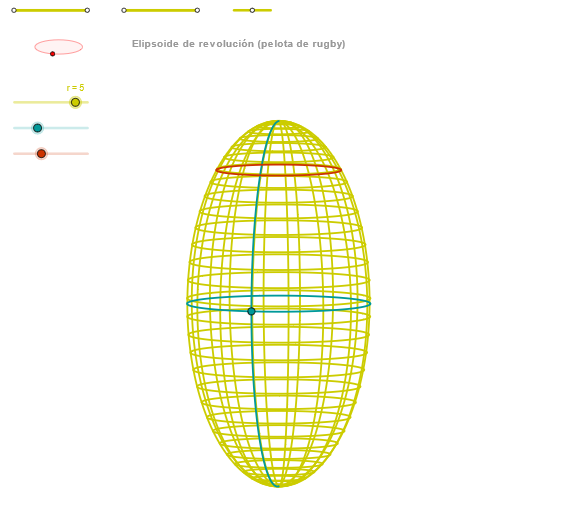
This example demonstrates the geometric construction and transformation properties of an ellipse. Key mathematical concepts include the definition of an ellipse, geometric transformations, and coordinate geometry. Construction involves using GeoGebra commands such as Segment, OrthogonalLine, Ellipse, and Angle to create ellipse objects, and analyzing their properties with CurveCartesian. Suitable for high school students learning geometric transformations and coordinate geometry applications, or for mathematical teaching demonstrations.
GeoGebra Commands & Parameters
Segment(Q3, Q4) → p2Point(p2) → P3Segment(P3, Q4) → p4Point(p4) → P4Segment(Q1, Q2) → p1Point(p1) → P1Segment(P1, Q2) → p3Point(p3) → P2OrthogonalLine(C, yAxis) → zz1Circle(C, 0.62) → zz0Intersect(zz0, zz1, 1) → ZZ1Intersect(zz0, zz1, 2) → ZZ2Ellipse(ZZ1, ZZ2, 0.65) → zElipse1Intersect(zElipse1, zz1) → ZZ5, ZZ6Point(zElipse1) → XYAngle(ZZ6, C, XY) → zAngRotOrthogonalLine(C, xAxis) → zz2Intersect(zz0, zz2, 2) → ZZ3Intersect(zz0, zz2, 1) → ZZ4Ellipse(ZZ3, ZZ4, 0.65) → zElipse2Intersect(zElipse2, zz2) → ZZ7, ZZ8Point(zElipse2) → ZAngle(ZZ8, C, Z) → zAngIncSegment(Q5, Q6) → p5Point(p5) → P5Segment(ZZ5, ZZ6) → zz4Segment(ZZ7, ZZ8) → zz3Intersect(zElipse2, zElipse1, 1) → zPunto1Intersect(zElipse2, zElipse1, 4) → zPunto2Segment(zPunto1, zPunto2) → zSeg2CurveCartesian((r / 2 * ((((b * cos(v)) * cos(α)) * sin(zAngRot)) + (((c * cos(v)) * sin(α)) * cos(zAngRot)))), (r / 2 * ((((((-b) * cos(v)) * cos(α)) * cos(zAngRot)) * sin(zAngInc)) + ((((c * cos(v)) * sin(α)) * sin(zAngRot)) * sin(zAngInc)) + ((d * sin(v)) * cos(zAngInc)))), v, v1, v2) → curva2Sequence(CurveCartesian[(r / 2 * ((((b * cos(v)) * cos(u)) * sin(zAngRot)) + (((c * cos(v)) * sin(u)) * cos(zAngRot)))), (r / 2 * ((((((-b) * cos(v)) * cos(u)) * cos(zAngRot)) * sin(zAngInc)) + ((((c * cos(v)) * sin(u)) * sin(zAngRot)) * sin(zAngInc)) + ((d * sin(v)) * cos(zAngInc)))), u, u1, u2], v, v1, v2, paso) → list2CurveCartesian((r / 2 * (((b * cos(u)) * sin(zAngRot)) + ((c * sin(u)) * cos(zAngRot)))), (r / 2 * (((((-b) * cos(u)) * cos(zAngRot)) * sin(zAngInc)) + (((c * sin(u)) * sin(zAngRot)) * sin(zAngInc)))), u, u1, u2) → curva1CurveCartesian((r / 2 * ((((b * cos(β)) * cos(u)) * sin(zAngRot)) + (((c * cos(β)) * sin(u)) * cos(zAngRot)))), (r / 2 * ((((((-b) * cos(β)) * cos(u)) * cos(zAngRot)) * sin(zAngInc)) + ((((c * cos(β)) * sin(u)) * sin(zAngRot)) * sin(zAngInc)) + ((d * sin(β)) * cos(zAngInc)))), u, u1, u2) → a1Sequence(CurveCartesian[(r / 2 * ((((b * cos(v)) * cos(u)) * sin(zAngRot)) + (((c * cos(v)) * sin(u)) * cos(zAngRot)))), (r / 2 * ((((((-b) * cos(v)) * cos(u)) * cos(zAngRot)) * sin(zAngInc)) + ((((c * cos(v)) * sin(u)) * sin(zAngRot)) * sin(zAngInc)) + ((d * sin(v)) * cos(zAngInc)))), v, v1, v2], u, u1, u2, (4 * paso)) → list1
AI Drawing Prompt Reference
Draw an ellipsoid by first constructing line segments through points Q1, Q2, Q3, and Q4 and taking midpoints. Then, use these points to construct an ellipse and further ellipses by their intersections with coordinate axes. Finally, use parametric equations to draw the ellipsoid's surface and demonstrate its transformation properties through rotation and translation.
The prompt above was compiled from the original drawing commands and is for reference only.