
Ellipse Mosaics: Conic Construction via Geometric Transformations
Loading the math board and drawing, please wait…
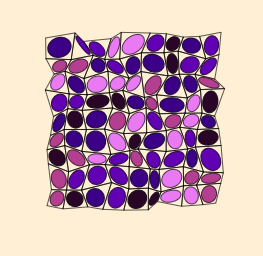
This example demonstrates how ellipse-based mosaics can be generated to create coherent, repeating patterns. The key mathematical ideas are conic sections—specifically constructing ellipses—together with geometric transformations such as mirroring (Mirror) and dilation (Dilate). The construction relies on building a polygonal framework, using lines and segments to define boundaries, and then computing intersection points and midpoints to place control elements precisely. In GeoGebra, the base layout is created with Polygon, Segment, and Line, while Intersect and Midpoint determine the critical geometric locations. Mirror produces symmetric counterparts of the generating configuration, and Dilate scales elements to form the next mosaic tile. Finally, Conic is used to create the ellipse from the specified parameters/conditions, and Element organizes the resulting objects; the included control elements (e.g., a button) support interactive exploration of the parameters. Suitable for secondary to early university students studying geometry construction, analytic geometry, and transformation-based visualization.
GeoGebra Commands & Parameters
Zip(Zip[(i + (0.7 * RandomUniform[0, w]), j + (0.7 * RandomUniform[0, h])), i, Lm], j, Lm) → PointsNPolygon(A, B, C, D) → q1, a, b, c, dSegment(B, D) → fLine(A, B) → gLine(B, C) → iLine(D, A) → jIntersect(h, g) → EIntersect(i, j) → FSegment(C, A) → kIntersect(f, k) → KLine(E, K) → mLine(F, K) → nIntersect(h, n) → GIntersect(j, m) → HIntersect(i, m) → IIntersect(g, n) → JSegment(G, H) → lSegment(G, I) → pMidpoint(l) → LMidpoint(p) → MLine(D, L) → qLine(C, M) → rIntersect(q, r) → NMirror(G, N) → G'Conic(I, G, H, G', J) → eDilate(e, 0.85, Center[e]) → e'Zip(Zip[Polygon[Element[PointsN, i, j], Element[PointsN, i, j + 1], Element[PointsN, i + 1, j + 1], Element[PointsN, i + 1, j]], i, Lm], j, Lm) → PolyNZip(Zip[EllipseQ[Element[PointsN, i, j], Element[PointsN, i, j + 1], Element[PointsN, i + 1, j + 1], Element[PointsN, i + 1, j]], i, Ln], j, Ln) → EllQElement(EllQ, 1, 1) → S1_1Element(EllQ, 2, 1) → S2_1Element(EllQ, 3, 1) → S3_1Element(EllQ, 4, 1) → S4_1Element(EllQ, 5, 1) → S5_1Element(EllQ, 6, 1) → S6_1Element(EllQ, 7, 1) → S7_1Element(EllQ, 8, 1) → S8_1Element(EllQ, 9, 1) → S9_1Element(EllQ, 1, 2) → S1_2Element(EllQ, 2, 2) → S2_2Element(EllQ, 3, 2) → S3_2Element(EllQ, 4, 2) → S4_2Element(EllQ, 5, 2) → S5_2Element(EllQ, 6, 2) → S6_2Element(EllQ, 7, 2) → S7_2Element(EllQ, 8, 2) → S8_2Element(EllQ, 9, 2) → S9_2Element(EllQ, 1, 3) → S1_3Element(EllQ, 2, 3) → S2_3Element(EllQ, 3, 3) → S3_3Element(EllQ, 4, 3) → S4_3Element(EllQ, 5, 3) → S5_3Element(EllQ, 6, 3) → S6_3Element(EllQ, 7, 3) → S7_3Element(EllQ, 8, 3) → S8_3Element(EllQ, 9, 3) → S9_3Element(EllQ, 1, 4) → S1_4Element(EllQ, 2, 4) → S2_4Element(EllQ, 3, 4) → S3_4Element(EllQ, 4, 4) → S4_4Element(EllQ, 5, 4) → S5_4Element(EllQ, 6, 4) → S6_4Element(EllQ, 7, 4) → S7_4Element(EllQ, 8, 4) → S8_4Element(EllQ, 9, 4) → S9_4Element(EllQ, 1, 5) → S1_5Element(EllQ, 2, 5) → S2_5Element(EllQ, 3, 5) → S3_5Element(EllQ, 4, 5) → S4_5Element(EllQ, 5, 5) → S5_5Element(EllQ, 6, 5) → S6_5Element(EllQ, 7, 5) → S7_5Element(EllQ, 8, 5) → S8_5Element(EllQ, 9, 5) → S9_5Element(EllQ, 1, 6) → S1_6Element(EllQ, 2, 6) → S2_6Element(EllQ, 3, 6) → S3_6Element(EllQ, 4, 6) → S4_6Element(EllQ, 5, 6) → S5_6Element(EllQ, 6, 6) → S6_6Element(EllQ, 7, 6) → S7_6Element(EllQ, 8, 6) → S8_6Element(EllQ, 9, 6) → S9_6Element(EllQ, 1, 7) → S1_7Element(EllQ, 2, 7) → S2_7Element(EllQ, 3, 7) → S3_7Element(EllQ, 4, 7) → S4_7Element(EllQ, 5, 7) → S5_7Element(EllQ, 6, 7) → S6_7Element(EllQ, 7, 7) → S7_7Element(EllQ, 8, 7) → S8_7Element(EllQ, 9, 7) → S9_7Element(EllQ, 1, 8) → S1_8Element(EllQ, 2, 8) → S2_8Element(EllQ, 3, 8) → S3_8Element(EllQ, 4, 8) → S4_8Element(EllQ, 5, 8) → S5_8Element(EllQ, 6, 8) → S6_8Element(EllQ, 7, 8) → S7_8Element(EllQ, 8, 8) → S8_8Element(EllQ, 9, 8) → S9_8Element(EllQ, 1, 9) → S1_9Element(EllQ, 2, 9) → S2_9Element(EllQ, 3, 9) → S3_9Element(EllQ, 4, 9) → S4_9Element(EllQ, 5, 9) → S5_9Element(EllQ, 6, 9) → S6_9Element(EllQ, 7, 9) → S7_9Element(EllQ, 8, 9) → S8_9Element(EllQ, 9, 9) → S9_9Zip(Zip[Centroid[Element[PolyN, i, j]], i, Lm], j, Lm) → CN
AI Drawing Prompt Reference
Draw an ellipse mosaic pattern with repetition and symmetry. The construction order: first draw a polygon framework to determine key points; then use geometric transformations like mirroring and scaling to generate ellipses; finally arrange the ellipses into a repeating mosaic. Key objects include ellipses, points, line segments, and intersection points, with ellipses determined by specific points and the mosaic achieved through mirroring and scaling.
The prompt above was compiled from the original drawing commands and is for reference only.