
Ellipse in Parallelogram
Loading the math board and drawing, please wait…
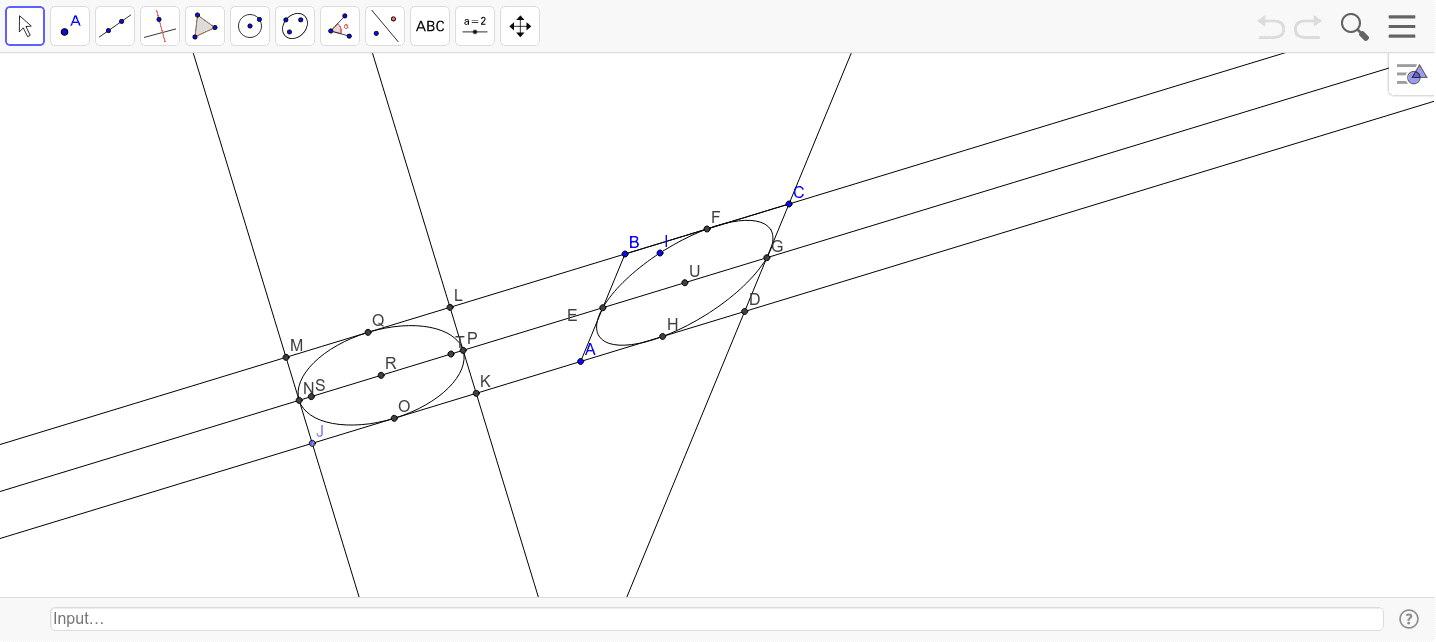
This example demonstrates how to construct an ellipse using the midpoints of the sides and vertices of a parallelogram. Core mathematical concepts include the definition of an ellipse, midpoint coordinates, coordinate geometry, and geometric construction. GeoGebra commands and objects used are Segment, Line, Point, OrthogonalLine, Intersect, Midpoint, Conic, Circle, and Ellipse. Suitable for high school students learning about the geometric properties and construction of ellipses.
GeoGebra Commands & Parameters
Segment(B, C) → bLine(A, b) → cLine(B, c) → iPoint(c) → JOrthogonalLine(J, c) → fSegment(A, B) → aLine(C, a) → dIntersect(c, d) → DMidpoint(A, B) → EMidpoint(B, C) → FMidpoint(D, C) → GMidpoint(D, A) → HConic(I, E, F, G, H) → eCircle(J, Segment[A, B]) → gCircle(J, Segment[A, D]) → hIntersect(h, c, 2) → KOrthogonalLine(K, c) → jIntersect(i, j) → LMidpoint(J, K) → OMidpoint(K, L) → PIntersect(i, f) → MMidpoint(J, M) → NMidpoint(L, M) → QMidpoint(Q, O) → RLine(R, If[Distance[Q, R] ≤ Distance[N, R], N, Q]) → kCircle(R, cdist) → pIntersect(p, k, 2) → SIntersect(p, k, 1) → TEllipse(S, T, Q) → qMidpoint(H, F) → U
AI Drawing Prompt Reference
Construct an ellipse within a parallelogram using the midpoints of its sides and vertices. Start by drawing the parallelogram's sides and finding their midpoints. Then, create auxiliary lines through these midpoints and vertices to locate key intersections. Use these points to form the ellipse, and employ helper circles for accurate positioning. Finally, determine the precise shape of the ellipse using intersections and midpoints to complete the construction.
The prompt above was compiled from the original drawing commands and is for reference only.