
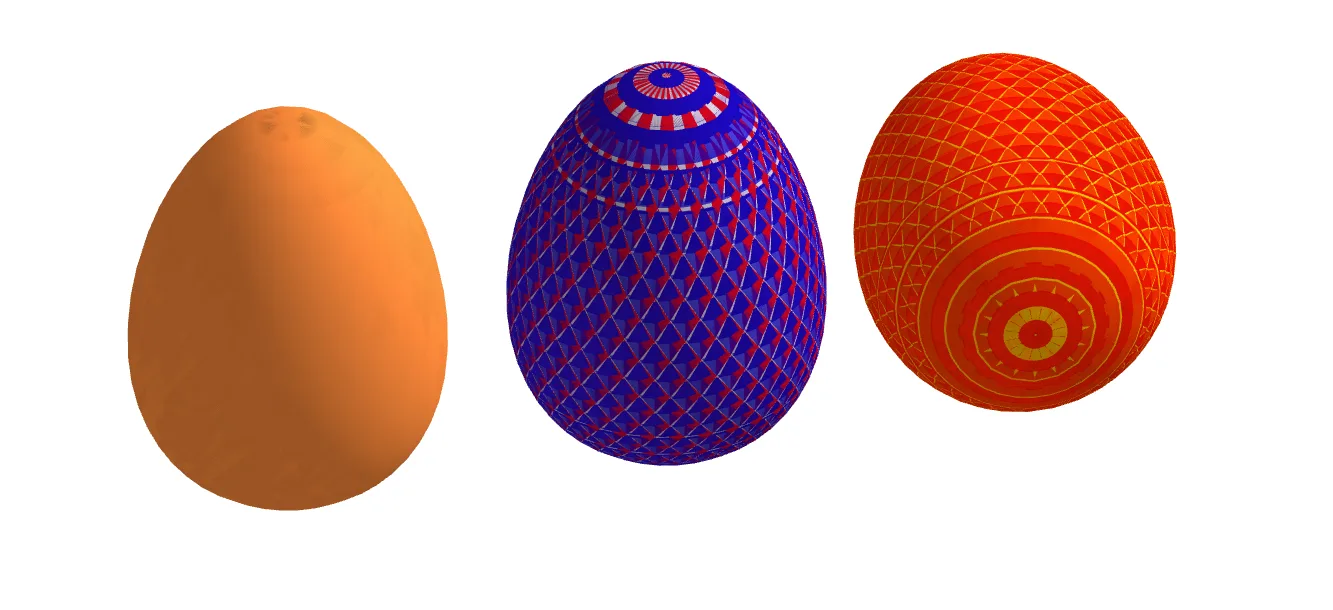
Egg Surface Modeling: 3D Geometric Construction Example
Loading the math board and drawing, please wait…
In collections
Color 3D surfaces
This example demonstrates how to use GeoGebra's Surface command to create a 3D egg-shaped surface model. Core mathematical concepts include: ① mathematical modeling of egg curves; ② the role of circumcircle in curve generation; ③ applications of integers and multiplication operations in parameter control; ④ logical judgments for smooth curve transitions. Construction highlights: Using parametric equations combined with the Surface command, generating a smooth egg contour surface through coordinate operations of control points O, A, B, etc. Suitable for middle school and above students learning 3D geometric construction, parametric surfaces, and mathematical modeling concepts, also serves as a demonstration for integrating information technology with mathematics education.
GeoGebra Commands & Parameters
Surface(x(O) + (((r * b) * sin(u)) * cos(v)), y(O) + (((r * b) * sin(u)) * sin(v)), z(O) + ((r * 0) * sin(u)) + (r * ((a * cos(u)) + (c * cos((2 * u))))), u, 0, 6.28319, v, 0, 6.28319) → dSurface(x(A) + (((r * b) * sin(u)) * cos(v)), y(A) + (((r * b) * sin(u)) * sin(v)), z(A) + ((r * 0) * sin(u)) + (r * ((a * cos(u)) + (c * cos((2 * u))))), u, 0, 6.28319, v, 0, 6.28319) → eSurface(x(O) + (((r * b) * sin(u)) * cos(v)), y(O) + (((r * b) * sin(u)) * sin(v)), z(O) + ((r * 0) * sin(u)) + (r * ((a * cos(u)) + (c * cos((2 * u))))), u, 0, 6.28319, v, 0, 6.27319) → fSurface(x(O) + (((r * b) * sin(u)) * cos(v)), y(O) + (((r * b) * sin(u)) * sin(v)), z(O) + ((r * 0) * sin(u)) + (r * ((a * cos(u)) + (c * cos((2 * u))))), u, 0, 6.25319, v, 0, 6.28319) → gSurface(x(A) + (((r * b) * sin(u)) * cos(v)), y(A) + (((r * b) * sin(u)) * sin(v)), z(A) + ((r * 0) * sin(u)) + (r * ((a * cos(u)) + (c * cos((2 * u))))), u, 0, 6.28319, v, 0, 6.28319) → hSurface(x(B) + (((r * b) * sin(u)) * cos(v)), y(B) + ((r * 0) * sin(u)) + (r * ((a * cos(u)) + (c * cos((2 * u))))), z(B) + (((r * b) * sin(u)) * sin(v)), u, 0, 6.28319, v, 0, 6.28319) → iSurface(x(B) + (((r * b) * sin(u)) * cos(v)), y(B) + ((r * 0) * sin(u)) + (r * ((a * cos(u)) + (c * cos((2 * u))))), z(B) + (((r * b) * sin(u)) * sin(v)), u, 0, 6.25319, v, 0, 6.28319) → j
AI Drawing Prompt Reference
Create a 3D parametric surface model of an egg-shaped form using spherical coordinates with elliptical deformations. Set two angle parameters u and v ranging from 0 to 2π, applying sine, cosine, and double-angle formulas to adjust curve smoothness and asymmetry. Introduce parameters a, b, c, and r to control ellipse stretching and curve bending, shaping the surface into a natural egg contour. Generate multiple surface families centered at three different reference points, combining them to form a complete volumetric egg model with a smooth shell texture.
The prompt above was compiled from the original drawing commands and is for reference only.