
Egg Curve
Loading the math board and drawing, please wait…
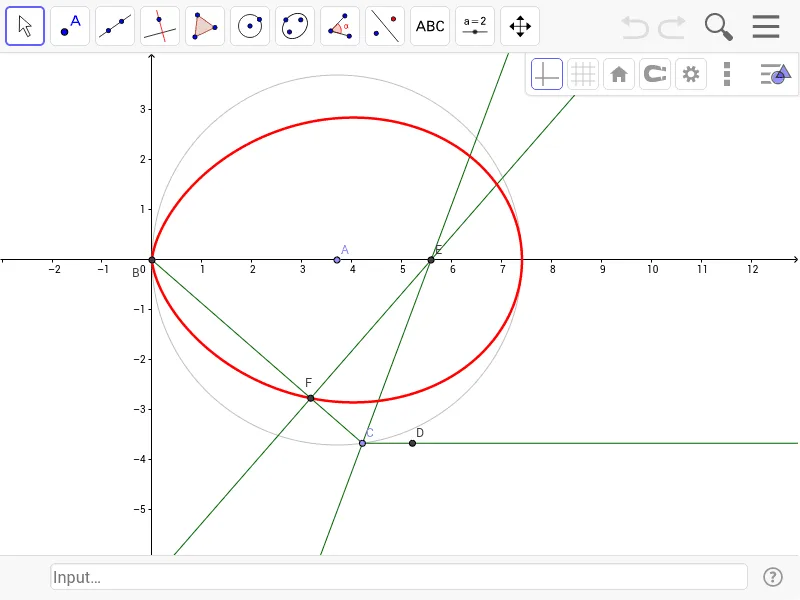
This example demonstrates the egg curve based on Schmidt (1907), involving parametric equations and geometric construction. Using GeoGebra commands such as Point, Intersect, Circle, Segment, Ray, AngularBisector, OrthogonalLine, and Locus, the trajectory of the egg curve can be constructed. Suitable for high school mathematics education and learning parametric equations.
GeoGebra Commands & Parameters
Point(xAxis) → AIntersect(xAxis, yAxis) → BCircle(A, B) → cPoint(c) → CSegment(B, C) → aRay(C, D) → bAngularBisector(B, C, D) → dIntersect(d, xAxis) → EOrthogonalLine(E, a) → eIntersect(e, a) → FLocus(F, C) → loc1
AI Drawing Prompt Reference
Draw an egg curve by first taking point A on the x-axis, then taking point B at the origin, drawing circle c with A and B as centers, taking point C on circle c, connecting B and C to form segment a, drawing ray b from C, making angle bisector d, letting d intersect the x-axis at point E, drawing a perpendicular line e from E to a, letting e intersect a at point F, and finally making the locus of F as C varies to form loc1.
The prompt above was compiled from the original drawing commands and is for reference only.