
Edirne Üç Şerefeli Mosque Geometric Construction Demo
Loading the math board and drawing, please wait…
In collections
Fatin Uluengin - muqarnas
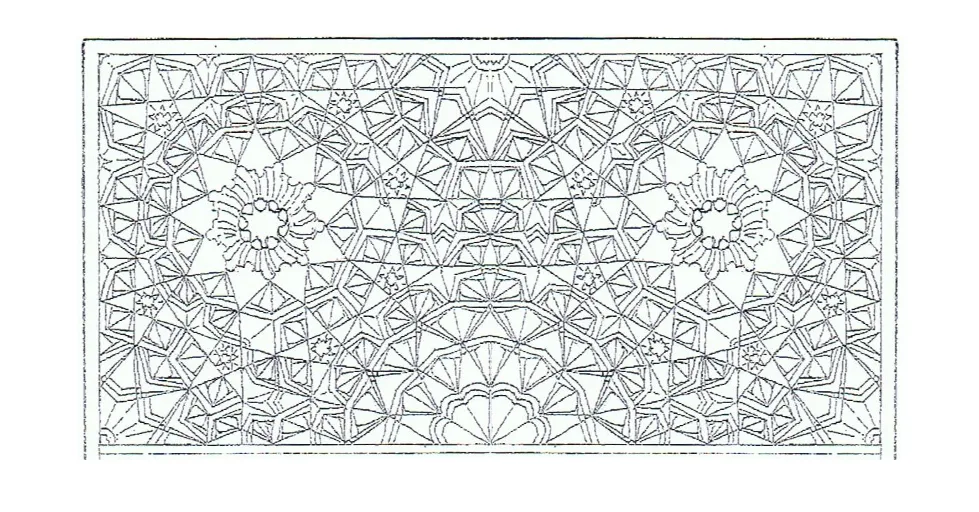
This example demonstrates the step‑by‑step planar geometric construction of the historic Üç Şerefeli Mosque in Edirne. It covers core concepts such as polygons, circles, angles, rotations, reflections, and sequences. The construction uses GeoGebra commands including ConstructionStep, Polygon, Midpoint, Rotate, Ray, Intersect, Segment, Angle, OrthogonalLine, Circle, Sequence, and Mirror, together with a rich set of points, lines, and circles. It is suitable for high‑school geometry instruction, geometric construction practice, and digital heritage visualization.
GeoGebra Commands & Parameters
ConstructionStep() → stapPolygon(I, J, K, L) → vierhoek1, i, j, k, lMidpoint(k) → MMidpoint(i) → NRotate(N, 30°, M) → N'Ray(M, N') → fIntersect(f, i) → O_1Rotate(N, (-(30°)), M) → N'_1Ray(M, N'_1) → gIntersect(i, g) → PSegment(M, P) → hSegment(M, O_1) → mSegment(M, N) → p_1Angle(N, M, O_1) → αAngle(P, M, N) → βSegment(L, N) → nSegment(M, N) → bRay(N, Rotate[J, 15°, N]) → dRay(N, Rotate[J, 30°, N]) → eRay(N, Rotate[J, 45°, N]) → f_1Ray(N, Rotate[J, 60°, N]) → g_1Ray(N, Rotate[J, 75°, N]) → h_1Intersect(k, h_1) → SIntersect(g_1, k) → TIntersect(j, e) → UIntersect(j, d) → VSegment(N, S) → i_1Segment(N, T) → j_1Segment(N, K) → k_1Segment(N, U) → l_1Segment(N, V) → m_1Angle(J, N, V) → γSegment(K, N) → pOrthogonalLine(P, i) → qIntersect(q, n) → OSegment(P, O) → n_1Rotate(P, (-(30°)), N) → P'Ray(N, P') → rIntersect(h, r) → RSegment(N, P') → sAngle(R, N, P) → δCircle(O, R) → cSegment(O, R) → tSequence(Segment[Rotate[O, (nn * 40°), O], Rotate[R, (nn * 40°), O]], nn, 1, 8) → l1Rotate(R, 40°, O) → R'Rotate(R, (-(80°)), O) → R'_1Rotate(R, (-(40°)), O) → R'_2Angle(R'_1, O, R'_2) → εSegment(R, R') → aMirror(c, p_1) → c'Mirror(l1, p_1) → l1'Mirror(O, p_1) → O'Mirror(R, p_1) → R'_3Segment(O', R'_3) → t'Mirror(R, p_1) → R'_4Mirror(R', p_1) → R''Segment(R'_4, R'') → a'Mirror(afbeelding3, yAxis) → afbeelding3'Mirror(afbeelding5, yAxis) → afbeelding5'
AI Drawing Prompt Reference
Draw a geometric construction representing the historic Edirne Üç Şerefeli Mosque. Start by creating a quadrilateral and find its midpoints. Rotate and reflect points to form rays and angles. Draw circles centered at specific points and use rotations and reflections to generate a sequence of line segments. Connect these segments and add arcs to create a complex, symmetric pattern that showcases geometric transformations.
The prompt above was compiled from the original drawing commands and is for reference only.