
Easily Color List Items
Loading the math board and drawing, please wait…
In collections
Color 3D surfaces
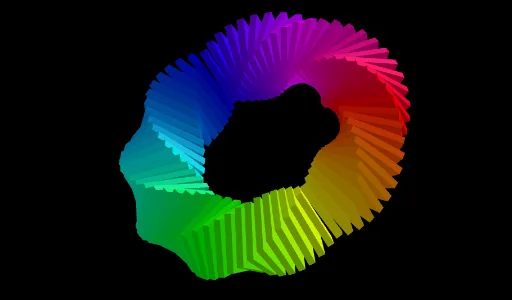
This example demonstrates how to easily color items in a list within GeoGebra, focusing on geometric constructions and properties. It involves core math concepts like polygons, solid geometry, and coordinate geometry. Key GeoGebra commands and objects used include Polygon, Prism, Midpoint, Circle, Line, Sequence, and Rotate. Suitable for high school and above students exploring geometric attributes and transformations.
GeoGebra Commands & Parameters
Polygon(A, B, 4, xOyPlane) → poly1, f, g, h, i, C, DPrism(poly1, 0.2) → a, E, edge1, edge2, edge3, edge4, edge5, edge6, edge7, edge8, F, G, H, face1, face2, face3, face4, face5Midpoint(D, B) → LCircle(yAxis, L) → cMidpoint(E, G) → JLine(L, J) → jSequence(Rotate[j, (w * π / 36), yAxis], w, 1, 72) → L_2Rotate(A, b, L) → AARotate(B, b, L) → BBPolygon(AA, BB, 4, xOyPlane) → poly2, k, l, m, n_1, I, KPrism(poly2, 0.2) → d, M, arêteAAM, arêteBBN, arêteIO, arêteKP, arêteMN, arêteNO, arêteOP, arêteMP, N, O, P, faceAABBNM, faceBBION, faceIKPO, faceAAKPM, faceMNOPRotate(Rotate[d, (A1 * π / (n / 2)), yAxis], (A1 * π / (n / 4)), Element[L_2, A1]) → B1Rotate(Rotate[d, (A2 * π / (n / 2)), yAxis], (A2 * π / (n / 4)), Element[L_2, A2]) → B2Rotate(Rotate[d, (A3 * π / (n / 2)), yAxis], (A3 * π / (n / 4)), Element[L_2, A3]) → B3Rotate(Rotate[d, (A4 * π / (n / 2)), yAxis], (A4 * π / (n / 4)), Element[L_2, A4]) → B4Rotate(Rotate[d, (A5 * π / (n / 2)), yAxis], (A5 * π / (n / 4)), Element[L_2, A5]) → B5Rotate(Rotate[d, (A6 * π / (n / 2)), yAxis], (A6 * π / (n / 4)), Element[L_2, A6]) → B6Rotate(Rotate[d, (A7 * π / (n / 2)), yAxis], (A7 * π / (n / 4)), Element[L_2, A7]) → B7Rotate(Rotate[d, (A8 * π / (n / 2)), yAxis], (A8 * π / (n / 4)), Element[L_2, A8]) → B8Rotate(Rotate[d, (A9 * π / (n / 2)), yAxis], (A9 * π / (n / 4)), Element[L_2, A9]) → B9Rotate(Rotate[d, (A10 * π / (n / 2)), yAxis], (A10 * π / (n / 4)), Element[L_2, A10]) → B10Rotate(Rotate[d, (A11 * π / (n / 2)), yAxis], (A11 * π / (n / 4)), Element[L_2, A11]) → B11Rotate(Rotate[d, (A12 * π / (n / 2)), yAxis], (A12 * π / (n / 4)), Element[L_2, A12]) → B12Rotate(Rotate[d, (A13 * π / (n / 2)), yAxis], (A13 * π / (n / 4)), Element[L_2, A13]) → B13Rotate(Rotate[d, (A14 * π / (n / 2)), yAxis], (A14 * π / (n / 4)), Element[L_2, A14]) → B14Rotate(Rotate[d, (A15 * π / (n / 2)), yAxis], (A15 * π / (n / 4)), Element[L_2, A15]) → B15Rotate(Rotate[d, (A16 * π / (n / 2)), yAxis], (A16 * π / (n / 4)), Element[L_2, A16]) → B16Rotate(Rotate[d, (A17 * π / (n / 2)), yAxis], (A17 * π / (n / 4)), Element[L_2, A17]) → B17Rotate(Rotate[d, (A18 * π / (n / 2)), yAxis], (A18 * π / (n / 4)), Element[L_2, A18]) → B18Rotate(Rotate[d, (A19 * π / (n / 2)), yAxis], (A19 * π / (n / 4)), Element[L_2, A19]) → B19Rotate(Rotate[d, (A20 * π / (n / 2)), yAxis], (A20 * π / (n / 4)), Element[L_2, A20]) → B20Rotate(Rotate[d, (A21 * π / (n / 2)), yAxis], (A21 * π / (n / 4)), Element[L_2, A21]) → B21Rotate(Rotate[d, (A22 * π / (n / 2)), yAxis], (A22 * π / (n / 4)), Element[L_2, A22]) → B22Rotate(Rotate[d, (A23 * π / (n / 2)), yAxis], (A23 * π / (n / 4)), Element[L_2, A23]) → B23Rotate(Rotate[d, (A24 * π / (n / 2)), yAxis], (A24 * π / (n / 4)), Element[L_2, A24]) → B24Rotate(Rotate[d, (A25 * π / (n / 2)), yAxis], (A25 * π / (n / 4)), Element[L_2, A25]) → B25Rotate(Rotate[d, (A26 * π / (n / 2)), yAxis], (A26 * π / (n / 4)), Element[L_2, A26]) → B26Rotate(Rotate[d, (A27 * π / (n / 2)), yAxis], (A27 * π / (n / 4)), Element[L_2, A27]) → B27Rotate(Rotate[d, (A28 * π / (n / 2)), yAxis], (A28 * π / (n / 4)), Element[L_2, A28]) → B28Rotate(Rotate[d, (A29 * π / (n / 2)), yAxis], (A29 * π / (n / 4)), Element[L_2, A29]) → B29Rotate(Rotate[d, (A30 * π / (n / 2)), yAxis], (A30 * π / (n / 4)), Element[L_2, A30]) → B30Rotate(Rotate[d, (A31 * π / (n / 2)), yAxis], (A31 * π / (n / 4)), Element[L_2, A31]) → B31Rotate(Rotate[d, (A32 * π / (n / 2)), yAxis], (A32 * π / (n / 4)), Element[L_2, A32]) → B32Rotate(Rotate[d, (A33 * π / (n / 2)), yAxis], (A33 * π / (n / 4)), Element[L_2, A33]) → B33Rotate(Rotate[d, (A34 * π / (n / 2)), yAxis], (A34 * π / (n / 4)), Element[L_2, A34]) → B34Rotate(Rotate[d, (A35 * π / (n / 2)), yAxis], (A35 * π / (n / 4)), Element[L_2, A35]) → B35Rotate(Rotate[d, (A36 * π / (n / 2)), yAxis], (A36 * π / (n / 4)), Element[L_2, A36]) → B36Rotate(Rotate[d, (A37 * π / (n / 2)), yAxis], (A37 * π / (n / 4)), Element[L_2, A37]) → B37Rotate(Rotate[d, (A38 * π / (n / 2)), yAxis], (A38 * π / (n / 4)), Element[L_2, A38]) → B38Rotate(Rotate[d, (A39 * π / (n / 2)), yAxis], (A39 * π / (n / 4)), Element[L_2, A39]) → B39Rotate(Rotate[d, (A40 * π / (n / 2)), yAxis], (A40 * π / (n / 4)), Element[L_2, A40]) → B40Rotate(Rotate[d, (A41 * π / (n / 2)), yAxis], (A41 * π / (n / 4)), Element[L_2, A41]) → B41Rotate(Rotate[d, (A42 * π / (n / 2)), yAxis], (A42 * π / (n / 4)), Element[L_2, A42]) → B42Rotate(Rotate[d, (A43 * π / (n / 2)), yAxis], (A43 * π / (n / 4)), Element[L_2, A43]) → B43Rotate(Rotate[d, (A44 * π / (n / 2)), yAxis], (A44 * π / (n / 4)), Element[L_2, A44]) → B44Rotate(Rotate[d, (A45 * π / (n / 2)), yAxis], (A45 * π / (n / 4)), Element[L_2, A45]) → B45Rotate(Rotate[d, (A46 * π / (n / 2)), yAxis], (A46 * π / (n / 4)), Element[L_2, A46]) → B46Rotate(Rotate[d, (A47 * π / (n / 2)), yAxis], (A47 * π / (n / 4)), Element[L_2, A47]) → B47Rotate(Rotate[d, (A48 * π / (n / 2)), yAxis], (A48 * π / (n / 4)), Element[L_2, A48]) → B48Rotate(Rotate[d, (A49 * π / (n / 2)), yAxis], (A49 * π / (n / 4)), Element[L_2, A49]) → B49Rotate(Rotate[d, (A50 * π / (n / 2)), yAxis], (A50 * π / (n / 4)), Element[L_2, A50]) → B50Rotate(Rotate[d, (A51 * π / (n / 2)), yAxis], (A51 * π / (n / 4)), Element[L_2, A51]) → B51Rotate(Rotate[d, (A52 * π / (n / 2)), yAxis], (A52 * π / (n / 4)), Element[L_2, A52]) → B52Rotate(Rotate[d, (A53 * π / (n / 2)), yAxis], (A53 * π / (n / 4)), Element[L_2, A53]) → B53Rotate(Rotate[d, (A54 * π / (n / 2)), yAxis], (A54 * π / (n / 4)), Element[L_2, A54]) → B54Rotate(Rotate[d, (A55 * π / (n / 2)), yAxis], (A55 * π / (n / 4)), Element[L_2, A55]) → B55Rotate(Rotate[d, (A56 * π / (n / 2)), yAxis], (A56 * π / (n / 4)), Element[L_2, A56]) → B56Rotate(Rotate[d, (A57 * π / (n / 2)), yAxis], (A57 * π / (n / 4)), Element[L_2, A57]) → B57Rotate(Rotate[d, (A58 * π / (n / 2)), yAxis], (A58 * π / (n / 4)), Element[L_2, A58]) → B58Rotate(Rotate[d, (A59 * π / (n / 2)), yAxis], (A59 * π / (n / 4)), Element[L_2, A59]) → B59Rotate(Rotate[d, (A60 * π / (n / 2)), yAxis], (A60 * π / (n / 4)), Element[L_2, A60]) → B60Rotate(Rotate[d, (A61 * π / (n / 2)), yAxis], (A61 * π / (n / 4)), Element[L_2, A61]) → B61Rotate(Rotate[d, (A62 * π / (n / 2)), yAxis], (A62 * π / (n / 4)), Element[L_2, A62]) → B62Rotate(Rotate[d, (A63 * π / (n / 2)), yAxis], (A63 * π / (n / 4)), Element[L_2, A63]) → B63Rotate(Rotate[d, (A64 * π / (n / 2)), yAxis], (A64 * π / (n / 4)), Element[L_2, A64]) → B64Rotate(Rotate[d, (A65 * π / (n / 2)), yAxis], (A65 * π / (n / 4)), Element[L_2, A65]) → B65Rotate(Rotate[d, (A66 * π / (n / 2)), yAxis], (A66 * π / (n / 4)), Element[L_2, A66]) → B66Rotate(Rotate[d, (A67 * π / (n / 2)), yAxis], (A67 * π / (n / 4)), Element[L_2, A67]) → B67Rotate(Rotate[d, (A68 * π / (n / 2)), yAxis], (A68 * π / (n / 4)), Element[L_2, A68]) → B68Rotate(Rotate[d, (A69 * π / (n / 2)), yAxis], (A69 * π / (n / 4)), Element[L_2, A69]) → B69Rotate(Rotate[d, (A70 * π / (n / 2)), yAxis], (A70 * π / (n / 4)), Element[L_2, A70]) → B70Rotate(Rotate[d, (A71 * π / (n / 2)), yAxis], (A71 * π / (n / 4)), Element[L_2, A71]) → B71Rotate(Rotate[d, (A72 * π / (n / 2)), yAxis], (A72 * π / (n / 4)), Element[L_2, A72]) → B72
AI Drawing Prompt Reference
Draw a quadrilateral and construct a prism based on it. Then find the midpoint of one vertex of the prism and one vertex of the quadrilateral, and draw a circle centered at this midpoint. Next, find the midpoints of the other two vertices of the prism, connect these midpoints to form a line, and rotate this line around the Y-axis 72 times, each rotation being π/36 degrees, to obtain a series of rotated lines.
The prompt above was compiled from the original drawing commands and is for reference only.