
Dynamic Slanted Cone: Interactive 3D Geometry Exploration
Loading the math board and drawing, please wait…
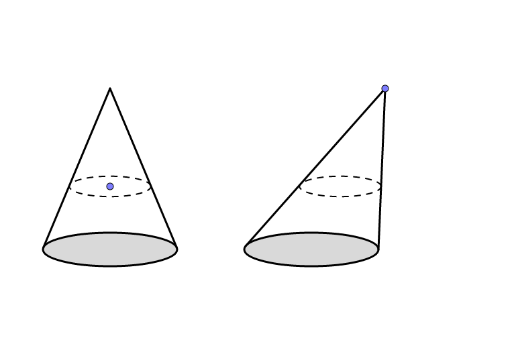
This example demonstrates a dynamically adjustable slanted cone in 3D space, where dragging control points or sliders updates the cone's tilt angle, base position, and generator lines in real time, visually contrasting slanted and right cones. Core mathematical concepts include solid geometry definitions of cones, generators, base circles, vertex projection, cross-sections (ellipses, circles), and perpendicular relationships between lines and planes. Construction uses GeoGebra commands: Line for generators, OrthogonalLine for perpendiculars, Point for key vertices, Tangent for base circle tangents, Intersect for intersection points, and Segment for edges; objects include vertex A, base center B, generator f, auxiliary lines a/b/c, and intersection points E/F, all linked parametrically. Suitable for high school and above for studying solid geometry and spatial reasoning, also useful in university analytic geometry or math modeling to explore cross-section properties (e.g., elliptical sections) and intuitive verification of volume formulas.
GeoGebra Commands & Parameters
Line(B, A) → fOrthogonalLine(E, f) → gPoint(g) → FTangent(F, c) → h, iIntersect(c, h, 1) → CIntersect(c, i, 1) → DSegment(F, C) → jSegment(F, D) → kLine(F, f) → lPoint(l) → GTangent(G, d) → m, nIntersect(d, m, 1) → HIntersect(d, n, 1) → ISegment(G, H) → pSegment(G, I) → qSegment(F, E) → rSegment(G, J) → sPoint(r) → KOrthogonalLine(K, r) → tIntersect(t, s) → LSegment(K, E) → eSegment(L, J) → f_1
AI Drawing Prompt Reference
Draw a dynamic slanted cone in 3D. Start with a vertex and a base center, connect them with a line as the cone's axis. From a point on the base circle, draw a perpendicular to the axis, pick a point on this perpendicular, then draw two tangents from that point to the base circle, connecting the tangent points to the foot to form two generator lines. Next, take another point on the axisainer, draw two tangents to a second base circle, forming another pair of generators. Connect the vertex to points on the base circle, and draw segments between the foot and the axis point to outline the slanted cone's surface. Finally, pick a point on one generator, draw a plane perpendicular to it, intersect with another generator to get a cross-section segment, illustrating the cone's section properties.
The prompt above was compiled from the original drawing commands and is for reference only.