
Filling the Aquarium: Interactive Practice on Volume Comparison
Loading the math board and drawing, please wait…
In collections
Wiederholung: Flächen- und Raummaße
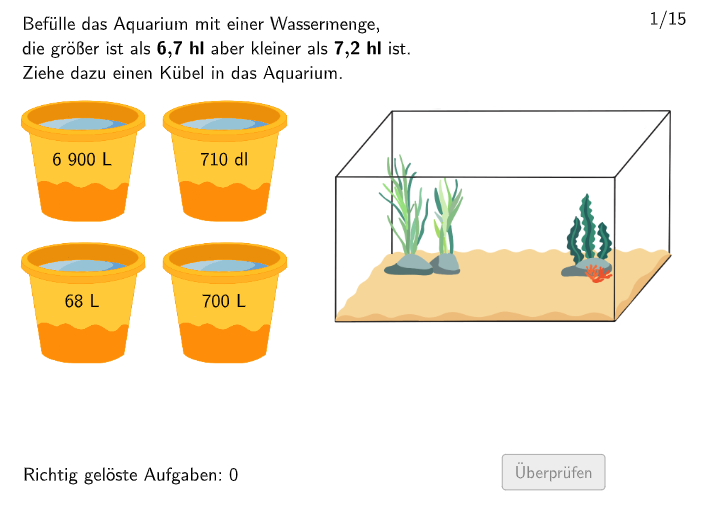
This example uses an aquarium-and-fill scenario to help students practice comparing measured fill amounts (which correspond to volume/contents) and deciding whether a chosen or computed fill level is correct. The key math ideas are measuring and comparing volumes/contents, keeping a consistent basis/units, using numeric bounds to classify results as “too big” or “too small,” and validating answers with immediate feedback. Construction and interaction are built from the GeoGebra command summary: Shuffle generates randomNumbers and selects randomNumber; Element together with Length/area-derived quantities supports the mapping from objects (e.g., aquarium and bucket images) to numeric values such as actualValues and bound checks (valueToBig2/valueToSmall2, valueToBig1/valueToSmall1). The interface logic uses validate and btnValidate, tracks attemptCount and correctCount, and provides feedback through txtHint, rectangleFeedback, showHint/showsolution, as well as buttons like btnNew and btnTryAgain to restart or review. It is aimed at grades 5–6 for measurement and comparison of room/contents volumes, and works well for classroom practice and interactive assessment.
GeoGebra Commands & Parameters
Shuffle(1…Length[values]) → randomNumbers, {9, 7, 10, 13, 14, 12, 4, 2, 8, 1, 3, 6, 5, 15, 11}Element(randomNumbers, Mod[questionCount, Length[randomNumbers]] + 1) → randomNumberElement(values, randomNumber) → actualValuesElement(actualValues, 7) → valueToBig2Element(actualValues, 5) → valueToSmall2Element(actualValues, 6) → valueToBig1Element(actualValues, 4) → valueToSmall1Element(actualValues, 3) → valueCorrectShuffle({{(0, 5.2), (3, 5.2)}, {(3.2, 5.2), (6.2, 5.2)}, {(0, 2), (3, 2)}, {(3.2, 2), (6.2, 2)}}) → startPositionsKuebel, {{(3.2, 2), (6.2, 2)}, {(0, 2), (3, 2)}, {(0, 5.2), (3, 5.2)}, {(3.2, 5.2), (6.2, 5.2)}}Element(actualValues, 1) → valueMinElement(actualValues, 2) → valueMaxLength(values) → numberOfQuestions
AI Drawing Prompt Reference
Create an interactive diagram of an aquarium and several buckets. The aquarium has different water levels, and the buckets vary in size. Randomly select a bucket to fill the aquarium, adjusting the amount with a slider. Compare the actual water added to the target amount, determining if the fill level is correct. Include the aquarium, buckets, water levels, a slider, numerical displays, and feedback to practice volume comparison and measurement.
The prompt above was compiled from the original drawing commands and is for reference only.