
Dynamic Similarity Transformation
Loading the math board and drawing, please wait…
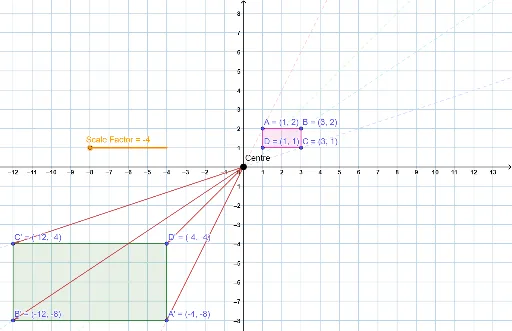
This example demonstrates the dynamic process of scaling a figure through a central similarity transformation. Key math concepts include similarity transformation, scale factor, vectors, and polygon construction. It uses GeoGebra commands like Point, Polygon, and Vector to construct the transformation center and shapes. Suitable for high school students and teachers learning similarity transformations and geometric constructions.
GeoGebra Commands & Parameters
Point(yAxis) → OPolygon(A, B, C, D) → Original, a, b, c, dPolygon(A', B', C', D') → Enlargement, e_1, f_1, g_1, h_1Vector(O, A') → uVector(O, D') → vVector(O, C') → wVector(O, B') → m
AI Drawing Prompt Reference
Draw a quadrilateral ABCD, then perform a similarity transformation around a central point O to create a new quadrilateral A'B'C'D'. First, create point O on the y-axis as the transformation center, then construct quadrilateral ABCD using points A, B, C, and D. Next, construct vectors u, v, w, and m from point O to A', D', C', and B' respectively, and finally use these vectors to create the new quadrilateral A'B'C'D'.
The prompt above was compiled from the original drawing commands and is for reference only.