
Dynamic Relationship Between Triangle and Two Circles
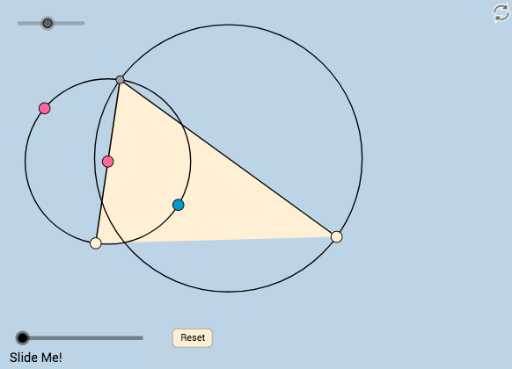
Loading the math board and drawing, please wait…
This example demonstrates how to construct a triangle and two circles where the two sides of the triangle serve as diameters of these circles. By dynamically adjusting the vertices of the triangle, one can observe the changing relationships between the circles and the triangle. Key math concepts involved include properties of circles, geometric relationships in triangles, rotation, and ratios. Construction highlights the use of GeoGebra commands such as Circle, Point, Line, Intersect, Rotate, Midpoint, OrthogonalLine, Polygon, etc. Suitable for high school mathematics education to understand geometric transformations and dynamic geometric relationships.
GeoGebra Commands & Parameters
Circle(A, B) → cPoint(c) → CLine(C, A) → fIntersect(c, f, 2) → DRotate(D, ((-a) * π / 180), C) → D'Ray(C, D') → gPoint(g) → EMidpoint(D, E) → FLine(F, D) → iOrthogonalLine(D, i) → jIntersect(c, j) → J, KCircleArc(A, K, D) → kAngle(D, C, D') → αCircle(F, E) → dPoint(k) → GCircleArc(A, C, D) → eRay(D, G) → hIntersect(d, h, 2) → HMidpoint(C, E) → IDistance(G, I) → distanceGIDistance(H, I) → distanceHIPolygon(C, E, D) → poly1, d_1, c_1, e_1Intersect(d, h) → L, MDistance(I, G) → distanceIGDistance(I, L) → distanceILSegment(D, E) → lDilate(C, If[0 < b ≤ 1, 1 - b, 0], I) → C'Segment(C, C') → mRotate(C, If[1 < b ≤ 2, ((-(b - 1)) * π), (-π)], I) → C'_1Rotate(C', If[1 < b ≤ 2, ((-(b - 1)) * π), (-π)], I) → C''Segment(C'_1, C'') → m'Dilate(D, If[2 < b ≤ 3, 3 - b, 0], G) → D'_1Dilate(G, If[3 < b ≤ 4, 4 - b, 0], L) → G'Segment(D, D'_1) → nSegment(G, G') → pLine(D, G) → qIntersect(d, q) → N, ODistance(D, G) → oDistance(D, O) → rDilate(D, If[2 < b ≤ 3, 3 - b, 0], L) → D'_2Segment(D, D'_2) → sDilate(L, If[3 < b ≤ 4, 4 - b, 0], G) → L'Segment(L, L') → tDilate(I, If[4 < b ≤ 5, 5 - b, 0], G) → I'Segment(I, I') → f_1Angle(L, I, G) → βRotate(I, If[5 < b ≤ 6, ((-(b - 5)) * β), (-β)], I) → I'_1Rotate(I', If[5 < b ≤ 6, ((-(b - 5)) * β), (-β)], I) → I''Segment(I'_1, I'') → g_1Segment(C, D) → h_1
AI Drawing Prompt Reference
Draw a triangle with its two sides as diameters of two circles. Adjust the triangle's vertices dynamically to observe the relationships between the circles and the triangle. Start by constructing the triangle, then draw two circles using its sides as diameters. Find the intersections of the circles with the triangle's sides, and use rotations, midpoints, and perpendicular lines to construct new points and segments. Finally, connect the relevant points and lines to form the final geometric figure, showcasing the dynamic relationships and geometric properties of the circles and triangle.
The prompt above was compiled from the original drawing commands and is for reference only.