
Dynamic Properties of a Rhombus
Loading the math board and drawing, please wait…
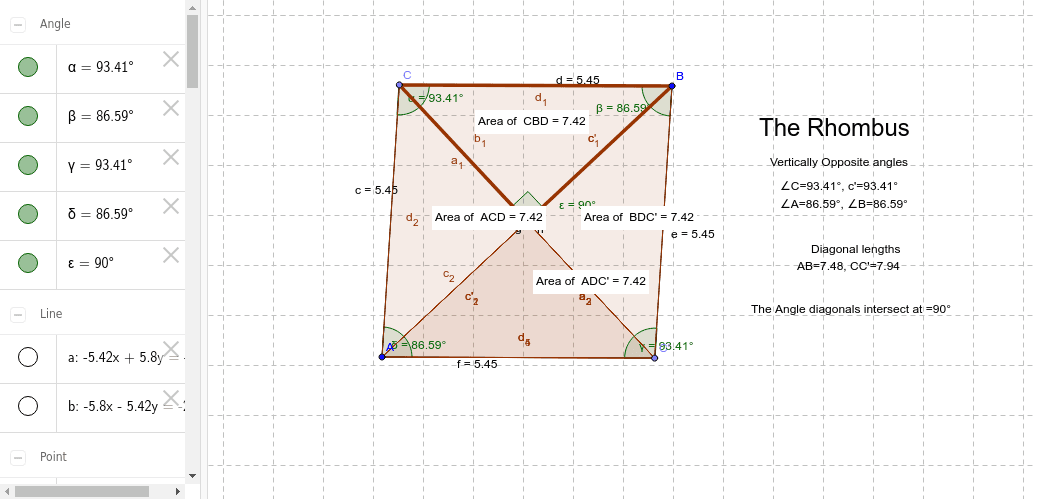
This example dynamically demonstrates the geometric properties of a rhombus, involving core concepts like polygons, angles, symmetry, and coordinate geometry. It utilizes commands such as Line, LineBisector, Point, Mirror, Segment, Angle, Intersect, Polygon, and PointIn in GeoGebra for construction. Suitable for high school mathematics education or geometric construction learning.
GeoGebra Commands & Parameters
Line(A, B) → aLineBisector(A, B) → bPoint(b) → CMirror(C, a) → C'Segment(A, C) → cSegment(C, B) → dSegment(B, C') → eSegment(C', A) → fAngle(C, B, C') → βAngle(B, C', A) → γAngle(C', A, C) → δSegment(C, C') → gSegment(A, B) → hIntersect(g, h) → DAngle(B, D, C) → εPolygon(C, B, D) → poly1, d_1, c_1, b_1PointIn(poly1) → Pointpoly1Polygon(A, C, D) → poly2, d_2, a_1, c_2PointIn(poly2) → Pointpoly2Polygon(B, D, C') → poly3, c', b_2, d_3PointIn(poly3) → Pointpoly3Polygon(A, D, C') → poly4, c'_1, a_2, d_4Angle(A, C, B) → αPolygon(A, D, C') → poly5, c'_2, a_3, d_5PointIn(poly4) → Pointpoly4
AI Drawing Prompt Reference
Draw a rhombus and dynamically demonstrate its geometric properties. Start by drawing one side of the rhombus, then find its perpendicular bisector and mark a point on it. Reflect this point across the side to create the other two vertices of the rhombus. Connect these points to form the rhombus. Calculate the interior angles and side lengths, and mark the intersection point of the diagonals. Finally, draw smaller polygons within the rhombus using these points and check if certain points lie inside these polygons.
The prompt above was compiled from the original drawing commands and is for reference only.